
✅ 오늘의 학습 목표
1. 격투 게임 (2)
2. 플레이어 찾기 (1)
1. 애니메이션
1. 코루틴 통합 및 PlayerInput 활용
using System.Collections;
using Photon.Pun;
using TMPro;
using UnityEngine;
using UnityEngine.InputSystem;

public class Fight_PlayerController : MonoBehaviourPun
{
    private Animator anim;

    [SerializeField] private GameObject punchBox;
    [SerializeField] private GameObject kickBox;

    // private bool isAttack = false; //PlayerInput을 사용하기 전에 필요했음
    private PlayerInput playerInput;

    void Start()
    {
        anim = GetComponent<Animator>();
        playerInput = GetComponent<PlayerInput>();
    }

    void OnPunch()
    {
        StartCoroutine(AttackRoutine("Punch", 0.5f, 0.3f, punchBox));
    }

    void OnKick()
    {
        StartCoroutine(AttackRoutine("Kick", 0.6f, 0.2f, kickBox));
    }

    #region 코루틴 통합 전
    //IEnumerator PunchRoutine()
    //{
    //    isAttack = true;
    //    anim.SetTrigger("Punch");
    //    yield return new WaitForSeconds(0.5f);
    //    punchBox.SetActive(true);

    //    yield return new WaitForSeconds(0.3f);
    //    punchBox.SetActive(false);
    //    isAttack = false;
    //}

    //IEnumerator KickRoutine()
    //{
    //    isAttack = true;

    //    anim.SetTrigger("Kick");
    //    yield return new WaitForSeconds(0.6f);
    //    kickBox.SetActive(true);

    //    yield return new WaitForSeconds(0.2f);
    //    kickBox.SetActive(false);
    //    isAttack = false;
    //}
    #endregion

    IEnumerator AttackRoutine(string parameter, float playTime, float endTime, GameObject hitBox)
    {
        playerInput.enabled = false;
        anim.SetTrigger(parameter);
        yield return new WaitForSeconds(playTime);
        kickBox.SetActive(true);

        yield return new WaitForSeconds(endTime);
        kickBox.SetActive(false);
        playerInput.enabled = true;
    }
}
- 코루틴 통합
- PlayerInput 값을 false로 설정하여 입력값을 일시적을 정지시켜 중복 입력 방지
2. Photon Animator View
애니메이션을 동기화해 주는 컴포넌트
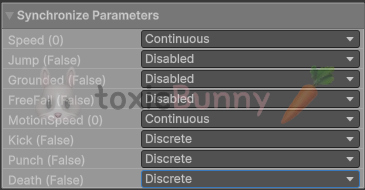
- Disabled : 동기화 X
- Discrete : 초당 10회 동기화 (이벤트 처리)
- Continuous : 매 프레임마다 동기화
스피드 같이 값이 계속 바뀌는 파라미터는 Continous를 사용해 주고
펀치나 킥같은 트리거 기반의 파라미터는 Discrete를 사용해 주면 된다.
3. 죽음 애니메이션
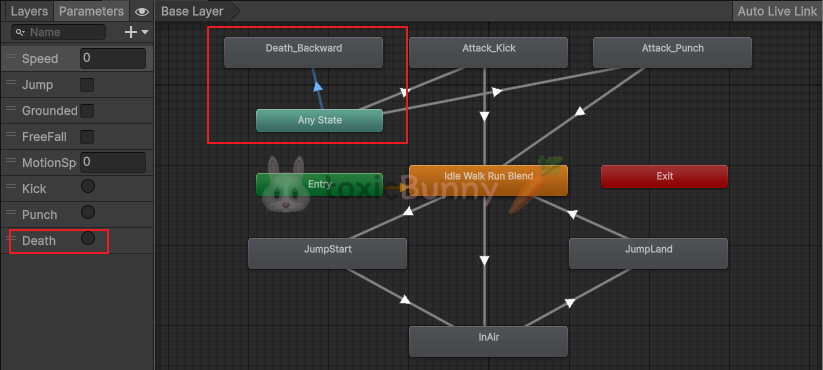
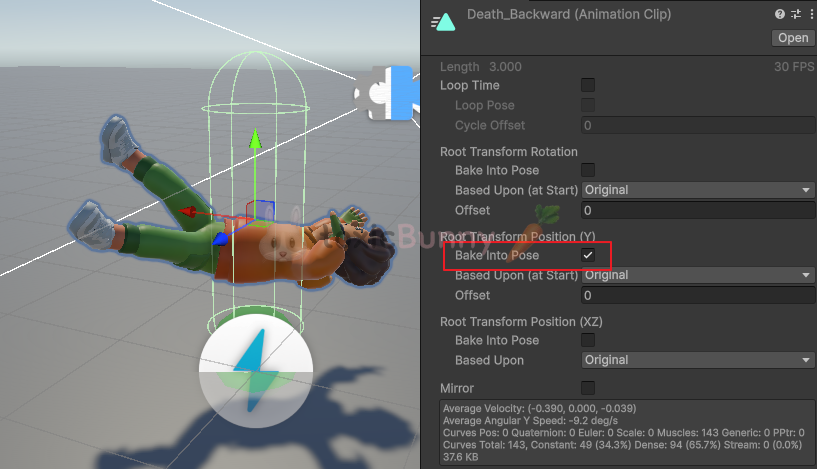
죽음 애니메이션의 경우 공중에 뜨는 현상이 있는데 Bake Into Pose을 체크해 주면 이를 해결해 줄 수 있다.
public class AttackEvent : MonoBehaviour
{
    void OnTriggerEnter(Collider other)
    {
        if (other.CompareTag("Player"))
        {
            other.GetComponent<Animator>().SetTrigger("Death");
        }
    }
}
해당 스크립트를 Hitbox 오브젝트에 연결해 주어
해당 히트박스에 닿는 Player 태그의 오브젝트는 Death 애니메이션을 수행한다.
public class Fight_PlayerController : MonoBehaviourPun
{
    void OnPunch()
    {
        photonView.RPC("Attack", RpcTarget.All, "Punch", 0.5f, 0.3f, punchBox);
    }

    void OnKick()
    {
        photonView.RPC("Attack", RpcTarget.All, "Kick", 0.6f, 0.2f, kickBox);
    }

    [PunRPC]
    private void Attack(string parameter, float playTime, float endTime, GameObject hitBoxIndex)
    {
        StartCoroutine(AttackRoutine(parameter, playTime, endTime, hitBoxIndex));
    }
}
죽음 애니메이션 동기화를 위해 RPC 메서드를 활용해 주었으나
RPC는 GameObject 타입의 파라미터 값을 받을 수 없기 때문에 에러가 발생한다.
public class Fight_PlayerController : MonoBehaviourPun
{
    void OnPunch()
    {
        photonView.RPC("Attack", RpcTarget.All, "Punch", 0.5f, 0.3f, 0);
    }

    void OnKick()
    {
        photonView.RPC("Attack", RpcTarget.All, "Kick", 0.6f, 0.2f, 1);
    }

    [PunRPC]
    private void Attack(string parameter, float playTime, float endTime, int hitBoxIndex)
    {
        StartCoroutine(AttackRoutine(parameter, playTime, endTime, hitBoxIndex));
    }

    IEnumerator AttackRoutine(string parameter, float playTime, float endTime, int hitBoxIndex)
    {
        GameObject hitBox = hitBoxIndex == 0 ? punchBox : kickBox;
    }
}
따라서 히트박스를 int 타입으로 변환하여 사용한다.
🚨 RPC 정리
- 네트워크 게임에서 내가 가진 객체의 메서드 호출을 다른 클라이언트에도 똑같이 실행시키는 방법
- 쉽게 말해서 내가 OnPunch()를 눌러서 공격하면
- Attack 메서드 호출이 내 컴퓨터뿐 아니라 방에 있는 모든 플레이어의 클라이언트에도 전달
- Photon에서는 PhotonView를 통해서 해당 객체를 구분하고 [PunRPC]가 붙은 메서드를 네트워크를 통해 실행할 수 있게 함
4. 체력바 및 데미지 처리
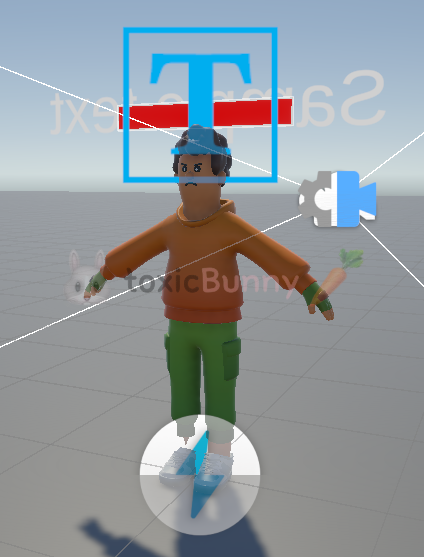
플레이어 머리 위에 체력바를 만들어주고 이제 데미지를 처리하는 로직을 만들어주겠다.
using System.Collections;
using Photon.Pun;
using TMPro;
using Unity.Cinemachine;
using UnityEngine;
using UnityEngine.InputSystem;
using UnityEngine.UI;

public class Fight_PlayerController : MonoBehaviourPun
{
    private Animator anim;

    [SerializeField] private TextMeshPro nickName;
    [SerializeField] private Transform playerRoot;

    [SerializeField] private GameObject punchBox;
    [SerializeField] private GameObject kickBox;

    private bool isAttack = false; //PlayerInput을 사용하기 전에 필요했음
    private PlayerInput playerInput;

    [SerializeField] private Image hpBar;
    private float currentHp = 100f;
    private float maxHp = 100f;

    public bool isDead = false;

    void Start()
    {
        anim = GetComponent<Animator>();
        playerInput = GetComponent<PlayerInput>();

        currentHp = maxHp;

        if (photonView.IsMine)
        {
            var followCamera = FindFirstObjectByType<CinemachineCamera>();
            followCamera.Target.TrackingTarget = playerRoot;

            nickName.text = PhotonNetwork.NickName;
            nickName.color = Color.green;
        }
        else
        {
            nickName.text = photonView.Owner.NickName;
            nickName.color = Color.red;
        }
    }

    void OnPunch()
    {
        if (!isAttack && !isDead)
            photonView.RPC("Attack", RpcTarget.All, "Punch", 0.5f, 0.3f, 0);
    }

    void OnKick()
    {
        if (!isAttack && !isDead)
            photonView.RPC("Attack", RpcTarget.All, "Kick", 0.6f, 0.2f, 1);
    }

    [PunRPC]
    private void Attack(string parameter, float playTime, float endTime, int hitBoxIndex)
    {
        StartCoroutine(AttackRoutine(parameter, playTime, endTime, hitBoxIndex));
    }

    IEnumerator AttackRoutine(string parameter, float playTime, float endTime, int hitBoxIndex)
    {
        GameObject hitBox = hitBoxIndex == 0 ? punchBox : kickBox;

        isAttack = true;
        anim.SetTrigger(parameter);

        yield return new WaitForSeconds(playTime);
        hitBox.SetActive(true);

        yield return new WaitForSeconds(endTime);
        hitBox.SetActive(false);
        isAttack = false;
    }

    public void GetDamage(float damage)
    {
        currentHp -= damage;

        hpBar.fillAmount = currentHp / maxHp;

        if (currentHp <= 0)
        {
            isDead = true;
            anim.SetTrigger("Death");
            GetComponent<CharacterController>().enabled = false;
        }
    }
}
기존에 공격 중복을 방지하기 위하여 사용한 PlayerInput의 경우 권한이 다른 플레이어에게 넘어가는 문제가 발생하여
모든 플레이어가 죽음 애니메이션을 실행하는 문제가 발생하였다.
결국은 isAttack과 isDead의 bool 값을 통해서 데미지 처리를 해주었다.
5. Fade
using System.Collections;
using Photon.Pun;
using UnityEngine;

public class Fight_GameManager : Singleton<Fight_GameManager>
{
    [SerializeField] private GameObject diedUI;

    IEnumerator Start()
    {
        yield return new WaitForSeconds(1f);

        var randomPos = new Vector3(Random.Range(-5f, 5f), 0, Random.Range(-5f, 5f));
        PhotonNetwork.Instantiate("Fight_Player", randomPos, Quaternion.identity);
    }

    public void EndGame()
    {
        Fade.onFadeAction(3f, Color.black, true, () => diedUI.SetActive(true));
    }
}
public class Fight_PlayerController : MonoBehaviourPun
{
[PunRPC]
private void TriggerEvent(int viewID, float damage)
{
PhotonView targetPv = PhotonView.Find(viewID);
if (targetPv != null)
targetPv.GetComponent<Fight_PlayerController>().GetDamage(damage);
}
public void GetDamage(float damage)
{
currentHp -= damage;
hpBar.fillAmount = currentHp / maxHp;
if (currentHp <= 0f)
{
if (photonView.IsMine)
{
isDead = true;
anim.SetTrigger("Death");
GetComponent<CharacterController>().enabled = false;
Fight_GameManager.Instance.EndGame();
}
}
}
}using System;
using Photon.Pun;
using UnityEngine;
public class AttackEvent : MonoBehaviour
{
[SerializeField] private PhotonView myPv;
[SerializeField] private float damage;
void Awake()
{
myPv = transform.root.GetComponent<PhotonView>();
}
private void OnTriggerEnter(Collider other)
{
if (other.CompareTag("Player"))
{
PhotonView otherPv = other.GetComponent<PhotonView>();
if (myPv.IsMine)
myPv.RPC("TriggerEvent", RpcTarget.All, otherPv.ViewID, damage);
}
}
}
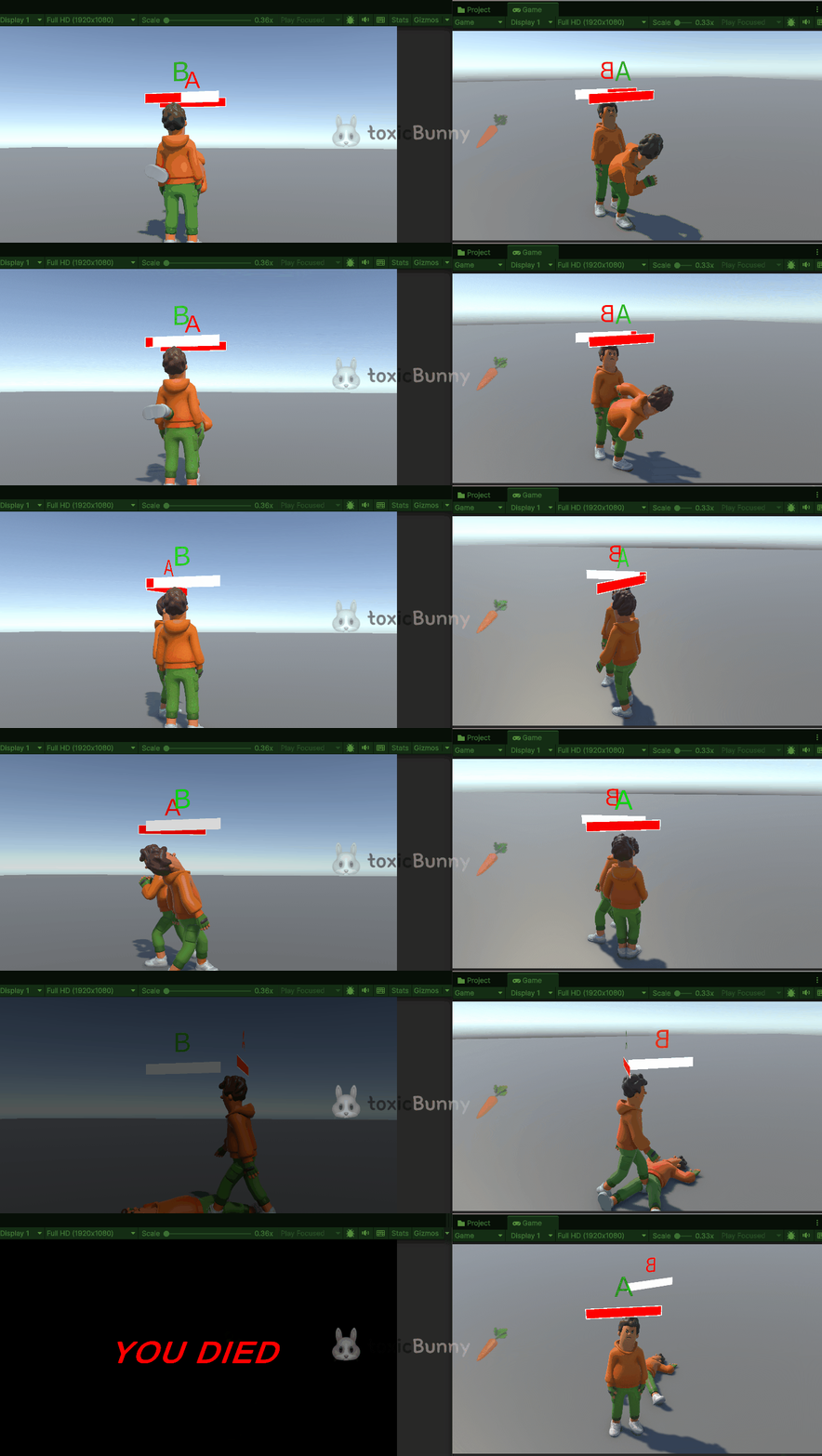
플레이어가 사망하는 경우 Fade 효과를 주어 게임이 종료되는 것을 구현해 주었다.
모든 플레이어에게 Died UI가 나타나는 것을 방지하기 위하여 공격 대상의 ID를 통해서 해당 대상만 UI가 나타나도록 해주었다.
[전체 흐름]
- 히트박스 충돌
- 공격자의 히트박스(AttackEvent)가 상대 Player와 부딪힘을 감지
- 소유자만 충돌을 판정하도록 myPv.IsMine 가드(중복 판정/이중 데미지 방지)
- 타깃 식별 (ViewID 전달)
- 상대 플레이어의 PhotonView.ViewID를 추출해서
myPv.RPC("TriggerEvent", RpcTarget.All, otherPv.ViewID, damage) 전송 - 네트워크로 GameObject 자체를 보내지 않고 ViewID(정수) 만 보낸다 → PUN RPC 제약 회피
- 상대 플레이어의 PhotonView.ViewID를 추출해서
- 피격자 찾기 (모두가 동일하게 해석)
- TriggerEvent(int viewID, float damage) RPC를 받은 각 클라에서 PhotonView.Find(viewID)로 같은 대상을 찾는다.
- 이렇게 하면 모두가 같은 대상을 가리키는 안정적인 판정이 됨
- 데미지 적용은 피격자 소유자에서
- GetDamage(damage) 내부에서 HP 차감/죽음 판정 진행
- 중요: if (photonView.IsMine) 가드로 내가 소유한 캐릭터일 때만 죽음 처리(애니메이션, 컨트롤러 비활성, UI/Fade 호출)를 수행
- 이러면 죽은 플레이어 본인 화면에서만 Fade와 Die UI가 뜬다
- 게임 종료 연출(Fade → UI)
- Fight_GameManager.EndGame()에서 Fade.onFadeAction(3f, Color.black, true, () => diedUI.SetActive(true)) 호출
- 3초간 블랙으로 페이드 → 끝나면 콜백으로 Die UI 활성화
- 이 호출을 피격자 소유자만 실행하므로 다른 플레이어 화면엔 아무 변화 없음
2. 플레이어 찾기 (1)
여러 명의 NPC가 돌아다니는 월드에서 플레이어를 찾는 게임을 만드려고 한다.
🥕 예행 작업
1. Asset 다운로드
Prototype Map | 3D 주변환경 | Unity Asset Store
Elevate your workflow with the Prototype Map asset from AngeloMaN87. Find this & other 주변환경 options on the Unity Asset Store.
assetstore.unity.com

맵 배치 후 캐릭터 오브젝트 배치 및 Nav Surface / Nav Agent 작업
- 맵에는 Mesh Collider 컴포넌트를 추가해야 Bake가 원활하게 처리됨 (+ Physics Colliders 기반)
1. NPC 무작위로 돌아다니기
using System.Collections;
using UnityEngine;
using UnityEngine.AI;

public class AgentController : MonoBehaviour
{
    private NavMeshAgent agent;
    private Animator anim;

    [SerializeField] private float wanderRadius = 30f;

    private float minWaitTime = 1f;
    private float maxWaitTime = 5f;

    private void Awake()
    {
        agent = GetComponent<NavMeshAgent>();
        // anim = GetComponent<Animator>();
    }

    IEnumerator Start()
    {
        while (true)
        {
            SetRandomDestination();
            // anim.SetBool("IsWalk", true);

            yield return new WaitUntil(() => !agent.pathPending && agent.remainingDistance <= agent.stoppingDistance);

            // anim.SetBool("IsWalk", false);
            float idleTime = Random.Range(minWaitTime, maxWaitTime);
            yield return new WaitForSeconds(idleTime);
        }
    }

    private void SetRandomDestination()
    {
        var randomDir = Random.insideUnitSphere * wanderRadius;
        randomDir += transform.position;

        NavMeshHit hit;
        if (NavMesh.SamplePosition(randomDir, out hit, wanderRadius, NavMesh.AllAreas))
        {
            agent.SetDestination(hit.position);
        }
    }
}
NPC들이 랜덤 하게 돌아다니도록 Farm 씬에서 구현한 코드를 재사용해주었다.
2. 랜덤 플레이어 생성
using System.Collections;
using Photon.Pun;
using UnityEngine;

public class Find_GameManager : Singleton<Find_GameManager>
{
    IEnumerator Start()
    {
        float randomTime = Random.Range(0f, 1f);
        yield return new WaitForSeconds(randomTime);


        int ranIndex = Random.Range(0, 5); // 0, 1, 2, 3, 4

        var randomPos = new Vector3(Random.Range(-5f, 5f), 0, Random.Range(-5f, 5f));

        PhotonNetwork.Instantiate("Player_" + ranIndex, randomPos, Quaternion.identity);
    }
}
게임을 실행하였을 때
Resource 폴더에 들어가 있는 프리팹 중에 랜덤으로 하나를 골라와서 랜덤 한 위치에 생성하는 코드를 작성하였다.
'Unity > 멋쟁이사자처럼 부트캠프' 카테고리의 다른 글
| [멋쟁이사자처럼부트캠프] 유니티 게임 개발 5기(66일차) - Mirror Network 실습 (4) | 2025.08.21 |
|---|---|
| [멋쟁이사자처럼부트캠프] 유니티 게임 개발 5기(65일차) - 플레이어 찾기 게임 (2) (2) | 2025.08.20 |
| [멋쟁이사자처럼부트캠프] 유니티 게임 개발 5기(63일차) - Network 기초 및 Photon 사용법 / 격투 게임 (1) (4) | 2025.08.18 |
| [멋쟁이사자처럼부트캠프] 유니티 게임 개발 5기(62일차) - 농장 게임 (4) (10) | 2025.08.14 |
| [멋쟁이사자처럼부트캠프] 유니티 게임 개발 5기(61일차) - 농장 게임 (3) (7) | 2025.08.13 |


