
1. HP bar 연동
hp바가 제대로 활성화 되는 것을 확인하였으니
이제 AI 캐릭터나 상대방한테 맞았을 때 HP Bar가 연동되는 것을 구현해주려고 한다.
using System;
using UnityEngine;

public class DummyPlayerHealth_UI : MonoBehaviour
{
    public float maxHP = 100f;
    public float currentHP;
    public event Action<float, float> onHealthChanged; // (cur, max)

    void Awake()
    {
        currentHP = maxHP;
        onHealthChanged?.Invoke(currentHP, maxHP);
    }

    public void TakeDamage(float dmg)
    {
        if (dmg <= 0f || currentHP <= 0f) return;
        currentHP = Mathf.Max(0f, currentHP - dmg);
        onHealthChanged?.Invoke(currentHP, maxHP);
    }
}
// HpBarUI.cs
using System.Collections;
using UnityEngine;
using UnityEngine.UI;
public class HpBarUI : MonoBehaviour
{
public DummyPlayerHealth_UI target;
public Image fillImage; // Hp bar 게이지
public bool smooth = true;
public float speed = 4f; // 부드럽게 줄어드는 속도
float targetFill = 1f;
DummyPlayerHealth_UI bound;
Coroutine waitCo;
void Awake()
{
if (!fillImage) fillImage = GetComponent<Image>();
}
void OnEnable()
{
TryBindNow(); // 지금 잡히면 즉시 바인딩
if (!bound) waitCo = StartCoroutine(CoWaitAndBind()); // 안 잡히면 다음 프레임들에서 대기
}
void OnDisable()
{
if (waitCo != null) { StopCoroutine(waitCo); waitCo = null; }
Unbind();
}
void Update()
{
if (smooth && fillImage)
fillImage.fillAmount = Mathf.MoveTowards(fillImage.fillAmount, targetFill,
Time.unscaledDeltaTime * speed);
}
void OnHealthChanged(float cur, float max)
{
targetFill = (max > 0f) ? cur / max : 0f;
if (!smooth && fillImage) fillImage.fillAmount = targetFill;
}
void Unbind()
{
if (bound != null)
{
bound.onHealthChanged -= OnHealthChanged;
bound = null;
}
}
void Bind(DummyPlayerHealth_UI hp)
{
if (!hp) return;
bound = hp;
bound.onHealthChanged += OnHealthChanged;
OnHealthChanged(bound.currentHP, bound.maxHP); // 즉시 UI 초기화
}
bool TryBindNow()
{
if (target) { Bind(target); return true; }
// DDOL 플레이어를 전역에서 가져오기
var local = PlayerLocator.GetLocalPlayer();
if (local)
{
var hp = local.GetComponent<DummyPlayerHealth_UI>();
if (hp) { Bind(hp); return true; }
}
return false;
}
IEnumerator CoWaitAndBind()
{
while (!TryBindNow())
yield return null; // 플레이어/컴포넌트가 생성될 때까지 한 프레임씩 대기
waitCo = null;
}
}
실은 데미지 처리의 경우 팀원이 작성해놓은 스크립트에 이어서 작업하면 됐었는데
결석자, 팀원간의 개발속도 차이로 인하여 기존에 만들어둔 스크립트를 건들 수 없는 상황이 있었다..
그래서 어쩔 수 없이 우선 시간이 급하니까 따로 스크립트를 만들어서 데미지를 받는 로직을 구현해주었다ㅠ
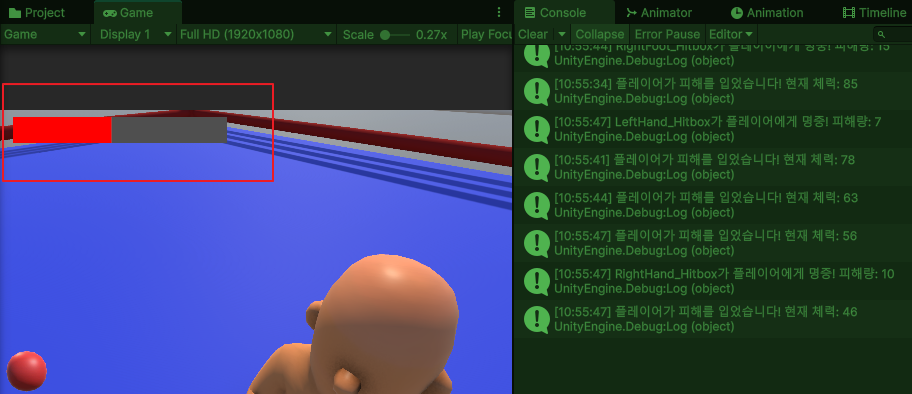
이렇게 AI한테 맞았을 때 UI가 연동되는 작업까지 완료!
2. 멀티플레이 구현
이제 반대로 플레이어가 AI를 공격할 때 AI의 체력 UI가 연동되는 걸 구현해주어야 할 차례인데
아직 플레이어의 공격 로직은 개발이 안되어서 우선 나는 멀티플레이 작업을 시작하기로 했다.
using Photon.Pun;
using Photon.Realtime;
using UnityEngine;

public class NetworkManager : MonoBehaviourPunCallbacks
{
    [SerializeField] string roomName = "Multi Room";
    [SerializeField] byte maxPlayers = 2;
    private string gameVersion = "1";

    void Awake()
    {
        Screen.SetResolution(1920, 1080, false); // 해상도 설정, false = Full Screen 사용 여부
        PhotonNetwork.SendRate = 60; // 내 컴퓨터 게임 정보에 대한 전송률
        PhotonNetwork.SerializationRate = 30; // Photon View 관측 중인 대상에 대한 전송률
        PhotonNetwork.AutomaticallySyncScene = true; // 씬 동기화
        PhotonNetwork.GameVersion = gameVersion;
    }

    void Start()
    {
        if (!GameSession.IsMultiplayer)
        {
            enabled = false;               // 이 컴포넌트 비활성
            return;
        }
        Connect();
    }

    public void Connect()
    {
        PhotonNetwork.ConnectUsingSettings(); // App ID 기반으로 접속

        Debug.Log("서버 접속");
    }

    public override void OnConnectedToMaster()
    {
        var opts = new RoomOptions { MaxPlayers = maxPlayers };
        PhotonNetwork.JoinOrCreateRoom(roomName, opts, TypedLobby.Default);

        Debug.Log("서버 접속 완료");
    }

    public override void OnJoinedRoom()
    {
        if (!GameSession.IsMultiplayer) // 혹시라도 싱글 플레이인데 들어온 상황이면 즉시 이탈
        {
            PhotonNetwork.LeaveRoom();
            return;
        }

        PhotonNetwork.LoadLevel("Multi Room"); // 이동 할 씬 이름

        Debug.Log("캐릭터 생성");
    }

    public override void OnDisconnected(DisconnectCause cause) // 네트워크가 끊겼을 때 호출되는 함수
    {
        Debug.LogWarning($"서버 연결이 끊어졌습니다. : {cause}");
    }
}
이렇게 서버에 접속 / 연결 / 해제 기능들을 나눠서 구현해주었고
using System.Collections;
using Photon.Pun;
using UnityEngine;

public class RoomSpawner : MonoBehaviour
{
    public string playerName = "IntroCharacter";

    void Start()
    {
        if (!GameSession.IsMultiplayer) // 싱글플레이에서는 작동되지 않도록
        {
            enabled = false;
            return;
        }

        StartCoroutine(SpawnWhenReady());
    }

    IEnumerator SpawnWhenReady()
    {
        // Pun 준비 대기
        while (!PhotonNetwork.IsConnectedAndReady || !PhotonNetwork.InRoom)
            yield return null;

        // 재생성 방지 (이미 네트워크상에 존재하는데 또 생성될까봐)
        if (PhotonNetwork.LocalPlayer.TagObject != null)
            yield break;

        // 캐릭터를 Room에 생성 (이때 위치는 임시용이고 실제로는 CharacterTransformManager가 위치 초기화)
        var data = (object[])(GameSession.OutfitIds ?? new string[0]); // 착장 정보 갖고오기
        var go = PhotonNetwork.Instantiate(playerName, Vector3.zero, Quaternion.identity, 0, data);

        Debug.Log($"[Spawn] outfitIds=({string.Join(",", GameSession.OutfitIds ?? new string[0])})");

        // 내 레퍼런스를 LocalPlayer에 저장
        PhotonNetwork.LocalPlayer.TagObject = go;
    }
}
룸에 입장했을 때 룸에 캐릭터가 생성되도록 구현해주었다.
using UnityEngine;

public static class GameSession
{
    public static bool IsMultiplayer; // 멀티플레이 방 클릭 시 true, 나갈 때 false로
    public static string[] OutfitIds; // 멀티 전용, 커스터마이즈 결과
}

public class GameSessionSetter : MonoBehaviour
{
    [SerializeField] NetworkManager networkManager;

    public void SetGameSessionMulti()
    {
        GameSession.IsMultiplayer = true;
        Debug.Log("멀티플레이 모드 ON");

        if (networkManager)
        {
            // NetworkManager가 disabled 상태라면 일단 켠다
            networkManager.enabled = true;
            networkManager.Connect();
        }
    }

    public void SetGameSessionSingle()
    {
        GameSession.IsMultiplayer = false;
        Debug.Log("싱글플레이 모드 ON");
    }
}
그리고 우리는 멀티/싱글 두가지 모드를 지원하기 때문에
멀티플레이 모드에 진입한 경우에만 네트워크에 연결되도록 해주었다.
그런데 지금 서버 접속 문구는 뜨는데
접속 완료가 되지 않아서 원인이 무엇인지 파악하는 시간을 가지면서 오늘 업무는 마무리..!


