
1. 이벤트 애니메이션 (오목판 던지기)
캐릭터 커스터마이즈는 구현이 끝났고
팀원들과 이야기하다보니 이벤트 발생시 발동할 애니메이션 제작이 필요하다는 의견이 나오게 되었다.
그부분을 내가 담당하게 되었고
로직이 간단할 것 같아서 걱정없이 진행하였다.
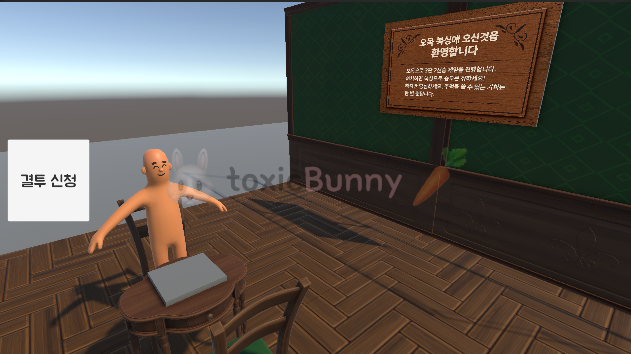
결투 신청 버튼을 눌렀을 때 책상에 있는 오목판이 던져지는 걸 구현하기로 했다.

이때 오목판만 던져지면 뭔가 이상할 것 같아서
믹사모에서 적절한 애니메이션을 찾아서 캐릭터에 같이 적용시켜주었다 ㅎ-ㅎ
using UnityEngine;
using UnityEngine.UI;

// 이 스크립트는 메서드 복붙용입니다. 플레이어 컨트롤러 스크립트에 넣어주세요.
public class Throw : MonoBehaviour
{
    // 테스트용!!
    [SerializeField] GameObject omokBoard; // 오목 보드는 게임 매니저같은 공용 스크립트에서 할당하는 것이 좋아보임
    private Animator omokAnim;

    private ClothesManager clothes;

    [SerializeField] Button fightButton;

    void Awake()
    {
        // 캐릭터에 달린 Animator 가져오기 위해 선언 해주었는데 플레이어 컨트롤 스크립트 보고 로직 변경 예정
        clothes = FindFirstObjectByType<ClothesManager>();

        // 오목 보드 애니메이션 할당
        omokAnim = omokBoard.GetComponent<Animator>();
    }

    public void ThrowBoard()
    {
        clothes.targetAnimator.SetTrigger("Throw");
        omokAnim.SetTrigger("Throw");
    }
}
지금은 단순히 애니메이션만 동작하면 되니까 정말 간단하게 코드를 구현하였는데
이렇게 다 끝내고 나니 발생할 문제점들이 보였다.
1. 플레이어 애니메이션 지금처럼 뒷쪽 의자에 앉은 캐릭터는 게시판 쪽으로 보드를 던지는 애니메이션이 잘 구현되어 있는데 반대쪽 의자에 앉은 플레이어의 경우 게시판 반대편으로 던지는 애니메이션이 동작될 것임
2. 지금 로직은 캐릭터가 하나만 있어서 FindFirstObjectByType로 애니메이터를 갖고오고 있는데 멀티가 구현되면 이부분도 수정할 필요가 있어보임
1. Animator의 Mirror 활용
Transform의 포지션을 플립하는 기능이 떠올랐으나
지금처럼 플레이어끼리 마주보고 있는 상황에서 플립 기능을 사용해버리면 (애초에 2D가 아니라 3D라..) 서로 똑같은 곳을 바라보게 되니 이 방식을 사용할 수는 없다.
지금 애니메이션은 휴머노이드 형태로 만들어진 애니메이션이므로 Animator의 Mirror을 활용해주면 된다.

using UnityEngine;
using UnityEngine.UI;

public class Throw : MonoBehaviour
{
    [SerializeField] Transform guideTarget; // 게시판
    [SerializeField] GameObject omokBoard; // 오목판
    private Animator omokAnim;

    [SerializeField] ClothesManager clothes;
    [SerializeField] Button fightButton;

    void Awake()
    {
        if (!clothes) clothes = GetComponentInParent<ClothesManager>();
        if (omokBoard) omokAnim = omokBoard.GetComponent<Animator>();
    }

    public void ThrowBoard()
    {
        if (clothes == null || clothes.targetAnimator == null) return;
        if (guideTarget == null) return;

        var anim = clothes.targetAnimator;

        var actorTf = clothes && clothes.targetAnimator
              ? clothes.targetAnimator.transform
              : transform;

        Vector3 toBoard = guideTarget.position - actorTf.position; // 게시판 위치
        Vector3 actorRight = actorTf.right; // 캐릭터 오브젝트 기준으로 좌/우 판정

        bool MirrorThrow = false;
        MirrorThrow = Vector3.Dot(actorRight, toBoard) < 0f; // 왼쪽이면 true, 오른쪽이면 false

        anim.SetBool("Mirror", MirrorThrow);
        anim.SetTrigger("Throw");

        if (omokAnim) omokAnim.SetTrigger("Throw");
    }
}
2. 표정 바꾸기
바둑판을 던질 때 표정도 변화되도록 구현해주었다.
using UnityEngine;
using UnityEngine.UI;

public class Throw : MonoBehaviour
{
    [SerializeField] Transform guideTarget; // 게시판
    [SerializeField] GameObject omokBoard; // 오목판
    private Animator omokAnim;

    [SerializeField] ClothesManager clothes;
    [SerializeField] Button fightButton;

    private string faceId = "Male_emotion_angry_003";

    void Awake()
    {
        if (!clothes) clothes = FindFirstObjectByType<ClothesManager>();
        if (omokBoard) omokAnim = omokBoard.GetComponent<Animator>();
    }

    public void ThrowBoard()
    {
        if (clothes == null || clothes.targetAnimator == null) return;
        if (guideTarget == null) return;

        if (clothes.catalog == null) clothes.catalog = FindFirstObjectByType<ClothesCatalog>();

        // 표정 바꾸기
        clothes.Unequip(SlotType.Faces);
        clothes.EquipById(faceId);

        var anim = clothes.targetAnimator;

        var playerTf = clothes && clothes.targetAnimator
              ? clothes.targetAnimator.transform
              : transform;

        Vector3 toBoard = guideTarget.position - playerTf.position; // 게시판 위치
        Vector3 actorRight = playerTf.right; // 캐릭터 오브젝트 기준으로 좌/우 판정

        bool MirrorThrow = false;
        MirrorThrow = Vector3.Dot(actorRight, toBoard) < 0f; // 왼쪽이면 true, 오른쪽이면 false

        anim.SetBool("Mirror", MirrorThrow);
        anim.SetTrigger("Throw");

        if (omokAnim) omokAnim.SetTrigger("Throw");
    }
}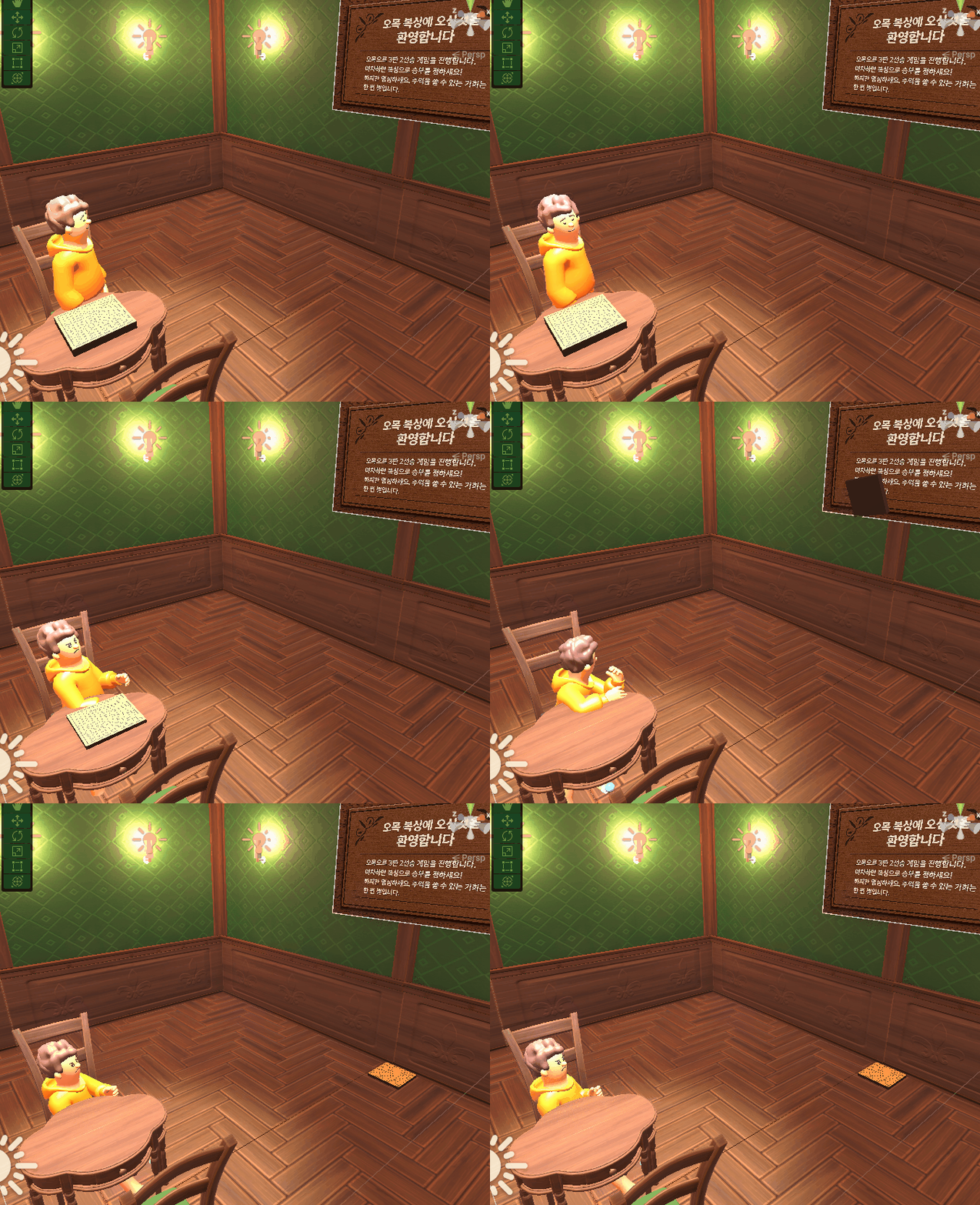
지금 이 바둑판 던지는 로직은
캐릭터가 하나일땐 제대로 동작하지만
추후에 멀티플레이 기능을 추가하면 이 로직들을 전체 고쳐야할 필요가 있어보인다..


