
✅ 오늘의 학습 목표
1. 소켓 프로그래밍 학습
2. C# 네트워크 활용
- 유니티 연동
- 틱택토 게임 구현
1. 소켓
물리적으로 연결된 네트워크 상에서 데이터 송수신에 사용될 수 있는 소프트웨어 장치로 운영체제(OS)에서 제공
- 서버 : socket() → bind() → listen() → accept() → send()/recv()
- 클라이언트 : socket() → connect() → send()/recv()
먼저 전화를 하기 위해서는 전화가 필요 (소켓 프로그래밍에서 통신을 하려면 소켓을 생성)
→ int socket()
전화가 있으면 전화번호 필요 (소켓에 IP, Port 번호, 주소 정보를 할당)
→ int bind()
전화를 받을 수 있는 상태로 전환 (현재 해당 소켓은 IP, Port 번호, 주소 정보가 할당되어 있기 때문에 다른 곳에서 통신 시도 가능)
→ int listen()
누군가 전화를 걸었으면 수화기를 들어 전화를 수신 가능 (다른 곳에서 데이터 송수신을 위해 연결 요청을 해오면, 이를 수락 가능)
→ int accept()
2. C# 서버 활용하기
기존에 Photon이나 Mirror, Netcode같이 프레임워크를 사용하지 않고
C#을 활용해서 서버를 만들 수 있다.
1. 서버 부팅 & 리스닝
게임 서버는 단순히 실행 버튼을 눌렀다고 해서 바로 플레이어가 접속할 수 있는 게 아니다.
서버는 우선 자리를 깔아놔야 한다.
- 이 포트 번호에서 접속을 받을 거야라고 선언하고
- 클라이언트가 들어올 때마다 쓸 수 있는 메모리와 통신 도구를 미리 마련해두어야 한다.
즉, 서버 부팅과 리스닝은 플레이어를 맞이할 준비를 하는 과정이다.
이게 없으면 클라이언트가 문을 두드려도(접속 요청) 서버는 반응하지 않는다.
internal class Program
{
    static void Main(string[] args)
    {
        Console.WriteLine("Starting Game Server");

        NetworkService netwrokService = new NetworkService();
        netwrokService.Init();
        netwrokService.Listen("0.0.0.0", 7979, 100);

        Console.WriteLine("Server is running");

        // 서버가 클라이언트에게 보내기
        while (true)
        {
            string input = Console.ReadLine();

            if (!string.IsNullOrEmpty(input))
            {
                netwrokService.Broadcast(input);
            }
        }
    }
}
using System.Net.Sockets;
internal class NetworkService
{
private Listener client_listener;
private SocketAsyncEventArgsPool receive_eventArgsPool;
private SocketAsyncEventArgsPool send_eventArgsPool;
private BufferManager bufferManager;
public delegate void SessionHandler(UserToken token);
public SessionHandler session_created_callback;
private List<UserToken> connectedClients; // 서버가 클라이언트에게 보내기
private int maxConnections;
private int bufferSize;
private int preAllocCount;
public NetworkService()
{
connectedClients = new List<UserToken>(); // 서버가 클라이언트에게 보내기
this.maxConnections = 10000; // 동시 접속 가능한 최대 클라이언트 수
this.bufferSize = 1024; // 각 소켓 버퍼의 크기 (1024)
this.preAllocCount = 2; // 클라이언트 당 할당된 버퍼 수(송신 : 1개, 수신 : 1개)
}
public void Init()
{
bufferManager = new BufferManager(maxConnections * bufferSize * preAllocCount, bufferSize);
bufferManager.InitBuffer();
receive_eventArgsPool = new SocketAsyncEventArgsPool(maxConnections);
send_eventArgsPool = new SocketAsyncEventArgsPool(maxConnections);
SocketAsyncEventArgs arg; // 비동기 I/O 작업을 효율적으로 하기 위한 클래스
for (int i = 0; i < maxConnections; i++) // 클라이언트 준비물
{
UserToken token = new UserToken();
arg = new SocketAsyncEventArgs();
arg.Completed += new EventHandler<SocketAsyncEventArgs>(Receive_Completed);
arg.UserToken = token;
bufferManager.SetBuffer(arg);
receive_eventArgsPool.Push(arg);
arg = new SocketAsyncEventArgs();
arg.Completed += new EventHandler<SocketAsyncEventArgs>(Send_Completed);
arg.UserToken = token;
bufferManager.SetBuffer(arg);
send_eventArgsPool.Push(arg);
}
}
public void Listen(string host, int port, int backlog)
{
client_listener = new Listener();
client_listener.onNewClient += OnNewClient;
client_listener.Start(host, port, backlog);
}
private void OnNewClient(Socket client_socket, object token) // 새로운 클라이언트 접속시 기본 셋팅
{
SocketAsyncEventArgs receive_args = receive_eventArgsPool.Pop();
SocketAsyncEventArgs send_args = send_eventArgsPool.Pop();
UserToken userToken = receive_args.UserToken as UserToken;
userToken.socket = client_socket;
userToken.receive_eventArgs = receive_args;
userToken.send_eventArgs = send_args;
connectedClients.Add(userToken); // 서버가 클라이언트에게 보내기
if (session_created_callback != null)
{
session_created_callback(userToken);
}
Begin_Receive(client_socket, receive_args);
}
public void Receive_Completed(object sender, SocketAsyncEventArgs e) // 수신 완료됐을 때 실행되는 함수
{
if (e.LastOperation == SocketAsyncOperation.Receive)
{
Process_Receive(e);
return;
}
throw new ArgumentException("Argument Exception");
}
public void Send_Completed(object sender, SocketAsyncEventArgs e) // 송신 완료됐을 때 실행되는 함수
{
UserToken token = e.UserToken as UserToken;
token.Process_Send(e);
}
private void Begin_Receive(Socket socket, SocketAsyncEventArgs receive_args)
{
bool pending = socket.ReceiveAsync(receive_args);
if (!pending)
{
Process_Receive(receive_args);
}
}
private void Process_Receive(SocketAsyncEventArgs e)
{
UserToken token = e.UserToken as UserToken;
if (e.BytesTransferred > 0 && e.SocketError == SocketError.Success)
{
token.OnReceive(e.Buffer, e.Offset, e.BytesTransferred);
bool pending = token.socket.ReceiveAsync(e);
if (!pending)
{
Process_Receive(e);
}
}
else
{
Close_ClientSocket(token);
}
}
// 서버가 클라이언트에게 보내기
public void Broadcast(string message)
{
Packet packet = new Packet();
packet.Clear();
packet.Push(message);
packet.RecordSize();
foreach (var client in connectedClients)
{
client.Send(packet);
}
}
private void Close_ClientSocket(UserToken token)
{
if (token.socket == null)
return;
Console.WriteLine($"Client Disconnected : {token.socket.RemoteEndPoint}");
token.Close();
if (token.receive_eventArgs != null)
{
receive_eventArgsPool.Push(token.receive_eventArgs);
}
if (token.send_eventArgs != null)
{
send_eventArgsPool.Push(token.send_eventArgs);
}
}
}using System.Net;
using System.Net.Sockets;
internal class Listener
{
private SocketAsyncEventArgs accept_args;
private Socket listen_socket;
private AutoResetEvent flowControlEvent;
public delegate void NewClientHandler(Socket client_socket, object token);
public NewClientHandler onNewClient;
public Listener()
{
onNewClient = null;
}
public void Start(string host, int port, int backlog)
{
listen_socket = new Socket(AddressFamily.InterNetwork, SocketType.Stream, ProtocolType.Tcp); // 소켓 셋팅
IPAddress address = (host == "0.0.0.0") ? IPAddress.Any : IPAddress.Parse(host);
IPEndPoint endPoint = new IPEndPoint(address, port); // IP 주소 + 포트 번호를 결합한 네트워크 끝 점
try
{
listen_socket.Bind(endPoint);
listen_socket.Listen(backlog);
accept_args = new SocketAsyncEventArgs();
accept_args.Completed += new EventHandler<SocketAsyncEventArgs>(On_Accept_Completed);
Thread listen_thread = new Thread(DoListen);
listen_thread.Start();
}
catch (Exception e)
{
Console.WriteLine(e.Message);
}
}
private void DoListen()
{
flowControlEvent = new AutoResetEvent(false);
while (true)
{
accept_args.AcceptSocket = null;
bool pending = true;
try
{
pending = listen_socket.AcceptAsync(accept_args);
}
catch (Exception e)
{
Console.WriteLine(e.Message);
continue;
}
if (!pending)
{
On_Accept_Completed(null, accept_args);
}
flowControlEvent.WaitOne();
}
}
private void On_Accept_Completed(object sender, SocketAsyncEventArgs e)
{
if (e.SocketError == SocketError.Success)
{
Socket client_socket = e.AcceptSocket;
flowControlEvent.Set();
if (onNewClient != null)
{
onNewClient(client_socket, e.UserToken);
}
return;
}
else
{
Console.WriteLine("Failed to accept client"); ;
}
flowControlEvent.Set();
}
}using System.Net.Sockets;
internal class SocketAsyncEventArgsPool
{
private Stack<SocketAsyncEventArgs> pool;
public SocketAsyncEventArgsPool(int capacity)
{
pool = new Stack<SocketAsyncEventArgs>(capacity);
}
public void Push(SocketAsyncEventArgs item)
{
if (item == null)
{
throw new ArgumentNullException("Item cannot be null");
}
lock (pool)
{
pool.Push(item);
}
}
public SocketAsyncEventArgs Pop()
{
lock (pool)
{
return pool.Pop();
}
}
public int Count => pool.Count;
}using System.Net.Sockets;
internal class BufferManager
{
private int numBytes;
private byte[] buffer;
private Stack<int> freeIndexPool;
private int currentIndex;
private int bufferSize;
public BufferManager(int totalBytes, int bufferSize)
{
this.numBytes = totalBytes;
this.currentIndex = 0;
this.bufferSize = bufferSize;
freeIndexPool = new Stack<int>();
}
public void InitBuffer()
{
buffer = new byte[numBytes];
}
public bool SetBuffer(SocketAsyncEventArgs args)
{
if (freeIndexPool.Count > 0)
{
args.SetBuffer(buffer, freeIndexPool.Pop(), bufferSize);
}
else
{
if ((numBytes - bufferSize) < currentIndex)
{
return false;
}
args.SetBuffer(buffer, currentIndex, bufferSize);
currentIndex += bufferSize;
}
return true;
}
public void FreeBuffer(SocketAsyncEventArgs args)
{
freeIndexPool.Push(args.Offset);
args.SetBuffer(null, 0, 0);
}
}
- Program.cs
이 파일은 서버 프로그램의 “출발점”이다.
콘솔 프로그램은 무조건 Main() 함수에서 시작하는데 여기서 NetworkService라는 큰 관리자를 하나 만든다.- Init()을 불러서 서버가 쓸 버퍼와 객체 풀을 세팅한다.
- Listen("0.0.0.0", 7979, 100)으로 “7979번 포트에서 100명까지 접속 대기”를 선언한다.
- 마지막에 Console.ReadKey()를 써서 콘솔이 꺼지지 않도록 대기한다. (이걸 안 쓰면 프로그램이 바로 종료돼 버린다)
- NetworkService.cs
서버의 “관리자”다.- 클라이언트가 수천 명 들어와도 문제없도록 버퍼와 이벤트 객체를 미리 만들어 둔다.
- 누군가 접속하면 Listener가 알려주고 이 관리자가 클라이언트 전용 토큰(UserToken)을 붙여준다.
즉, 한마디로 “새 손님 오셨습니다 → 자리 배정해드릴게요” 역할이다.
- Listener.cs
문지기다.- 서버 소켓을 열고(Bind), 지정한 포트에 앉아(Listen) 접속을 기다린다.
- 누군가 들어오면 AcceptAsync로 받아들여서 “새 클라 왔습니다!” 하고 신호를 준다.
- SocketAsyncEventArgsPool.cs
재사용 창고라고 생각하면 된다.- 네트워크 통신에는 SocketAsyncEventArgs라는 객체가 필요한데 접속마다 새로 만들면 느려진다.
- 그래서 아예 창고에 1만 개쯤 미리 쌓아두고 필요할 때 꺼내 쓰고, 다 쓰면 다시 넣는다.
- BufferManager.cs
이것도 “공용 창고”다.- 네트워크 통신은 바이트 배열(버퍼)을 써야 하는데 접속마다 버퍼를 새로 만들면 메모리가 낭비된다.
- 그래서 거대한 한 장짜리 버퍼를 만들어 놓고 마치 종이를 잘라 쓰듯 조금씩 잘라 각 클라이언트에게 나눠준다.
[흐름 설명]
- Program.cs에서 서버를 실행하면,
→ NetworkService.Init()이 버퍼·창고를 준비한다. - Listen("0.0.0.0", 7979, 100)을 호출하면,
→ Listener가 문을 열고 대기한다. - 클라이언트가 접속을 시도하면,
→ Listener가 “새 손님 왔습니다!” 하고 알린다. - NetworkService는 준비해 둔 버퍼 조각과 이벤트 객체를 그 손님에게 붙여준다.
→ 이제 이 클라이언트는 자기 전용 통신 공간(UserToken)을 갖게 된다.
[바이트 배열을 사용하는 이유 → 패킷 구조가 결국 바이트로 만들어지기 때문에]
패킷은 [헤더] + [본문] 형태를 갖는다.
문자열이든 숫자든 네트워크로 보내기 직전에는 전부 바이트 타입으로 변환해야 한다.
예: "Hello" → Encoding.UTF8.GetBytes("Hello") → [72, 101, 108, 108, 111] (아스키 코드)
2. 세션과 수신 파이프라인
플레이어가 채팅을 치거나, 움직이거나, 스킬을 사용하는 등 여러 데이터를 지속해서 보내는 경우가 있다.
서버는 이 데이터를 정확하게 잘라내서 "한 개의 메시지" 단위로 이해해야 한다.
internal class UserToken
{
    public Socket socket;
    public SocketAsyncEventArgs receive_eventArgs;
    public SocketAsyncEventArgs send_eventArgs;

    private MessageResolver messageResolver;

    public UserToken()
    {
        socket = null;
        messageResolver = new MessageResolver();
    }

    public void OnReceive(byte[] buffer, int offset, int bytesTransferred)
    {
        // 수신한 데이터를 MessageResolver로 넘겨서
        // 패킷 단위로 잘라내도록 한다
        messageResolver.OnReceive(buffer, offset, bytesTransferred, OnMessage);
    }

    void OnMessage(byte[] buffer)
    {
        // MessageResolver가 완성된 메시지를 콜백으로 넘겨주면 실행됨
        string received_text = Encoding.UTF8.GetString(buffer);
        Console.WriteLine($"[From Client] {received_text}");

        // (에코를 위해) 바로 송신 파이프라인으로 넘긴다
        Packet packetToSend = new Packet();
        packetToSend.Push(buffer);
        Send(packetToSend);
    }
}
internal class MessageResolver
{
public delegate void CompletedMessageCallback(byte[] buffer);
private int messageSize;
private byte[] messageBuffer = new byte[1024];
private int currentPosition;
private int positionToRead;
private int remainBytes;
public MessageResolver()
{
messageSize = 0;
currentPosition = 0;
positionToRead = 0;
remainBytes = 0;
}
private bool ReadUntil(byte[] buffer, ref int srcPosition, int offset, int transferred)
{
if (currentPosition >= offset + transferred)
return false;
int copySize = positionToRead - currentPosition;
if (remainBytes < copySize)
{
copySize = remainBytes;
}
Array.Copy(buffer, srcPosition, messageBuffer, currentPosition, copySize);
srcPosition += copySize;
currentPosition += copySize;
remainBytes -= copySize;
return currentPosition >= positionToRead;
}
public void OnReceive(byte[] buffer, int offset, int transferred, CompletedMessageCallback callback)
{
remainBytes = transferred;
int srcPosition = offset;
while (remainBytes > 0)
{
bool completed = false;
if (currentPosition < Defines.HEADERSIZE)
{
positionToRead = Defines.HEADERSIZE;
completed = ReadUntil(buffer, ref srcPosition, offset, transferred);
if (!completed)
return;
messageSize = Get_BodySize();
positionToRead = messageSize + Defines.HEADERSIZE;
}
completed = ReadUntil(buffer, ref srcPosition, offset, transferred);
if (completed)
{
byte[] completed_message = new byte[messageSize];
Array.Copy(messageBuffer, Defines.HEADERSIZE, completed_message, 0, messageSize);
callback(completed_message);
Clear_Buffer();
}
}
}
private int Get_BodySize()
{
return BitConverter.ToInt16(messageBuffer, 0);
}
private void Clear_Buffer()
{
Array.Clear(messageBuffer, 0, messageBuffer.Length);
currentPosition = 0;
messageSize = 0;
}
}internal class Defines
{
public static short HEADERSIZE = 2;
}
- UserToken.cs
- 한 명의 클라이언트를 대표하는 세션이다.
- 클라이언트 소켓, 수신용 이벤트, 송신용 이벤트를 묶어 관리한다.
- 데이터를 받으면 OnReceive()에서 MessageResolver로 넘기고
- 완성된 메시지가 나오면 OnMessage() 콜백이 실행된다.
- MessageResolver.cs
- TCP 통신은 스트림이라서, 메시지가 잘려 들어오거나 두 개가 합쳐져 들어올 수 있다.
- 이 클래스는 먼저 2바이트짜리 헤더를 읽어 메시지 길이를 확인한다.
- 이후 필요한 만큼 바이트가 모두 모이면 “하나의 완전한 메시지”로 콜백을 호출한다.
- Defines.cs
- 메시지 헤더 크기를 정의해 둔 곳이다.
- HEADERSIZE = 2라는 값이 바로 “앞의 2바이트는 본문 길이를 알려준다”는 의미다
[흐름]
[클라이언트] "Hello" → [0100][48656C6C6F]
                     ↑헤더=5바이트 길이

[서버 수신] UserToken.OnReceive
   → MessageResolver.OnReceive
       → 먼저 헤더(2B) 읽음 → 본문 크기 파악
       → 필요한 만큼 바이트가 모일 때까지 대기
       → 모두 모이면 콜백(OnMessage) 실행
- "Hello"를 UTF-8로 보내면 5바이트가 된다.
- 헤더에는 숫자 5가 short(2바이트)로 기록된다.
- 서버는 먼저 헤더를 읽고, 뒤에 올 5바이트가 모두 도착할 때까지 기다린다.
- 다 모이면 비로소 “하나의 패킷”으로 처리하고, OnMessage()에서 문자열로 변환해 출력한다.
즉, MessageResolver = 스트림을 패킷 단위로 잘라주는 칼이라고 생각하면 된다.
3. 송신 파이프라인 & 에코
위에서 작업한 내용은 "받는 쪽"만을 구현한 것이다.
이번에는 보내는 쪽을 구현하려고 한다.
TCP 소켓은 동시에 여러 번 SendAsync()를 걸면 꼬일 수 있기 때문에
반드시 큐(Queue)를 사용하여 순차적으로 처리해야 한다.
using System;
using System.Text;

public class Packet
{
    public byte[] buffer { get; private set; }
    public int position { get; private set; }

    public Packet()
    {
        buffer = new byte[1024];
    }

    public void RecordSize()
    {
        short bodySize = (short)(position - Defines.HEADERSIZE);
        byte[] header = BitConverter.GetBytes(bodySize);
        header.CopyTo(buffer, 0);
    }

    public void Push(short value)
    {
        byte[] data = BitConverter.GetBytes(value);
        data.CopyTo(buffer, position);
        position += data.Length;
    }

    public void Push(string value)
    {
        byte[] data = Encoding.UTF8.GetBytes(value);
        data.CopyTo(buffer, position);
        position += data.Length;
    }

    public void Push(byte[] data)
    {
        data.CopyTo(buffer, position);
        position += data.Length;
    }

    public void Clear()
    {
        position = Defines.HEADERSIZE;

        Array.Clear(buffer, 0, buffer.Length);
    }
}
internal class UserToken
{
private Queue<Packet> sending_queue;
private object sending_queue_obj;
public UserToken()
{
sending_queue = new Queue<Packet>();
sending_queue_obj = new object();
}
public void Send(Packet msg)
{
lock (sending_queue_obj)
{
if (sending_queue.Count <= 0)
{
sending_queue.Enqueue(msg);
Start_Send();
return;
}
sending_queue.Enqueue(msg);
}
}
private void Start_Send()
{
lock (sending_queue_obj)
{
Packet msg = sending_queue.Peek();
msg.RecordSize();
send_eventArgs.SetBuffer(send_eventArgs.Offset, msg.position);
Array.Copy(msg.buffer, 0, send_eventArgs.Buffer, send_eventArgs.Offset, msg.position);
bool pending = socket.SendAsync(send_eventArgs);
if (!pending)
{
Process_Send(send_eventArgs);
}
}
}
public void Process_Send(SocketAsyncEventArgs e)
{
if (e.SocketError != SocketError.Success)
{
Console.WriteLine($"Send Failed with error : {e.SocketError}");
return;
}
lock (sending_queue_obj)
{
sending_queue.Dequeue();
if (sending_queue.Count > 0)
{
Start_Send();
}
}
}
}
- Packet.cs
- 서버에서 보낼 메시지를 만드는 도우미다.
- 데이터를 차례대로 Push() 하면서 내부 버퍼에 기록한다.
- 마지막에 RecordSize()를 호출하면 버퍼 맨 앞 2바이트에 본문 길이가 자동으로 기록된다.
- 즉, “헤더+바디” 구조를 쉽게 만들 수 있게 해주는 클래스다.
- UserToken.cs (송신 부분)
- Send(Packet msg): 메시지를 송신 큐에 넣는다.
- 큐가 비어있으면 바로 전송 시작(Start_Send)
- 이미 전송 중이면 대기열에 추가
- Start_Send(): 큐 맨 앞의 패킷을 꺼내 소켓 버퍼에 복사한 뒤 SendAsync() 실행
- Process_Send(): 전송이 완료되면 큐에서 제거하고 남은 메시지가 있으면 다시 Start_Send() 호출
- 이런 식으로 한 번에 하나씩만 전송되도록 보장한다.
- Send(Packet msg): 메시지를 송신 큐에 넣는다.
- 에코 기능
- OnMessage()에서 받은 데이터를 그대로 새로운 Packet에 넣고 Send()로 보낸다.
- 따라서 클라이언트가 “Hello”를 보내면 서버는 똑같이 “Hello”를 다시 돌려준다.
[흐름 설명]
송신 파이프라인은 크게 3단계로 이해하면 된다.
- 패킷 만들기
- 문자열이든 숫자든 전송하기 전에는 반드시 바이트 배열로 바꿔야 한다.
- Packet 클래스가 이 과정을 도와준다.
- 예: “Hi” → [02 00][48 69] (앞 2바이트는 길이=2, 뒤는 본문)
- 큐에 넣기
- Send(Packet)을 호출하면 메시지가 큐에 들어간다.
- 큐가 비어있을 때만 바로 전송을 시작한다.
- 비동기 전송 → 완료 → 다음
- SendAsync()는 비동기로 동작한다.
- 완료되면 Process_Send()가 큐에서 메시지를 빼고 남아있으면 다음 메시지를 이어서 전송한다.
- 이렇게 하면 소켓이 꼬이지 않고 메시지가 보낸 순서대로 클라이언트에 도착한다.
즉, 송신 파이프라인은 “패킷 조립 → 큐에 등록 → 순차적 전송”이라는 안전한 흐름으로 동작한다.
4. 클라이언트
위에서 작성한 스크립트는 모두 서버용 스크립트이다.
서버가 문을 열고 대기하고 있으면
이번에는 누군가 접속해서 메시지를 보내 서버가 응답하도록 구현해 보자
using System.Net;
using System.Net.Sockets;
using System.Text;

internal class Program
{
    static void Main(string[] args)
    {
        Console.WriteLine("Hello, World!");

        Socket client_socket = new Socket(AddressFamily.InterNetwork, SocketType.Stream, ProtocolType.Tcp);

        IPAddress ipAddress = IPAddress.Parse("127.0.0.1");
        IPEndPoint remoteEP = new IPEndPoint(ipAddress, 7979);

        try
        {
            Console.WriteLine("Connecting to Server...");
            client_socket.Connect(remoteEP);

            Console.WriteLine("Conneted Succesfully!");

            string messageToSend = "Hello, Echo Server";
            Console.WriteLine($"Sending : {messageToSend}");

            byte[] bodyData = Encoding.UTF8.GetBytes(messageToSend);
            short bodySize = (short)bodyData.Length;
            byte[] headerData = BitConverter.GetBytes(bodySize);

            byte[] packetToSend = new byte[headerData.Length + bodyData.Length];
            Array.Copy(headerData, 0, packetToSend, 0, headerData.Length);
            Array.Copy(bodyData, 0, packetToSend, headerData.Length, bodyData.Length);

            client_socket.Send(packetToSend);

            Console.WriteLine("Waitng for Echo Response...");

            byte[] received_buffer = new byte[1024];
            int bytes_received = client_socket.Receive(received_buffer);

            if (bytes_received > 0)
            {
                short response_bodySize = BitConverter.ToInt16(received_buffer, 0);

                string echoMessage = Encoding.UTF8.GetString(received_buffer, 2, response_bodySize);
                Console.WriteLine($"Echo Received : {echoMessage}");
            }

            client_socket.Shutdown(SocketShutdown.Both);
            client_socket.Close();
        }
        catch (Exception e)
        {
            Console.WriteLine(e.Message);
        }

        Console.WriteLine("Press and key to exit");
        Console.ReadKey();
    }
}
- Socket client_socket = new Socket(...)
클라이언트 소켓을 생성한다. (서버와 통신할 도구) - client_socket.Connect(remoteEP)
서버 주소(127.0.0.1:7979)로 접속을 시도한다. 여기서 127.0.0.1은 자기 컴퓨터(로컬호스트)를 의미한다. - 메시지 만들기
"Hello, Echo Server"라는 문자열을 UTF-8 바이트 배열로 바꾼다.
앞쪽 2바이트에는 본문 길이를 넣는다(BitConverter.GetBytes)
결국 [헤더(2바이트)] + [본문] 형태의 패킷이 완성된다. - client_socket.Send(packetToSend)
완성된 패킷을 서버로 보낸다. - 응답 받기
client_socket.Receive(received_buffer)로 서버가 돌려준 데이터를 받는다.
받은 바이트 배열에서 맨 앞 2바이트는 길이 그 뒤는 본문이므로 UTF-8 문자열로 바꿔 출력한다. - 마무리
소켓을 정상적으로 종료(Shutdown, Close)하고 콘솔에서 키 입력을 대기한다.
🚨 주의할 점
클라이언트는 서버와 똑같은 패킷 규칙을 따라야 한다.
- 서버: 수신할 때 무조건 앞 2바이트(헤더)로 본문 길이를 확인한다.
- 클라이언트: 송신할 때 반드시 앞 2바이트에 본문 길이를 써넣는다.
그래야 서버와 클라이언트가 서로 “여기가 메시지 경계야”라고 이해할 수 있다.
즉, 이 클라이언트 코드는 서버 프로젝트에서 만든 MessageResolver + Packet 구조와 정확히 짝이 맞도록 설계된 것이다.
위에서 구현한 것들이
정상적으로 작동하는지 확인해 보자
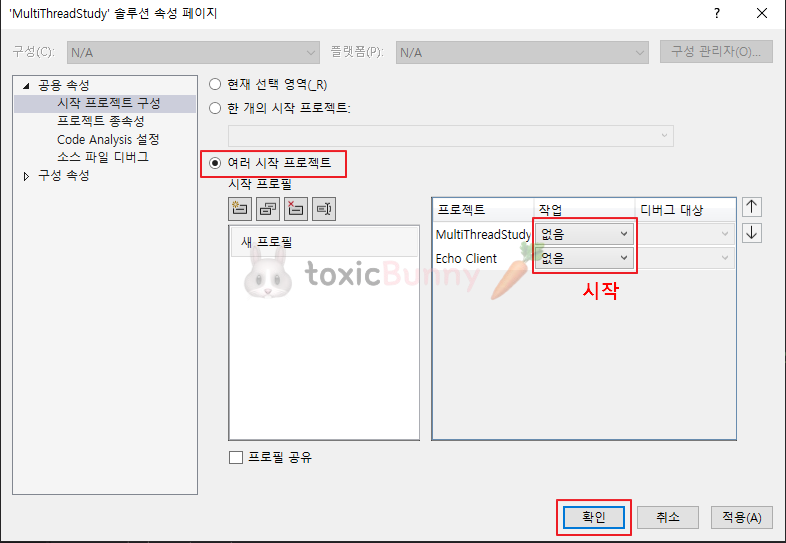
우선 두 개의 프로젝트가 동시에 실행할 수 있도록
프로젝트 설정을 위와 같이 바꿔주었다.

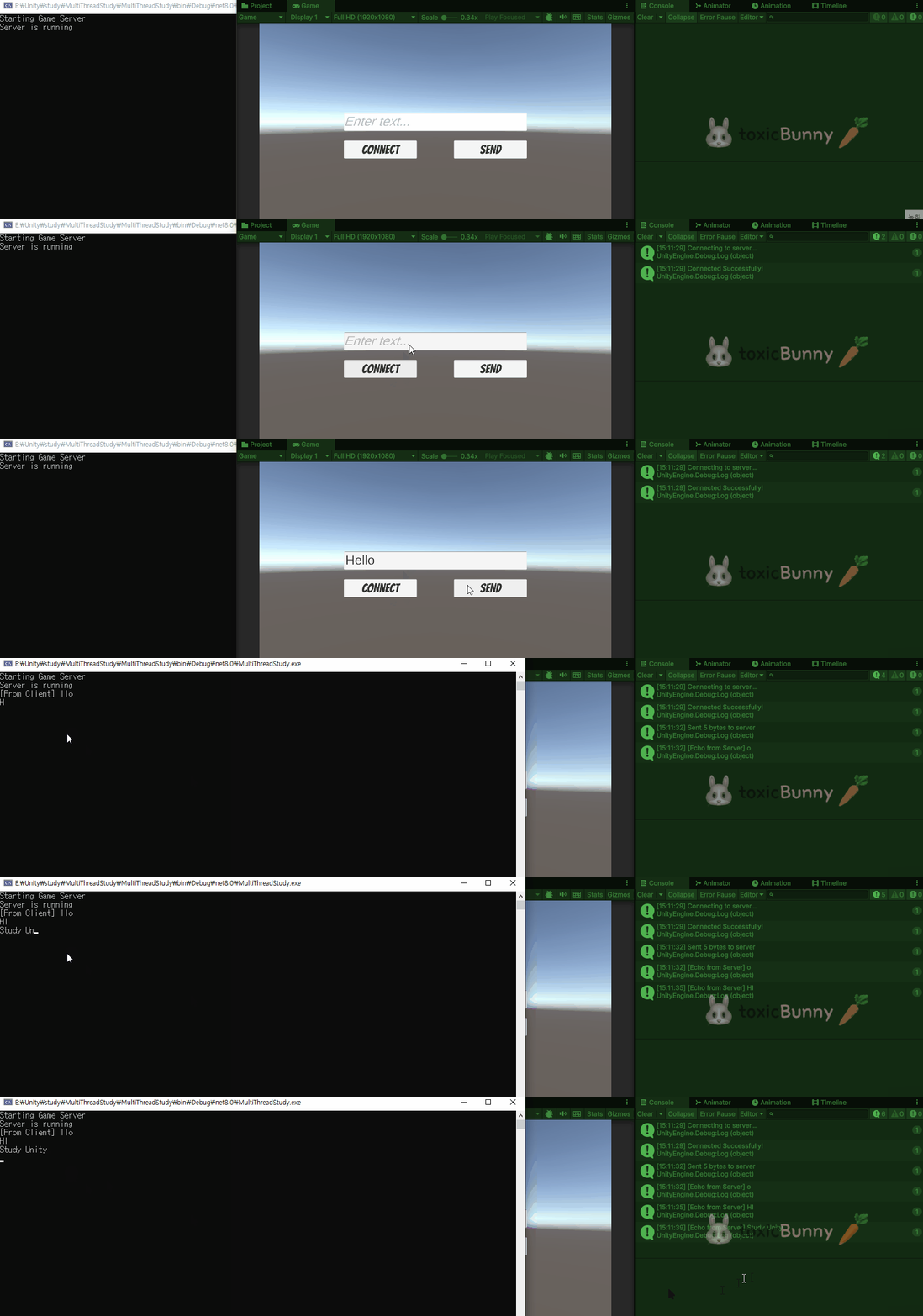
서버가 가동되고
이후에 클라이언트가 접속하여 "Hello, Echo Server"를 서버에게 보낸다.
에코로 "llo, Echo Server"가 출력되었고 서버 화면에서도 클라이언트가 보낸 메시지가 정상적으로 들어왔다.
🚨 글자가 잘리는 이유
클라이언트 창에서 에코로 받은 메시지를 보면 "llo, Echo Server" 로 받아진 걸 확인할 수 있다.
이는 패킷 구조(헤더 + 본문)를 문자열 변환할 때 헤더를 잘못 건드려서 발생한 문제이다.
현재 Packet은 처음에 position이 0인데 본문 바이트를 그대로 Push()로 0부터 채워 넣고 있다.
그다음 RecordSize()가 헤더 2바이트를 버퍼[0..1]에 기록하면서 이미 들어가 있던 본문 첫 2바이트(예: "He")를 덮어써버린다
(원래 의도) [헤더 2B][H][e][l][l][o]...
(실제 전송) [헤더 2B가 H/e를 덮어씀][l][l][o]...
public class Packet
{
public byte[] buffer { get; private set; }
public int position { get; private set; }
public Packet()
{
buffer = new byte[1024];
position = Defines.HEADERSIZE; // 헤더 2바이트 미리 비워두기
}
// ...
}
Packet을 만들 때 처음부터 포인터를 2로 시작시키면(= 헤더 2바이트 건너뛰고 본문 쓰기 시작) 해결된다.

3. Unity와 연동해보기
콘솔앱을 통해서 확인해보았다면
유니티를 통해서도 서버 통신이 정상적으로 작동되는지 확인해보겠다.
단, 이번에는 클라이언트가 지정된 메시지를 보내는 게 아니라
직접 입력하고 보내는 방식으로 수정해줄 것이다!
1. UI 제작
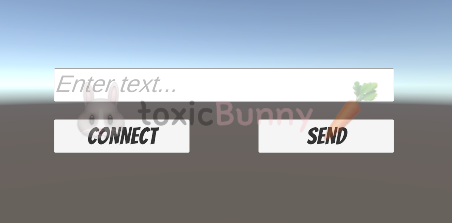
2. 클라이언트 스크립트
2.1. 서버와 연결 및 UI 작업 처리
using System;
using System.Collections.Generic;
using System.Net;
using System.Net.Sockets;
using TMPro;
using UnityEngine;
using UnityEngine.UI;

public class ChatNetworkManager : MonoBehaviour
{
    public static ChatNetworkManager Instance { get; private set; }

    private Socket client_socket;
    private byte[] receive_buffer = new byte[1024];
    private List<byte> incomplete_packetBuffer = new List<byte>();

    [SerializeField] private TMP_InputField inputField;
    [SerializeField] private Button connectButton;
    [SerializeField] private Button sendButton;

    void Awake()
    {
        Instance = this;
    }

    void Start()
    {
        connectButton.onClick.AddListener(Connect);
        sendButton.onClick.AddListener(Send);
    }

    public void Connect()
    {
        try
        {
            client_socket = new Socket(AddressFamily.InterNetwork, SocketType.Stream, ProtocolType.Tcp);
            IPAddress ipAddress = IPAddress.Parse("127.0.0.1");
            IPEndPoint remoteEP = new IPEndPoint(ipAddress, 7979);

            Debug.Log("Connecting to server.");
            client_socket.BeginConnect(remoteEP, new AsyncCallback(ConnectCallback), null);
        }
        catch (Exception e)
        {
            Debug.Log(e.Message);
        }
    }

    private void ConnectCallback(IAsyncResult AR)
    {
        try
        {
            client_socket.EndConnect(AR);
            Debug.Log("Connected Successfully!");

            // 서버가 클라이언트에게 보내기
            client_socket.BeginReceive(receive_buffer, 0, receive_buffer.Length, SocketFlags.None, new AsyncCallback(ReceiveCallback), null);
        }
        catch (Exception e)
        {
            Console.WriteLine(e.Message);
        }
    }
}
- Awake/Start에서 싱글턴을 세팅하고 접속 버튼과 전송 버튼에 콜백을 연결한다.
- Connect()는 TCP 소켓을 만들고 서버 주소로 비동기 접속을 시도한다.
- ConnectCallback()이 성공하면 즉시 비동기 수신 루프를 시작한다.
- 이후부터는 서버가 보내는 바이트를 끊임없이 받게 된다.
유니티 메인스레드는 렌더링과 입력을 담당하므로
네트워크 I/O은 비동기 콜백으로 분리하는 것이 좋다.
접속이 완료되면 같은 소켓으로 수신을 걸어두고, 콜백이 불릴 때마다 다음 수신을 다시 건다.
이렇게 하면 메인스레드를 막지 않고도 지속적으로 데이터를 받을 수 있다.
2.2. 수신 파이프라인 & 패킷 조립
서버가 클라이언트에게 보내는 메시지가 있을 수 있으니 이부분도 구현해줄 것이다.
public partial class ChatNetworkManager
{
    // 서버가 클라이언트에게 보내기
    private void ReceiveCallback(IAsyncResult AR)
    {
        try
        {
            int bytesRead = client_socket.EndReceive(AR);

            if (bytesRead > 0)
            {
                for (int i = 0; i < bytesRead; i++)
                {
                    incomplete_packetBuffer.Add(receive_buffer[i]);
                }

                ProcessReceivedData();

                client_socket.BeginReceive(receive_buffer, 0, receive_buffer.Length, SocketFlags.None, new AsyncCallback(ReceiveCallback), null);
            }
            else
            {
                Debug.Log("Server disConnected.");
                DisConnect();
            }
        }
        catch (Exception e)
        {
            Debug.LogError($"Receive failed: {e.Message}");
            DisConnect();
        }
    }

    // 서버가 클라이언트에게 보내기
    private void ProcessReceivedData()
    {
        while (true)
        {
            if (incomplete_packetBuffer.Count < Defines.HEADERSIZE)
            {
                return;
            }

            short bodySize = BitConverter.ToInt16(incomplete_packetBuffer.ToArray(), 0);

            if (incomplete_packetBuffer.Count < Defines.HEADERSIZE + bodySize)
            {
                return;
            }

            byte[] completedMessage = new byte[bodySize];
            incomplete_packetBuffer.CopyTo(Defines.HEADERSIZE, completedMessage, 0, bodySize);

            string received_text = Encoding.UTF8.GetString(completedMessage);
            Debug.Log($"[Echo from Server] {received_text}");

            incomplete_packetBuffer.RemoveRange(0, Defines.HEADERSIZE + bodySize);
        }
    }
}
- ReceiveCallback()은 도착한 바이트를 임시 리스트 버퍼에 이어 붙인다.
- ProcessReceivedData()는 먼저 헤더 2바이트만큼이 모였는지 확인한 뒤 거기서 본문 길이를 읽어낸다.
- “헤더 + 본문 길이”만큼 실제로 모였을 때만 그 조각을 완성 메시지로 꺼내 문자열로 변환한다.
- 사용한 부분은 리스트에서 제거하고 남은 바이트는 다음 수신과 합쳐 계속 처리한다.
- 헤더의 크기는 Defines.HEADERSIZE = 2로 고정한다.
2.3. 송신 파이프라인 & 패킷 구성
유니티 클라이언트는 단순히 텍스트만 주고받는 것이 아니라
게임 오브젝트의 움직임이나 상태 같은 다양한 데이터를 서버와 주고받아야 한다.
이를 구분하기 위해 메시지마다 의도를 표시하는 프로토콜을 정의했다.
public enum PROTOCOL : short
{
    CHAT_MSG_REQ = 1,
    CHAT_MSG_ACK,

    MATCH_REQ,
    MATCH_SUCCESS_ACK,
    MATCH_FAIL_ACK,

    PLACE_STONE_REQ,

    BOARD_UPDATE_ACK,
    TURN_UPDATE_ACK,
    GAME_OVER_ACK,
}
PROTOCOL은 short 열거형으로 채팅/매치/보드 업데이트 등 각 메시지 타입을 식별한다.
using System;
using System.Text;
using UnityEngine;

public class Packet
{
    public byte[] buffer { get; private set; }
    public int position { get; private set; }
    public short protocol_id { get; private set; }

    public Packet()
    {
        buffer = new byte[1024];
    }

    public Packet(byte[] buffer)
    {
        buffer = new byte[buffer.Length];
        Array.Copy(buffer, buffer, buffer.Length);
        position = buffer.Length;
    }

    public Packet(PROTOCOL protocol)
    {
        protocol_id = (short)protocol;
        Push(protocol_id);
    }

    public void RecordSize()
    {
        short body_size = (short)(position - Defines.HEADERSIZE);
        byte[] header = BitConverter.GetBytes(body_size);
        header.CopyTo(buffer, 0);
    }

    public void Push(short value)
    {
        byte[] data = BitConverter.GetBytes(value);
        data.CopyTo(buffer, position);
        position += data.Length;
    }

    public void Push(string value)
    {
        byte[] data = Encoding.UTF8.GetBytes(value);
        data.CopyTo(buffer, position);
        position += data.Length;
    }

    public void Push(byte value)
    {
        buffer[position] = value;
        position++;
    }

    public void Push(byte[] value)
    {
        value.CopyTo(buffer, position);
        position += value.Length;
    }
}
- Packet은 내부 버퍼에 순서대로 바이트를 쌓는다.
- 반드시 헤더(길이) 공간을 먼저 비워둔 다음
- 프로토콜(2B) → 본문을 누적하고 마지막에 RecordSize()로 헤더에 길이를 기록한다.
- 현재 Packet에 프로토콜 전용 생성자가 있고(Packet(PROTOCOL))
- 내부에 protocol_id 필드가 있다.
- 이를 활용하면 전송 시 프로토콜을 먼저 밀어 넣을 수 있다.
2.4. 메인 스레드 디스패처
네트워크 콜백은 유니티 메인스레드 바깥에서 실행될 수 있다.
이때 UI 갱신이나 게임 오브젝트 조작은 메인스레드에서만 안전하다.
따라서 콜백에서 받은 작업을 메인스레드로 되돌려 실행할 수 있는 큐가 필요하다.
using System;
using System.Collections.Generic;
using UnityEngine;

public class UnityMainThreadDispatcher : MonoBehaviour
{
    private static Queue<Action> executionQueue = new Queue<Action>();
    private static UnityMainThreadDispatcher instance;

    void Awake()
    {
        instance = this;
    }

    public static UnityMainThreadDispatcher Instance()
    {
        return instance;
    }

    public void Enqueue(Action action)
    {
        if (action == null)
            return;

        lock (executionQueue)
        {
            executionQueue.Enqueue(action);
        }
    }

    void Update()
    {
        lock (executionQueue)
        {
            while (executionQueue.Count > 0)
            {
                executionQueue.Dequeue().Invoke();
            }
        }
    }
}
- UnityMainThreadDispatcher는 Action을 큐에 모아두었다가 Update()에서 한 번에 실행한다.
- 네트워크 콜백 안에서는 Dispatcher.Enqueue(() => /* UI 갱신 */)처럼 넘기고
- 실제 처리는 다음 프레임에 메인스레드에서 안전하게 수행한다
유니티 API 대다수는 메인스레드 전용이다.
네트워크 스레드에서 직접 TextMeshPro나 GameObject를 만지면 예외가 날 수 있으므로 디스패처를 통해 스레드 경계를 명확히 넘기는 습관이 필요하다.
4. Tic Tac Toc
1. UI 제작

2. GameServer & GameRomm (서버 게임 관리)
서버는 단순히 메시지를 주고 받는 역할을 넘어 게임 규칙을 강제하고 진행 상황을 관리해야 한다.
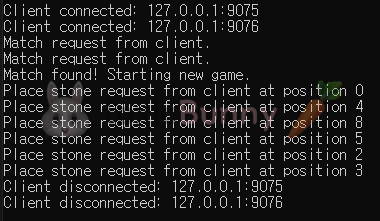
틱택토 게임은 두명의 플레이어를 한 방에 가둬놓고 하나의 보드 상태를 서로 공유하며 턴이 올바르게 진행되도록 제어해야 한다.
public class GameServer
{
    private Queue<UserToken> waiting_players = new Queue<UserToken>();

    public void OnClientConnected(UserToken token)
    {
        Console.WriteLine($"Client connected: {token.socket.RemoteEndPoint}");
        token.SetOnPacketReceive(OnPacketReceived);
        token.SetOnDisconnect(OnClientDisconnected);
    }

    public void OnPacketReceived(UserToken token, Packet packet)
    {
        short protocol_id = packet.PopShort();
        switch ((PROTOCOL)protocol_id)
        {
            case PROTOCOL.MATCH_REQ:
                Console.WriteLine($"Match request from client.");
                MatchRequest(token);
                break;
            case PROTOCOL.PLACE_STONE_REQ:
                byte position = packet.PopByte();
                Console.WriteLine($"Place stone request from client at position {position}");
                token.game_room.PlaceStone(token, position);
                break;
            default:
                break;
        }
    }

    private void MatchRequest(UserToken token)
    {
        lock (waiting_players)
        {
            waiting_players.Enqueue(token);

            if (waiting_players.Count >= 2)
            {
                UserToken player1 = waiting_players.Dequeue();
                UserToken player2 = waiting_players.Dequeue();

                Console.WriteLine("Match found! Starting new game.");
                new GameRoom(player1, player2);
            }
        }
    }

    private void OnClientDisconnected(UserToken token)
    {
        if (token.game_room != null)
        {
            token.game_room.OnPlayerDisconnect(token);
        }
    }
}
- 새로운 클라이언트가 들어오면 UserToken을 할당한다.
- 매칭 요청이 들어오면 빈 자리를 가진 GameRoom을 찾아 플레이어를 배정한다.
public class GameRoom
{
    public UserToken player1_token { get; private set; }
    public UserToken player2_token { get; private set; }

    private byte[] board_state = new byte[9];
    private byte current_turn_player_index;

    private bool is_game_over = false;

    public GameRoom(UserToken token1, UserToken token2)
    {
        player1_token = token1;
        player2_token = token2;

        player1_token.SetGameRoom(this);
        player2_token.SetGameRoom(this);

        ResetGame();
    }

    public void ResetGame()
    {
        for (int i = 0; i < 9; i++)
        {
            board_state[i] = 0;
        }
        is_game_over = false;

        Random rand = new Random();
        current_turn_player_index = (byte)rand.Next(1, 3);

        SendMatchSuccessAck();
        SendTurnUpdateAck();
        SendBoardUpdateAck();
    }

    private void SendMatchSuccessAck()
    {
        Packet packet1 = new Packet(PROTOCOL.MATCH_SUCCESS_ACK);
        packet1.Push((byte)1); // player1의 인덱스는 1
        player1_token.Send(packet1);

        Packet packet2 = new Packet(PROTOCOL.MATCH_SUCCESS_ACK);
        packet2.Push((byte)2); // player2의 인덱스는 2
        player2_token.Send(packet2);
    }

    private void SendTurnUpdateAck()
    {
        Packet packet = new Packet(PROTOCOL.TURN_UPDATE_ACK);
        packet.Push(current_turn_player_index);

        player1_token.Send(packet);
        player2_token.Send(packet);
    }

    private void SendBoardUpdateAck()
    {
        Packet packet = new Packet(PROTOCOL.BOARD_UPDATE_ACK);
        packet.Push(board_state);

        player1_token.Send(packet);
        player2_token.Send(packet);
    }

    private void SendGameOverAck(byte winner_index)
    {
        Packet packet = new Packet(PROTOCOL.GAME_OVER_ACK);
        packet.Push(winner_index);

        player1_token.Send(packet);
        player2_token.Send(packet);
    }

    public void PlaceStone(UserToken request_token, byte position)
    {
        byte player_index = (request_token == player1_token) ? (byte)1 : (byte)2;
        if (player_index != current_turn_player_index)
        {
            return;
        }

        if (position < 0 || position >= 9 || board_state[position] != 0)
        {
            return;
        }

        board_state[position] = player_index;

        SendBoardUpdateAck();

        byte winner = CheckWinner();

        if (winner != 255)
        {
            is_game_over = true;
            SendGameOverAck(winner);
        }
        else
        {
            current_turn_player_index = (current_turn_player_index == 1) ? (byte)2 : (byte)1;
            SendTurnUpdateAck();
        }
    }

    private byte CheckWinner()
    {
        byte[][] winPatterns = new byte[][]
        {
            new byte[] {0, 1, 2}, new byte[] {3, 4, 5}, new byte[] {6, 7, 8},
            new byte[] {0, 3, 6}, new byte[] {1, 4, 7}, new byte[] {2, 5, 8},
            new byte[] {0, 4, 8}, new byte[] {2, 4, 6}
        };

        foreach (var pattern in winPatterns)
        {
            if (board_state[pattern[0]] != 0 &&
                board_state[pattern[0]] == board_state[pattern[1]] &&
                board_state[pattern[1]] == board_state[pattern[2]])
            {
                return board_state[pattern[0]];
            }
        }

        bool isDraw = true;
        for (int i = 0; i < 9; i++)
        {
            if (board_state[i] == 0)
            {
                isDraw = false;
                break;
            }
        }

        return isDraw ? (byte)0 : (byte)255;
    }

    public void OnPlayerDisconnect(UserToken disconnected_token)
    {
        if (is_game_over) return;

        is_game_over = true;
        byte winner_index = (disconnected_token == player1_token) ? (byte)2 : (byte)1;
        SendGameOverAck(winner_index);
    }
}
- 3x3 보드를 배열로 관리한다.
- 두 플레이어가 순서대로 돌을 두도록 턴을 제어한다.
- 누군가 승리했는지 무승부인지 판단한 뒤 결과를 양쪽에 알려준다
3. Unity 클라이언트 네트워크 처리
유니티 클라이언트에서는 버튼 입력 → 패킷 전송 → 서버 응답 수신 과정을 한 곳에서 관리할 필요가 있다.
이걸 담당하는 게 NetworkManager다.
using UnityEngine;
using System.Net;
using System.Net.Sockets;
using System;
using System.Collections.Generic;
using System.Text;
using UnityEngine.UI;

public class NetworkManager : MonoBehaviour
{
    public static NetworkManager Instance { get; private set; }

    private Socket client_socket;
    private byte[] receive_buffer = new byte[4096];
    private List<byte> incomplete_packet_buffer = new List<byte>();

    private readonly Queue<Action> main_thread_actions = new Queue<Action>();

    public byte my_player_index { get; private set; } = 255;
    public byte current_turn_player_index { get; private set; }
    public byte[] board_state { get; private set; }
    public byte game_over_winner { get; private set; }
    public bool is_game_over { get; private set; }

    public Action OnMatchSuccess;
    public Action OnBoardUpdate;
    public Action OnTurnUpdate;
    public Action<byte> OnGameOver;

    [SerializeField] private Button connectButton;

    void Awake()
    {
        if (Instance == null)
        {
            Instance = this;
            DontDestroyOnLoad(gameObject);
            board_state = new byte[9];
        }
        else
        {
            Destroy(gameObject);
        }

        connectButton.onClick.AddListener(connect);

        Application.runInBackground = true;
    }

    void Update()
    {
        lock (main_thread_actions)
        {
            while (main_thread_actions.Count > 0)
            {
                Action action = main_thread_actions.Dequeue();
                action?.Invoke();
            }
        }
    }

    public void connect()
    {
        try
        {
            client_socket = new Socket(AddressFamily.InterNetwork, SocketType.Stream, ProtocolType.Tcp);
            IPAddress ipAddress = IPAddress.Parse("127.0.0.1");
            IPEndPoint remoteEP = new IPEndPoint(ipAddress, 7979);

            Debug.Log("Connecting to server...");
            client_socket.BeginConnect(remoteEP, new AsyncCallback(ConnectCallback), null);
        }
        catch (Exception e)
        {
            Debug.LogError($"Connection failed: {e.Message}");
        }
    }

    private void ConnectCallback(IAsyncResult AR)
    {
        try
        {
            client_socket.EndConnect(AR);

            lock (main_thread_actions)
            {
                main_thread_actions.Enqueue(() => {
                    Debug.Log("Connected successfully!");
                });
            }
            client_socket.BeginReceive(receive_buffer, 0, receive_buffer.Length, SocketFlags.None, new AsyncCallback(ReceiveCallback), null);
        }
        catch (Exception e)
        {
            lock (main_thread_actions)
            {
                main_thread_actions.Enqueue(() => {
                    Debug.LogError($"Connection callback failed: {e.Message}");
                });
            }
        }
    }

    private void SendCallback(IAsyncResult AR)
    {
        try
        {
            int bytesSent = client_socket.EndSend(AR);
            lock (main_thread_actions)
            {
                main_thread_actions.Enqueue(() => {
                    Debug.Log($"Sent {bytesSent} bytes to server.");
                });
            }
        }
        catch (Exception e)
        {
            lock (main_thread_actions)
            {
                main_thread_actions.Enqueue(() => {
                    Debug.LogError($"Send failed: {e.Message}");
                });
            }
        }
    }

    private void ReceiveCallback(IAsyncResult AR)
    {
        try
        {
            int bytesRead = client_socket.EndReceive(AR);
            if (bytesRead > 0)
            {
                for (int i = 0; i < bytesRead; i++)
                {
                    incomplete_packet_buffer.Add(receive_buffer[i]);
                }
                ProcessReceivedData();
                client_socket.BeginReceive(receive_buffer, 0, receive_buffer.Length, SocketFlags.None, new AsyncCallback(ReceiveCallback), null);
            }
            else
            {
                lock (main_thread_actions)
                {
                    main_thread_actions.Enqueue(() => {
                        Debug.Log("Server disconnected.");
                        Disconnect();
                    });
                }
            }
        }
        catch (Exception e)
        {
            lock (main_thread_actions)
            {
                main_thread_actions.Enqueue(() => {
                    Debug.LogError($"Receive failed: {e.Message}");
                    Disconnect();
                });
            }
        }
    }

    private void ProcessReceivedData()
    {
        while (true)
        {
            if (incomplete_packet_buffer.Count < Defines.HEADERSIZE) return;

            short body_size = BitConverter.ToInt16(incomplete_packet_buffer.ToArray(), 0);

            if (incomplete_packet_buffer.Count < Defines.HEADERSIZE + body_size) return;

            byte[] completed_message_body = new byte[body_size];
            incomplete_packet_buffer.CopyTo(Defines.HEADERSIZE, completed_message_body, 0, body_size);
            incomplete_packet_buffer.RemoveRange(0, Defines.HEADERSIZE + body_size);

            lock (main_thread_actions)
            {
                main_thread_actions.Enqueue(() => {
                    short protocol = BitConverter.ToInt16(completed_message_body, 0);
                    switch ((PROTOCOL)protocol)
                    {
                        case PROTOCOL.MATCH_SUCCESS_ACK:
                            handle_match_success(completed_message_body);
                            break;
                        case PROTOCOL.BOARD_UPDATE_ACK:
                            handle_board_update(completed_message_body);
                            break;
                        case PROTOCOL.TURN_UPDATE_ACK:
                            handle_turn_update(completed_message_body);
                            break;
                        case PROTOCOL.GAME_OVER_ACK:
                            handle_game_over(completed_message_body);
                            break;
                    }
                });
            }
        }
    }

    public void Disconnect()
    {
        if (client_socket != null && client_socket.Connected)
        {
            client_socket.Shutdown(SocketShutdown.Both);
            client_socket.Close();
        }
        client_socket = null;
        Debug.Log("Disconnected from server.");
    }

    void OnApplicationQuit()
    {
        Disconnect();
    }

    private void send_packet(Packet packet)
    {
        if (client_socket == null || !client_socket.Connected) return;
        packet.RecordSize();
        byte[] data_to_send = new byte[packet.position];
        Array.Copy(packet.buffer, 0, data_to_send, 0, packet.position);
        client_socket.BeginSend(data_to_send, 0, data_to_send.Length, SocketFlags.None, new AsyncCallback(SendCallback), null);
    }

    public void send_match_request()
    {
        Packet packet = new Packet(PROTOCOL.MATCH_REQ);
        send_packet(packet);
    }

    public void send_place_stone(byte position)
    {
        Packet packet = new Packet(PROTOCOL.PLACE_STONE_REQ);
        packet.Push(position);
        send_packet(packet);
    }

    private void handle_match_success(byte[] data)
    {
        my_player_index = data[2];
        Debug.Log($"Match success! I am player index: {my_player_index}");
        OnMatchSuccess?.Invoke();
    }

    private void handle_board_update(byte[] data)
    {
        Array.Copy(data, 2, board_state, 0, 9);
        Debug.Log("Board state updated.");
        OnBoardUpdate?.Invoke();
    }

    private void handle_turn_update(byte[] data)
    {
        current_turn_player_index = data[2];
        Debug.Log($"Turn updated. Current turn is player: {current_turn_player_index}");
        OnTurnUpdate?.Invoke();
    }

    private void handle_game_over(byte[] data)
    {
        is_game_over = true;
        game_over_winner = data[2];
        Debug.Log($"Game over! Winner is player: {game_over_winner}");
        OnGameOver?.Invoke(game_over_winner);
    }
}
- send_match_request() : 매칭 요청 패킷 전송
- send_place_stone(byte index) : 선택한 칸 위치를 서버에 전송
- OnBoardUpdate / OnTurnUpdate / OnMatchSuccess / OnGameOver 이벤트 제공 → UI와 연결
네트워크 로직을 UI와 분리함으로써
게임 UI는 단순히 이벤트만 구독해서 보드와 상태를 업데이트한다.
이 구조는 확장성과 유지보수성에 유리하다.
4. Unity 게임 UI 처리
유니티 화면에서 실제로 보드 버튼, 턴 표시, 승패 알림을 처리하는 부분이다.
using UnityEngine;
using UnityEngine.UI;
using TMPro;

public class GameUIManager : MonoBehaviour
{
    public Button[] board_buttons = new Button[9];
    public TextMeshProUGUI status_text;
    public Button match_button;
    public GameObject game_over_panel;
    public TextMeshProUGUI result_text;

    void Start()
    {
        game_over_panel.SetActive(false);

        for (int i = 0; i < board_buttons.Length; i++)
        {
            int button_index = i;
            board_buttons[i].onClick.AddListener(() => OnBoardButtonClicked(button_index));
        }
        match_button.onClick.AddListener(OnMatchButtonClicked);

        NetworkManager.Instance.OnBoardUpdate += UpdateBoardUI;
        NetworkManager.Instance.OnTurnUpdate += UpdateStatusText;
        NetworkManager.Instance.OnMatchSuccess += OnMatchSuccess;
        NetworkManager.Instance.OnGameOver += ShowGameOver;

        UpdateStatusText();
    }

    void OnDestroy()
    {
        if (NetworkManager.Instance != null)
        {
            NetworkManager.Instance.OnBoardUpdate -= UpdateBoardUI;
            NetworkManager.Instance.OnTurnUpdate -= UpdateStatusText;
            NetworkManager.Instance.OnMatchSuccess -= OnMatchSuccess;
            NetworkManager.Instance.OnGameOver -= ShowGameOver;
        }
    }

    void OnBoardButtonClicked(int index)
    {
        if (NetworkManager.Instance.my_player_index == NetworkManager.Instance.current_turn_player_index)
        {
            NetworkManager.Instance.send_place_stone((byte)index);
        }
        else
        {
            Debug.Log("Not your turn!");
        }
    }

    void OnMatchButtonClicked()
    {
        NetworkManager.Instance.send_match_request();
        match_button.interactable = false;
        status_text.text = "Waiting for match...";
    }

    void OnMatchSuccess()
    {
        UpdateStatusText();
    }

    void UpdateBoardUI()
    {
        for (int i = 0; i < NetworkManager.Instance.board_state.Length; i++)
        {
            TextMeshProUGUI button_text = board_buttons[i].GetComponentInChildren<TextMeshProUGUI>();
            if (button_text == null) continue;

            byte state = NetworkManager.Instance.board_state[i];
            switch (state)
            {
                case 1: button_text.text = "O"; break;
                case 2: button_text.text = "X"; break;
                default: button_text.text = ""; break;
            }
        }
    }

    void UpdateStatusText()
    {
        if (NetworkManager.Instance.is_game_over) return;

        byte my_index = NetworkManager.Instance.my_player_index;

        if (my_index > 1)
        {
            status_text.text = "Press Match button";
            return;
        }

        byte current_turn_index = NetworkManager.Instance.current_turn_player_index;
        if (my_index == current_turn_index)
        {
            status_text.text = "Your Turn";
        }
        else
        {
            status_text.text = "Opponent's Turn";
        }
    }

    void ShowGameOver(byte winner_index)
    {
        game_over_panel.SetActive(true);

        if (winner_index == 0)
        {
            result_text.text = "Draw";
        }
        else if (winner_index == NetworkManager.Instance.my_player_index)
        {
            result_text.text = "You Win!";
        }
        else
        {
            result_text.text = "You Lose";
        }
    }
}
- 보드 버튼(9개): 누르면 OnBoardButtonClicked(index) 실행 → 내 턴일 때만 서버에 돌 두기 요청 전송
- 매칭 버튼: 누르면 서버에 매칭 요청 → “Waiting for match...” 표시
- UpdateBoardUI(): 서버에서 받은 보드 상태를 O/X 텍스트로 갱신
- UpdateStatusText(): 내 턴인지 상대 턴인지 표시
- ShowGameOver(): 게임 종료 후 승/패/무승부 결과 표시

'Unity > 멋쟁이사자처럼 부트캠프' 카테고리의 다른 글
| [멋쟁이사자처럼부트캠프] 유니티 게임 개발 5기(72일차) - Jira 및 Plastic SCM 사용법 (0) | 2025.08.29 |
|---|---|
| [멋쟁이사자처럼부트캠프] 유니티 게임 개발 5기(71일차) - OT 및 게임 소프트웨어 공학 (4) | 2025.08.28 |
| [멋쟁이사자처럼부트캠프] 유니티 게임 개발 5기(69일차) - 네트워크 이론 및 멀티 쓰레드 (4) | 2025.08.26 |
| [멋쟁이사자처럼부트캠프] 유니티 게임 개발 5기(68일차) - 땅 파기 게임 (2) (5) | 2025.08.25 |
| [멋쟁이사자처럼부트캠프] 유니티 게임 개발 5기(67일차) - NGO Network 실습 및 땅 파기 게임 (0) | 2025.08.22 |


