Carrot
본문 바로가기
Unity/멋쟁이사자처럼 부트캠프

[멋쟁이사자처럼부트캠프] 유니티 게임 개발 5기(36일차) - 자료구조 (2) 및 실습

by 독기품은토끼 2025. 7. 8.
✅ 오늘의 학습 목표
1. 자료구조 이론(2)
2. 폭탄 폭발 실습
3. Git 새로운 저장소 생성


1. 자료구조

1. 클래스를 통한 딕셔너리 활용

using System.Collections.Generic;
using UnityEngine;

public class PersonData
{
    public int age;
    public string name;
    public float height;
    public float weight;
    
    public PersonData(int age, string name, float height, float weight)
    {
        this.age = age;
        this.name = name;
        this.height = height;
        this.weight = weight;
    }
}

public class StudyDictionary : MonoBehaviour
{
    public Dictionary<string, PersonData> persons = new Dictionary<string, PersonData>();

    void Start()
    {
        persons.Add("철수", new PersonData(10, "철수", 150f, 30f));
        persons.Add("영희", new PersonData(10, "영희", 150f, 30f));
        persons.Add("동수", new PersonData(10, "동수", 150f, 30f));

        Debug.Log(persons["철수"].age);
        Debug.Log(persons["철수"].name);
        Debug.Log(persons["철수"].height);
        Debug.Log(persons["철수"].weight);
    }
}


2. 해쉬 테이블 (Hash Table)

딕셔너리와 유사하지만 모든 데이터를 <object>로 저장하는 자료구조

(Boxing, UnBoxing이 발생하기 때문에 자주 사용하지 않는다)

Hashtable table = new Hashtable();

table["key"] = 123;      // int 저장
table["name"] = "철수"; // string 저장
table[10] = true;        // bool 저장
Hashtable h_nameAges = new Hashtable();

# 추가
h_nameAges["철수"] = 10;
h_nameAges["영수"] = "20"; // 다른 타입 저장 가능 (비효율적)

# 데이터 출력 -> 캐스팅 필요
int score = (int)h_nameAges["철수"];

# 삭제
h_nameAges.Remove("Player2");

if (h_nameAges.ContainsKey("철수"))
{
    Debug.Log("HashTable에 철수가 있음.");
}


▶ GetHashCode()

특정 인스턴스를 식별할 수 있는 고유한 값

int number = 1;
Debug.Log(number.GetHashCode());

string key1 = "Player1";
string key2 = "Player2";

Debug.Log(key1.GetHashCode());
Debug.Log(key2.GetHashCode());


3. 그래프


정점과 간선으로 구성된 자료구조

  • 루트 노드의 개념이 없음 / 부모-자식 관계 개념 없음
  • 2개 이상의 경로 가능 (무방향, 방향, 양방향 가능)
  • 네트워크 모델


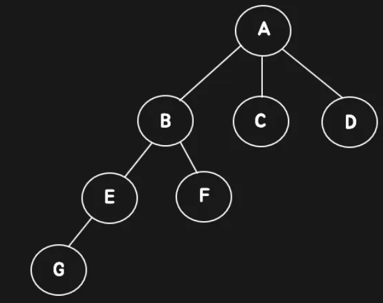
4. 트리


정점과 간선으로 계층적 관계를 표현하는 자료구조

  • A → 루트 노드
  • C, D, F, G → 단말 노드
  • A, B, E → 비단말 노드, 내부 노드


▶ 트리 순회


2. 폭탄 실습

🥕 예행 작업
1. Scene 생성 (Array Bomb)
2. Scripts 생성 (Bomb, BombSpawner)
3. Assets 다운로드
 

Props 3D | 3D 소품 | Unity Asset Store

Elevate your workflow with the Props 3D asset from Sigmoid Button Assets. Find this & other 소품 options on the Unity Asset Store.

assetstore.unity.com


Sherbb's Particle Collection | 시각 효과 파티클 | Unity Asset Store

Add depth to your next project with Sherbb's Particle Collection from Sherbb. Find this & more 시각 효과 파티클 on the Unity Asset Store.

assetstore.unity.com


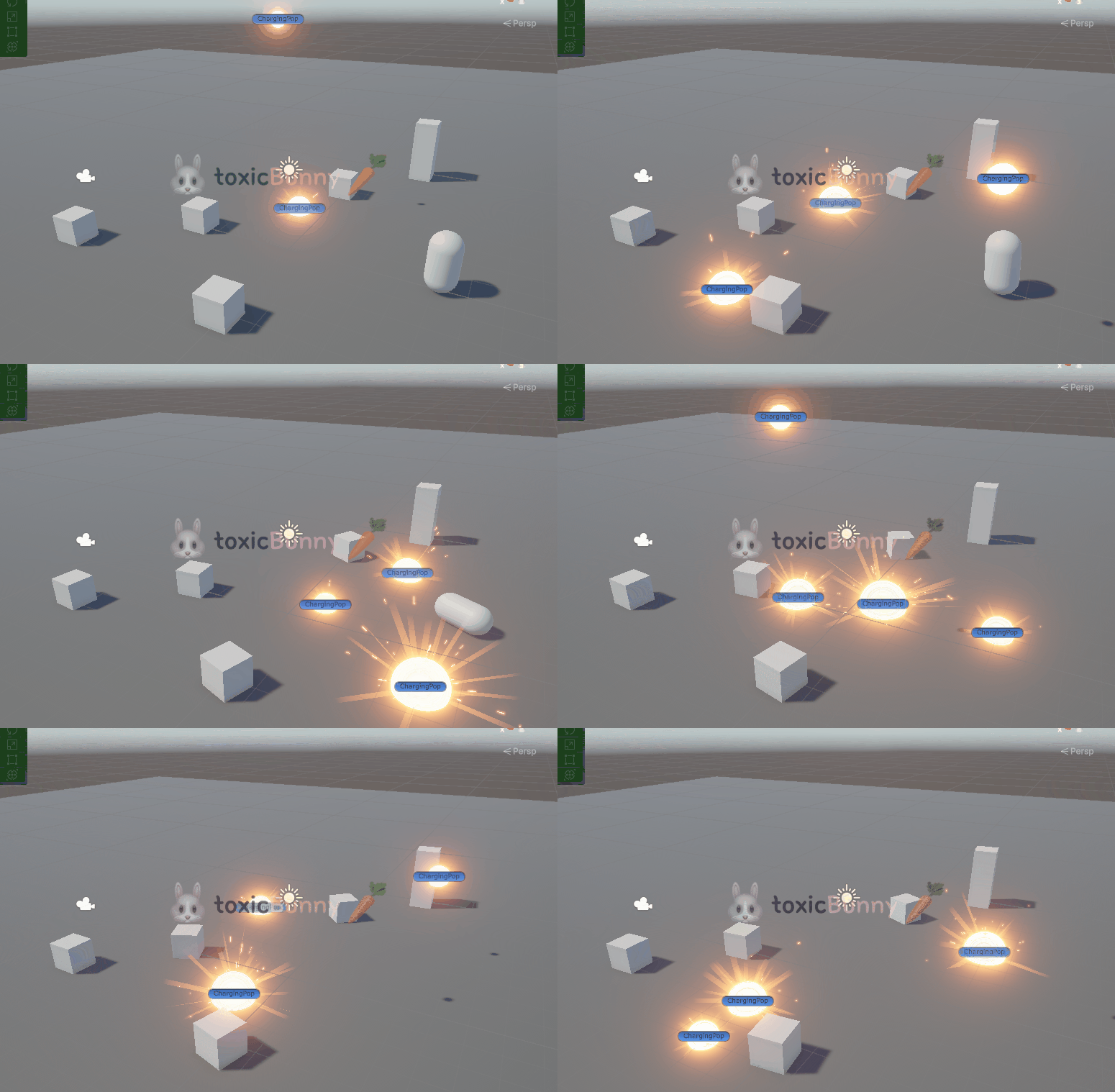
1. 폭발 구현

using System.Collections;
using UnityEngine;

public class Bomb : MonoBehaviour
{
    private Rigidbody bombRb;
    public float bombTime = 4f;
    public float bombRange = 10f;
    public LayerMask layerMask;

    void Awake()
    {
        bombRb = GetComponent<Rigidbody>();
    }

    // 원하는 타이밍에 폭탄 효과 실행
    IEnumerator Start()
    {
        yield return new WaitForSeconds(bombTime);

        BombForce();
    }

    private void BombForce()
    {
        // 감지 범위
        Collider[] colliders = Physics.OverlapSphere(transform.position, bombRange, layerMask);

        foreach (var collider in colliders)
        {
            Rigidbody rb = collider.GetComponent<Rigidbody>();

            // AddExplosionForce(폭발 파워, 폭발 위치, 폭발 범위, 폭발 높이)
            rb.AddExplosionForce(100f, transform.position, bombRange, 1f);
        }

        Destroy(gameObject);
    }
}


LayerMask를 활용해 폭발 영향을 받을 대상을 필터링 가능 (예: "Player", "Enemy" 등) 하도록 하였다.


2. 폭탄 스포너

using System.Collections;
using UnityEngine;

public class BombSpawner : MonoBehaviour
{
    public GameObject bombPrefab;

    public int rangeX = 5;
    public int rangeZ = 5;

    IEnumerator Start()
    {
        while (true)
        {
            yield return new WaitForSeconds(1f);

            RespawnBomb();
        }
    }

    private void RespawnBomb()
    {
        float ranX = Random.Range(-rangeX, rangeX + 1);
        float ranZ = Random.Range(-rangeZ, rangeZ + 1);

        Vector3 ranPos = new Vector3(ranX, 10f, ranZ);

        Instantiate(bombPrefab, ranPos, Quaternion.identity);
    }
}


3. Git 새로운 저장소 생성

3D 프로젝트 형상 관리를 위해

새로운 레포지토리를 생성해 주고 해당 레포를 기준으로 커밋&푸시 진행


소스트리를 활용해서 브랜치를 눈에 보기 쉽게 활용할 수 있음


Sourcetree | Free Git GUI for Mac and Windows

A Git GUI that offers a visual representation of your repositories. Sourcetree is a free Git client for Windows and Mac.

www.sourcetreeapp.com