
✅ 오늘의 학습 목표
1. 자료구조 이론
1. 자료구조
1. 종류
데이터를 효율적으로 접근하고 활용할 수 있도록 데이터 구조를 만들고 이를 저장 및 관리하는 것
- 단순 구조 (Primitive Data Structure)
- 프로그래밍에서 사용되는 기본적인 데이터 타입
- 정수, 실수, 문자, 논리 등의 기본 타입
- 선형 구조 (Linear Data Structure)
- 데이터가 선형적으로 연결되어 있는 구조로써 데이터가 1:1 관계를 갖는 구조
- 배열, 리스트, 스택, 큐 등
- 비선형 구조 (Non-Linear Data Structure)
- 데이터가 1:N 또는 다:다 구조
- 그래프, 트리 등
- 파일 구조 (File Data Structure))
- 레코드의 집합인 파일에 대한 자료구조
- 순차파일, 색인파일
2. 메모리 영역
- 코드 영역 (Code Segment)
- 프로그램의 코드가 저장되는 공간
- 컴파일 시 결정되며 읽기 전용
- 실행 중에는 변경되지 않으며 크기 고정
- 데이터 영역 (Data Segment)
- static, const, 전역 변수 등을 저장
- 프로그램 시작 시 메모리에 할당되며, 런타임 중 크기 변화 X
- 힙 영역 (Heap)
- new 키워드로 생성되는 객체, 배열 등 참조형 데이터가 저장
- 런타임 중 크기가 결정되고 동적으로 변함
- 메모리 관리는 GC(가바지 컬렉션)가 처리
- 스택 영역 (Stack)
- 함수 호출 시 생성되는 지역 변수, 매개 변수, 호출 정보 등이 저장
- 컴파일 타임에 크기가 결정됨
- 함수가 호출되면 쌓이고, 종료되면 자동으로 제거됨
- 매우 빠르게 접근되는 메모리 영역
2. 배열
1. 정적 배열 (Static Array)
메모리 공간을 미리 만들어두고 사용하는 자료구조
using UnityEngine;

public class StaticArray : MonoBehaviour
{
    // 자료형 [ ] : 정적 배열
    public int[] array1; // 배열 선언
    public int[] array2 = {10, 20, 30, 40, 50}; // 배열 선언과 초기화
    public int[] array3 = new int[5]; // 배열 선언 및 공간 할당
    public int[] array4 = new int[5] { 10, 20, 30, 40, 50 }; // 배열 선언 및 공간 할당 + 초기화

    NewData[] data = new NewData[5];

    void Start()
    {
        int number = array2[3]; // 인덱서
    }
}

public class NewData
{

}
2. 다차원 배열 (Multidimensional Array)
행과 열로 구성된 고정 메모리 자료구조
using UnityEngine;

public class MultidimensionalArray : MonoBehaviour
{
    public int[,] array1 = new int[3, 3]; // 3행 3열 2차원 배열
    public int[,,] array2 = new int[3, 3, 3]; // 3차원 배열

    void Start()
    {
        int number1 = array1[0, 0];
        int number2 = array1[1, 0];
        int number3 = array1[2, 2];
    }
}
3. 다중 배열 (Jagged Array)
배열 안에 배열을 가진 자료구조 (가변 배열)
using UnityEngine;

public class JaggedArray : MonoBehaviour
{
    public int[] array1 = new int[3]; // int 값이 3개
    public int[][] jaggedArray1 = new int[3][]; // int 배열이 3개

    private void Start()
    {
        array1[0] = 1;
        array1[1] = 2;
        array1[2] = 3;

        jaggedArray1[0] = new int[3] {1, 2, 3};
        jaggedArray1[1] = new int[2] {4, 5};
        jaggedArray1[2] = new int[5] {6, 7, 8, 9, 10};
    }
}
4. 동적 배열 (Dynamic Array)
크기에 따라 공간을 넉넉히 잡아서 자동 확장 가능한 자료구조
using System.Collections.Generic;
using UnityEngine;

public class DynamicArray : MonoBehaviour
{
    public List<int> list1 = new List<int>();

    void Start()
    {
        for (int i = 1; i <= 10; i++) // 1 ~ 10까지 값을 list1에 추가
            list1.Add(i); // 뒤에 i를 추가

        // list1.Insert(5, 100); // 인덱스 5번에 100을 삽입
        // list1.Remove(5); // 값 5를 제거
        // list1.RemoveAt(5); // 인덱스 5번에 있는 값을 제거
        // list1.RemoveRange(1, 3); // 인덱스 1번에서 3개까지 제거
        // list1.Clear(); // 데이터 모두 제거
        // list1.RemoveAll(x => x > 5); // 현재 List 안에서 x > 5 값은 모두 제거
        // list1.Sort(); // 오름차순 정렬
        // string str = String.Empty; // ""
        // foreach (var x in list1)
        // {
        //     str += x.ToString() + " / ";
        // }
        //
        // Debug.Log(str);

        if (list1.Contains(10)) // List에서 10이라는 값이 있으면 true
            Debug.Log("값 10이 존재 O");
        else
            Debug.Log("값 10이 존재 X");
    }
}
3. 문자열
문자로 이루어진 배열
using UnityEngine;

public class StudyString : MonoBehaviour
{
    public string str1 = "Hello World***";

    public string[] str2 = new string[3] { "Hello", "Unity", "World" };

    void Start()
    {
        Debug.Log(str1[0]); // H
        Debug.Log(str1[2]); // l

        Debug.Log(str2[0]); // Hello
        Debug.Log(str2[2]); // World

        Debug.Log(str1.Length); // 문자열의 길이 : 14
        Debug.Log(str1.Trim()); // 앞뒤 공백 제거 : Hello World***
        Debug.Log(str1.Trim('*')); // 앞뒤 문자 '*' 제거 : Hello World

        Debug.Log(str1.Contains("H")); //  H 존재여부 확인
        Debug.Log(str1.Contains("h")); //  h 존재여부 확인
        Debug.Log(str1.Contains("Hello")); // Hello 존재 여부 확인
        Debug.Log(str1.ToUpper()); // 대문자 변환
        Debug.Log(str1.ToLower()); // 소문자 변환

        Debug.Log(str1.Replace("World", "Unity")); // World를 Unity로 변환
        Debug.Log(str1);

        string text = "Apple,Banana,Orange";

        string[] fruits = text.Split(','); // , 를 기준으로 문자열 자르기

        foreach (var fruit in fruits)
            Debug.Log(fruit);
    }
}
4. 리스트
1. 순차 리스트 (Array List)
다양한 자료형을 <object>로 저장하는 자료구조
List<T> list1 = new List<T>();
2. 연결 리스트 (Linked List)
다른 메모리 위치에 있는 데이터를 노드처럼 연결하여 사용하는 자료구조
using System.Collections.Generic;
using UnityEngine;

public class StudyLinkedList : MonoBehaviour
{
    public LinkedList<int> linkedList1 = new LinkedList<int>();
    public LinkedListNode<int> node2;

    void Start()
    {
        for (int i = 1; i <= 10; i++)
        {
            linkedList1.AddLast(i);
        }

        linkedList1.AddFirst(100);
        linkedList1.AddLast(500);

        var node = linkedList1.AddFirst(1);

        linkedList1.AddBefore(node, 200);
        linkedList1.AddAfter(node2, 300);
    }
}
5. 스택 (Stack)
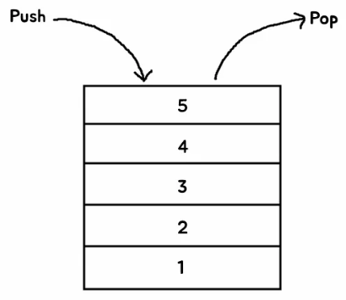
나중에 추가된 데이터가 가장 먼저 나오는 자료구조 → LIFO (Last In, First Out)
using System.Collections.Generic;
using UnityEngine;

public class StudyStack : MonoBehaviour
{
    public Stack<int> stack = new Stack<int>();

    void Start()
    {
        for (int i = 1; i <= 10; i++)
        {
            stack.Push(i); //
        }

        Debug.Log(stack.Pop()); // Last 값 반환 후 제거
        Debug.Log(stack.Count);

        Debug.Log(stack.Peek()); // Last 값 확인
        Debug.Log(stack.Count);

        Debug.Log(stack.Pop());
        Debug.Log(stack.Count);
    }
}
using System.Collections.Generic;
using UnityEngine;
public class StudyStack : MonoBehaviour
{
public Stack<int> stack = new Stack<int>();
public int[] array = new int[3] { 1, 2, 3 };
public int[] array2;
void Start()
{
stack = new Stack<int>(array);
array2 = stack.ToArray();
}
}
6. 큐 (Queue)
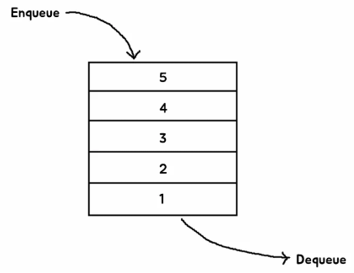
먼저 추가된 데이터가 가장 먼저 나오는 자료구조 → FIFO (First In, First Out)
using System.Collections.Generic;
using UnityEngine;

public class StudyQueue : MonoBehaviour
{
    public Queue<int> queue = new Queue<int>();

    private void Start()
    {
        for (int i = 1; i <= 10; i++)
        {
            queue.Enqueue(i); // 1 ~ 10 추가
        }

        int output = queue.Dequeue(); // 스택과 큐는 값을 반환 후 삭제하기 때문에 변수로 넣을 수 있음
        Debug.Log(output);

        Debug.Log(queue.Peek());

        Debug.Log(queue.Contains(5));

        queue.Clear(); // 모든 값 삭제

        Debug.Log(queue.Count);
    }
}
7. 딕셔너리
키(Key)와 값(Value)으로 이루어진 자료구조 → Map 방식
using System.Collections.Generic;
using UnityEngine;

public class StudyDictionary : MonoBehaviour
{
    public Dictionary<string, int> persons = new Dictionary<string, int>();

    void Start()
    {
        // Dictionary에 데이터 추가
        persons.Add("철수", 10);
        persons.Add("영희", 15);
        persons.Add("동수", 17);

        persons["철수"] = 13; // 철수 값 덮어쓰기

        int age = persons["철수"]; // Key값으로 value를 출력
        Debug.Log($"철수의 나이는 {age}입니다.");

        foreach (var person in persons)
        {
            if (person.Value == 15)
                Debug.Log($"나이가 15인 사람의 이름은 {person.Key}입니다.");

            Debug.Log($"{person.Key}의 나이는 {person.Value}입니다.");
        }

        if (persons.ContainsKey("철수"))
        {
            Debug.Log("사람 중에 철수가 있다.");
        }

        if (persons.ContainsValue(17))
        {
            Debug.Log("17살인 사람이 있다.");
        }
    }
}'Unity > 멋쟁이사자처럼 부트캠프' 카테고리의 다른 글
| [멋쟁이사자처럼부트캠프] 유니티 게임 개발 5기(37일차) - 자료구조 (3) 하노이 타워 (0) | 2025.07.09 |
|---|---|
| [멋쟁이사자처럼부트캠프] 유니티 게임 개발 5기(36일차) - 자료구조 (2) 및 실습 (1) | 2025.07.08 |
| [멋쟁이사자처럼부트캠프] 유니티 게임 개발 5기(34일차) - 2D 플랫포머 게임 (9) 및 2D Rigging 실습 (1) | 2025.07.03 |
| [멋쟁이사자처럼부트캠프] 유니티 게임 개발 5기(33일차) - 2D 플랫포머 게임 (8) (4) | 2025.07.02 |
| [멋쟁이사자처럼부트캠프] 유니티 게임 개발 5기(32일차) - 2D 플랫포머 게임(7) (1) | 2025.07.01 |


