
눈으로만 코드를 분석하다보니까
뒤돌아서면 헷갈려하고 까먹다보니 코드 분석한 내용을 글로 정리해보려고 한다...
1. LevelEditorAdvancedValidation
해당 스크립트는 레벨 데이터를 받아서 > 기본 검사를 수행한 다음 > 시뮬레이션을 통해 상태&액션 탐색 > 결과&경고 메시지를 반환하는 스크립트이다.
0. 변수 초기화
/// <summary>
/// Result of advanced validation containing solution count and detailed analysis
/// </summary>
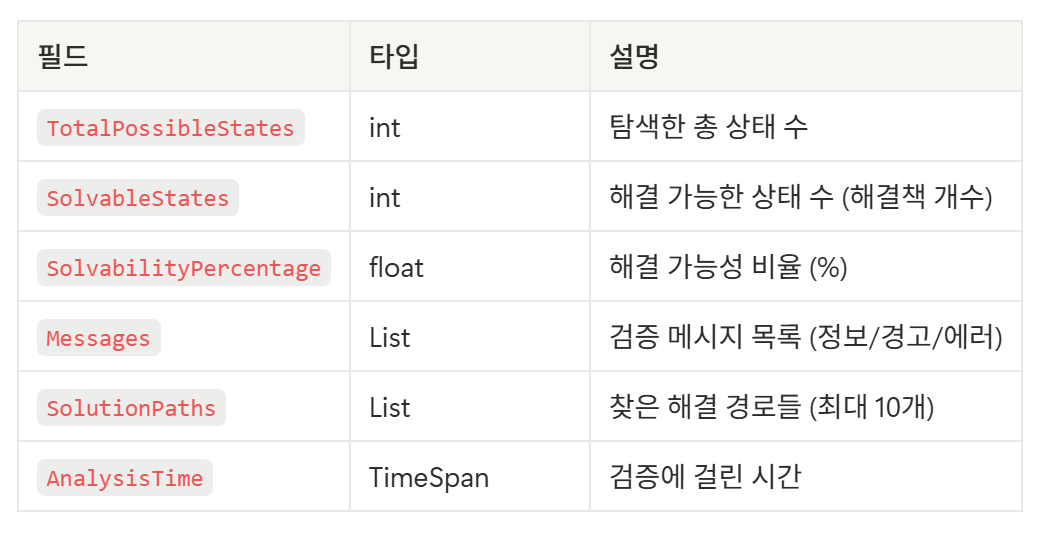
public struct AdvancedValidationResult
{
    public int TotalPossibleStates;
    public int SolvableStates;
    public float SolvabilityPercentage;
    public List<ValidationMessage> Messages;
    public List<SolutionPath> SolutionPaths;
    public TimeSpan AnalysisTime;
}
/// <summary>
/// Represents a single solution path found during analysis
/// </summary>
public struct SolutionPath
{
    public List<TileMove> Moves;
    public Dictionary<int, int> RotationCounts; // TileId -> rotation count
    public string Description;
}

/// <summary>
/// Represents a single tile movement or rotation
/// </summary>
public struct TileMove
{
    public int TileId;
    public MoveType Type;
    public Vector2Int FromPosition;
    public Vector2Int ToPosition;
    public int RotationSteps; // For rotations: 1=90°, 2=180°, 3=270°

    public enum MoveType
    {
        Move,
        Rotate
    }
}
SolutionPath > 게임 완료를 위해 타일을 움직이는 하나하나의 액션들 모음
TileMove > 타일 움직임과 관련된 구조체
/// <summary>
/// Represents a specific board state with tile positions and rotations
/// </summary>
private class BoardState
{
    public Dictionary<int, Vector2Int> TilePositions { get; set; } = new();
    public Dictionary<int, int> TileRotations { get; set; } = new(); // Rotation count (0-3)
    public Dictionary<Vector2Int, OccupiedCell> Occupancy { get; set; } = new();
    public Dictionary<int, bool> FrozenTileUnlocked { get; set; } = new(); // Track frozen tile unlock status
    public int MoveCount { get; set; } = 0; // Track total moves made
    public int PathsCompleted { get; set; } = 0; // Track completed paths
    public int TilesRotated { get; set; } = 0; // Track tile rotations

    public BoardState Clone()
    {
        return new BoardState
        {
            TilePositions = new Dictionary<int, Vector2Int>(TilePositions),
            TileRotations = new Dictionary<int, int>(TileRotations),
            Occupancy = new Dictionary<Vector2Int, OccupiedCell>(Occupancy),
            FrozenTileUnlocked = new Dictionary<int, bool>(FrozenTileUnlocked),
            MoveCount = MoveCount,
            PathsCompleted = PathsCompleted,
            TilesRotated = TilesRotated
        };
    }
}
| 변수명 | 역할 |
| TilePositions | 각 타일 ID (row, col) |
| TileRotations | 각 타일 ID의 회전 상태 (90°, 180°, 270°) |
| Occupancy | 각 셀 좌표 (차지되고 있는) |
| FrozenTileUnlocked | 얼음 타일이 녹아있는지 상태 체크 |
| Move Count / TileRoatate | 총 이동 / 회전 횟수 |
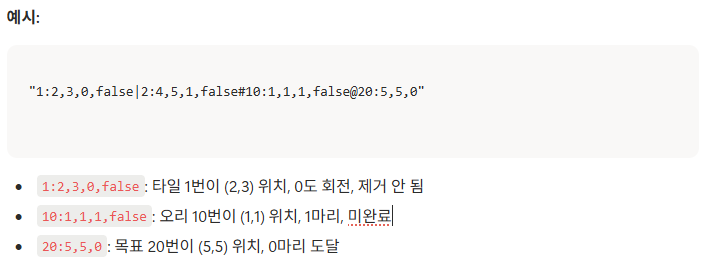
public string GetStateHash()
{
    var positions = TilePositions.OrderBy(kvp => kvp.Key)
        .Select(kvp => $"{kvp.Key}:{kvp.Value.x},{kvp.Value.y}");
    var rotations = TileRotations.OrderBy(kvp => kvp.Key)
        .Select(kvp => $"{kvp.Key}:{kvp.Value}");
    var frozen = FrozenTileUnlocked.OrderBy(kvp => kvp.Key)
        .Select(kvp => $"{kvp.Key}:{kvp.Value}");

    return string.Join("|", positions) + "#" + string.Join("|", rotations) + "@" + string.Join("|", frozen);
}
Positions/Rotations/Frozen 상태를 정렬해서 string으로 붙여 만든 해시
visitedStates에 넣어서 동일 상태 재탐색 방지
[Board 생성 관련 메서드]
근데 이게 사용중이진 않은 것 같음 (다른 스크립트에서 호출하는지는 체크 안해봄)
- CreateInitialBoardState(LevelEditorData data)
- TilePosition에 현재 Origin 등록
- TileRotations[tile.Id] = 0
- 얼음 타일 있으면 FrozenTileUnlocked = false
- GetWorldCells(tile)로 셀별 OccupiedCell 생성해서 Occupancy 채우기
- GetMovableTiles
- GetRotatableTiles
GetMovableTiles, GetRotatableTiles에서 호출하고 있는 메서드 ↓
private static bool IsActuallyMovable(TileData tile)
{
    // Apply PipeInfo.isMovable(PipeTrait) game rules exactly - ignore isMovable flag
    if (tile.Type != RuntimeTileType.Pipe)
        return false;

    // Duck and Goal tiles are never movable
    if (tile.Type == RuntimeTileType.Duck || tile.Type == RuntimeTileType.Goal)
        return false;

    // Check traits that prevent movement (following PipeInfo.isMovable logic)
    if (HasTrait(tile, "RotateOnly") || HasTrait(tile, "Fixed"))
        return false;

    // For Frozen tiles, consider that they can be unlocked during gameplay
    // In validation, we should consider both scenarios: locked and unlocked states
    // This will be handled in the state generation where we simulate unlock conditions
    if (HasTrait(tile, "Frozen"))
    {
        // For advanced validation, consider frozen tiles as potentially movable
        // We'll generate states both with frozen and unfrozen versions
        return true; // Will be handled dynamically in state generation
    }

    // If no restricting traits, pipe is movable regardless of isMovable flag
    return true;
}

// -------------------------------

private static bool IsActuallyRotatable(TileData tile)
{
    if (tile.Type != RuntimeTileType.Pipe)
        return false;

    // 게임 규칙: RotateOnly trait가 있는 파이프만 회전 가능
    // 그 외 모든 파이프는 회전 불가능
    if (!HasTrait(tile, "RotateOnly"))
        return false;

    // RotateOnly이지만 Fixed나 Frozen이면 회전 불가
    if (HasTrait(tile, "Fixed"))
        return false;

    // Frozen 타일은 해제될 때까지 회전 불가 (동적으로 체크됨)
    if (HasTrait(tile, "Frozen"))
    {
        return true; // Will be handled dynamically in state generation
    }

    return true;
}
타일을 실제로 움직이거나 회전이 가능한 파이프만 추려내는 역할을 함
- Pipe가 아니면 false,
- 오리이거나 골이면 false
- RotateOnly이거나 Fixed 타일일 경우 false (RotateOnly > 회전은 true)
- Frozen은 true를 반환하나 실제 이동 가능 여부는 상태에서 체크
1. ValidateAsync
var basicMessages = LevelEditorValidation.Validate(data);
result.Messages.AddRange(basicMessages);

if (basicMessages.Any(m => m.Severity == ValidationSeverity.Error))
{
    // 에러 있으면 고급 검증 스킵
    ...
    return result;
}

// 참고용 LevelEditorValidation 스크립트
public static class LevelEditorValidation
{
    public static List<ValidationMessage> Validate(LevelEditorData data)
    {
        var messages = new List<ValidationMessage>();

        if (data.Grid.Rows <= 0 || data.Grid.Cols <= 0)
        {
            messages.Add(new ValidationMessage(ValidationSeverity.Error, "Grid 크기가 유효하지 않습니다."));
            return messages;
        }

        var occupied = new Dictionary<Vector2Int, OccupiedCell>();
        foreach (var tile in data.Tiles)
        {
            foreach (var cell in GetWorldCells(tile))
            {
                if (!IsInsideGrid(cell.World, data.Grid))
                {
                    messages.Add(new ValidationMessage(ValidationSeverity.Error, $"Tile {tile.Id} 이 보드 밖으로 벗어납니다."));
                    continue;
                }

                if (occupied.TryGetValue(cell.World, out var other))
                {
                    messages.Add(new ValidationMessage(ValidationSeverity.Error, $"Tile {tile.Id} 과 {other.Tile.Id} 가 {cell.World} 셀을 동시에 점유합니다."));
                }
                else
                {
                    occupied[cell.World] = cell;
                }
            }
        }

        var ducks = data.Tiles.Where(t => t.Type == RuntimeTileType.Duck).ToList();
        var goals = data.Tiles.Where(t => t.Type == RuntimeTileType.Goal).ToList();

        foreach (var duck in ducks)
        {
            if (string.IsNullOrEmpty(duck.Color))
            {
                messages.Add(new ValidationMessage(ValidationSeverity.Warning, $"Duck {duck.Id} 색상이 지정되지 않았습니다."));
            }
            else if (goals.All(g => g.Color != duck.Color))
            {
                messages.Add(new ValidationMessage(ValidationSeverity.Error, $"Duck {duck.Id} ({duck.Color}) 와 매칭되는 Goal 이 없습니다."));
            }
        }

        foreach (var goal in goals)
        {
            if (string.IsNullOrEmpty(goal.Color))
            {
                messages.Add(new ValidationMessage(ValidationSeverity.Warning, $"Goal {goal.Id} 색상이 지정되지 않았습니다."));
            }
            else if (ducks.All(d => d.Color != goal.Color))
            {
                messages.Add(new ValidationMessage(ValidationSeverity.Error, $"Goal {goal.Id} ({goal.Color}) 와 매칭되는 Duck 이 없습니다."));
            }
        }

        foreach (var duck in ducks)
        {
            if (!TryFindPath(duck, goals, data, occupied))
            {
                messages.Add(new ValidationMessage(ValidationSeverity.Warning, $"Duck {duck.Id} ({duck.Color}) 에서 Goal 로 가는 경로를 찾지 못했습니다."));
            }
        }

        return messages;
    }
A* 알고리즘을 수행하기 전에
타일이 없거나, 오리가 없거나, 골이 없거나 등 기본적인 문제점이 있는지부터 체크
var simulator = new WaterSlideSimulator(data);
var initialState = simulator.CreateInitialState();

// 참고용 CreateInitialState()
public GameState CreateInitialState()
{
    var state = new GameState();

    foreach (var tile in levelData.Tiles)
    {
        if (tile.Type == RuntimeTileType.Duck)
        {
            state.Ducks.Add(new DuckInfo
            {
                Id = tile.Id,
                Position = tile.Origin.ToVector2Int(),
                Color = tile.Color,
                Count = tile.Count
            });
        }
        else if (tile.Type == RuntimeTileType.Goal)
        {
            state.Goals.Add(new GoalInfo
            {
                Id = tile.Id,
                Position = tile.Origin.ToVector2Int(),
                Color = tile.Color,
                RequiredCount = tile.RequiredCount
            });
        }
        else if (tile.Type == RuntimeTileType.Pipe)
        {
            // 파이프의 연결 정보는 origin 기준 셀의 connections 사용
            var connections = new List<string>();
            if (tile.Shape != null && tile.Shape.Count > 0)
            {
                // origin(0,0) 위치에 해당하는 셀 찾기
                var originCell = tile.Shape.FirstOrDefault(c => c.Row == 0 && c.Col == 0);
                if (originCell?.Connections != null)
                {
                    connections = new List<string>(originCell.Connections);
                }
            }

            state.Tiles[tile.Id] = new TileInfo
            {
                Id = tile.Id,
                Type = tile.Type,
                Position = tile.Origin.ToVector2Int(),
                Rotation = 0,
                Connections = connections,
                Traits = new List<string>(tile.Traits ?? new List<string>())
            };
        }
        // Obstacle 타일은 이동/회전 불가하므로 별도 처리 불필요
    }

    // 중요: 초기 상태에서도 물 흐름 시뮬레이션 실행!
    // 초기 배치가 이미 경로가 연결된 상태일 수 있음
    SimulateWaterFlow(state);

    return state;
}
워터 슬라이드 시뮬레이터 생성 & 초기 상태 만들기
CreateInitialState() 메서드는 현재 레벨 데이터 > GameState로 변환하는 역할을 수행한다.
int movableTiles = data.Tiles.Count(
    t => t.Type == RuntimeTileType.Pipe && IsActuallyMovable(t));
움직일 수 있는 파이프 개수 계산
var solutions = await FindSolutionsOptimizedAsync(
    simulator, initialState, movableTiles, result, cancellationToken, progress);
A* 알고리즘 호출부분
result.TotalPossibleStates = solutions.exploredStates;
result.SolvableStates = solutions.solutionPaths.Count;
result.SolvabilityPercentage = result.TotalPossibleStates > 0
    ? (float)result.SolvableStates / result.TotalPossibleStates * 100f
    : 0f;

// Convert to solution paths
result.SolutionPaths = solutions.solutionPaths.Take(10) // Limit to 10 best solutions
    .Select(path => ConvertGameActionsToSolutionPath(path))
    .ToList();

progress?.Report(0.9f);
알고리즘 돌린 후
- 탐색한 총 상태 수
- 해결 가능한 상태 수
- 해결 가능성율
중에 상위 10개만 반환하고
이게 현재 에디터 전용으로 수행한 게 아니라 시뮬레이터에서 돌린 거라
ConvertGameActionsToSolutionPaht 함수를 호출 함
/// <summary>
/// 게임 액션들을 SolutionPath로 변환
/// </summary>
private static SolutionPath ConvertGameActionsToSolutionPath(List<WaterSlideSimulator.GameAction> actions)
{
    var tileMoves = new List<TileMove>();
    var rotationCounts = new Dictionary<int, int>();

    foreach (var action in actions)
    {
        if (action.Type == WaterSlideSimulator.GameAction.ActionType.Move)
        {
            tileMoves.Add(new TileMove
            {
                TileId = action.TileId,
                Type = TileMove.MoveType.Move,
                FromPosition = action.FromPosition.Value,
                ToPosition = action.ToPosition.Value
            });
        }
        else if (action.Type == WaterSlideSimulator.GameAction.ActionType.Rotate)
        {
            tileMoves.Add(new TileMove
            {
                TileId = action.TileId,
                Type = TileMove.MoveType.Rotate,
                RotationSteps = action.RotationSteps
            });

            if (!rotationCounts.ContainsKey(action.TileId))
                rotationCounts[action.TileId] = 0;
            rotationCounts[action.TileId] += action.RotationSteps;
        }
    }

    var description = $"Solution with {tileMoves.Count} actions";
    var moveCount = tileMoves.Count(m => m.Type == TileMove.MoveType.Move);
    var rotateCount = tileMoves.Count(m => m.Type == TileMove.MoveType.Rotate);

    if (moveCount > 0 && rotateCount > 0)
        description += $" ({moveCount} moves, {rotateCount} rotations)";
    else if (moveCount > 0)
        description += $" ({moveCount} moves only)";
    else if (rotateCount > 0)
        description += $" ({rotateCount} rotations only)";

    return new SolutionPath
    {
        Moves = tileMoves,
        RotationCounts = rotationCounts,
        Description = description
    };
}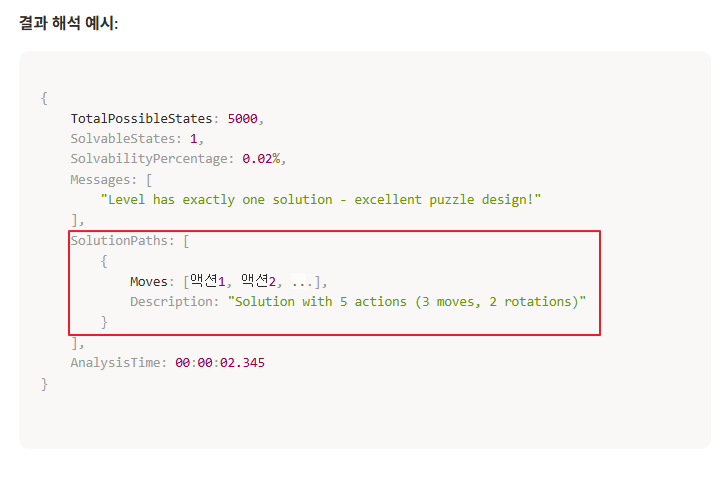
긍까 반환받은 솔루션을 '(0,0)에 있는 타일을 (0, 1)로 이동해라' 이런식으로 사람이 보기쉽게 만들어주는 용도
예시: Solution with 7 actions (3 moves, 4 rotations) => 7개의 액션 (3번 움직임, 4번 회전)
2. FindSolutionsOptimizedAsync
/// <summary>
/// 최적화된 게임 시뮬레이션으로 해결책 찾기 (A* 기반)
/// </summary>
private static async Task<(List<List<WaterSlideSimulator.GameAction>> solutionPaths, int exploredStates)>
    FindSolutionsOptimizedAsync(WaterSlideSimulator simulator, WaterSlideSimulator.GameState initialState,
int movableTileCount, AdvancedValidationResult result, CancellationToken cancellationToken, IProgress<float> progress)| 변수명 | 역할 |
| simulator | 실제 액션 적용 + 이동 시뮬레이션을 해주는 엔진 |
| initialState | 현재 레벨의 초기 게임 상태 |
| movableTileCount | 움직일 수 있는 파이프 수 (탐색 제한용) |
| result | 설계 경고 메세지용 |
| cancellationToken, progress | 취소/프로그레스 처리용 |


무한 탐색 방지용 max값 지정
// Priority queue: (state, path, depth, heuristic score)
var stateQueue = new SortedSet<SearchNode>(Comparer<SearchNode>.Create((a, b) =>
{
    // 먼저 heuristic score로 정렬 (낮을수록 좋음)
    var scoreComp = a.HeuristicScore.CompareTo(b.HeuristicScore);
    if (scoreComp != 0) return scoreComp;

    // 같으면 depth로 정렬 (얕을수록 좋음)
    var depthComp = a.Depth.CompareTo(b.Depth);
    if (depthComp != 0) return depthComp;

    // 고유성을 위해 해시코드 사용
    return a.GetHashCode().CompareTo(b.GetHashCode());
}));
우선 순위 큐 준비
1. 휴리스틱 낮은 노드
2. Depth 얕은 노드
private class SearchNode
{
    public WaterSlideSimulator.GameState State { get; set; }
    public List<WaterSlideSimulator.GameAction> Path { get; set; }
    public int Depth { get; set; }
    public int HeuristicScore { get; set; }
}
SearchNode에는 이런 구조체를 갖고있음
// 초기 상태가 이미 완료 상태인지 먼저 체크
if (initialState.IsGameComplete())
{
    solutionPaths.Add(new List<WaterSlideSimulator.GameAction>()); // 액션 없이 완료
    return (solutionPaths, 1);
}

var initialHash = initialState.GetStateHash();
visitedStates.Add(initialHash);

var initialScore = CalculateHeuristicScore(initialState);
stateQueue.Add(new SearchNode
{
    State = initialState,
    Path = new List<WaterSlideSimulator.GameAction>(),
    Depth = 0,
    HeuristicScore = initialScore
});
초기 상태가 이미 성공인지 체크하고
그게 아니라면 초기 노드를 큐에 삽입
상태 넣어주었으니 현재 보드 상태 기준 우선순위 점수 매겨 줌 ↓
/// <summary>
/// Heuristic 점수 계산 (낮을수록 목표에 가까움)
/// </summary>
private static int CalculateHeuristicScore(WaterSlideSimulator.GameState state)
{
    int score = 0;

    // 1. 완료되지 않은 오리 수 (가장 중요 - 최우선)
    var incompleteDucks = state.Ducks.Count(d => !d.IsCompleted);
    score += incompleteDucks * 1000; // 가중치 대폭 증가

    // 2. 목표까지 남은 카운트 (두 번째로 중요)
    foreach (var goal in state.Goals)
    {
        var remaining = goal.RequiredCount - goal.CurrentCount;
        score += remaining * 500; // 가중치 증가
    }

    // 3. 완료되지 않은 Duck과 Goal 사이의 Manhattan distance
    // → 이것보다 "실제 경로 존재 여부"가 더 중요!
    foreach (var duck in state.Ducks.Where(d => !d.IsCompleted))
    {
        var matchingGoals = state.Goals.Where(g => g.Color == duck.Color).ToList();
        if (matchingGoals.Any())
        {
            // 가장 가까운 Goal까지의 거리
            var minDistance = matchingGoals.Min(g =>
                Math.Abs(duck.Position.x - g.Position.x) + Math.Abs(duck.Position.y - g.Position.y));
            score += minDistance * 20; // 가중치 증가
        }
        else
        {
            // Goal이 없으면 매우 나쁜 상태!
            score += 10000;
        }
    }

    // 4. 제거된 파이프 수는 낮은 우선순위
    var removedPipes = state.Tiles.Values.Count(t => t.IsRemoved);
    score -= removedPipes * 2;

    return score;
}
이 점수들을 토대로 A* 알고리즘에서 활용 > 불필요한 연산 없이 해답에 가까운 놈들만 먼저 계산하도록 하는 역할
// 가장 유망한 상태 선택
var currentNode = stateQueue.Min;
stateQueue.Remove(currentNode);
exploredStates++;
- Min으로 가장 좋은 후보 상태를 하나 고르고
- 그 후보를 제거 > 다음 루프에서 이 노드를 계속 참조하지 않도록 하기 위함
- 탐색한 상태 갯수 추가 ++
// 액션 필터링 및 우선순위 부여 (Duck-Goal 연결 중심)
var prioritizedActions = PrioritizeActions(possibleActions, currentNode.Path, currentNode.State);

foreach (var action in prioritizedActions)
{
    try
    {
        var newState = simulator.ApplyActionAndSimulate(currentNode.State, action);
        var stateHash = newState.GetStateHash();

        if (!visitedStates.Contains(stateHash))
        {
            visitedStates.Add(stateHash);

            var newPath = new List<WaterSlideSimulator.GameAction>(currentNode.Path) { action };
            var heuristicScore = CalculateHeuristicScore(newState) + newPath.Count;

            // 조기 종료: Duck이 완료되었으면 즉시 우선순위 상승
            var currentIncompleteDucks = currentNode.State.Ducks.Count(d => !d.IsCompleted);
            var newIncompleteDucks = newState.Ducks.Count(d => !d.IsCompleted);

            if (newIncompleteDucks < currentIncompleteDucks)
            {
                // Duck이 완료되었음! → 매우 높은 우선순위
                heuristicScore -= 5000;
            }

            stateQueue.Add(new SearchNode
            {
                State = newState,
                Path = newPath,
                Depth = currentNode.Depth + 1,
                HeuristicScore = heuristicScore
            });
        }
    }
    catch
    {
        // 잘못된 액션은 무시
    }
}

// 참고용
/// <summary>
/// 액션을 적용하고 게임 시뮬레이션 실행
/// </summary>
public GameState ApplyActionAndSimulate(GameState state, GameAction action)
{
    var newState = state.Clone();

    // 액션 적용
    if (action.Type == GameAction.ActionType.Move)
    {
        newState.Tiles[action.TileId].Position = action.ToPosition.Value;
        newState.MoveCount++;
    }
    else if (action.Type == GameAction.ActionType.Rotate)
    {
        var tile = newState.Tiles[action.TileId];
        tile.Rotation = (tile.Rotation + action.RotationSteps) % 4;
        tile.Connections = RotateConnections(tile.Connections, action.RotationSteps);
        newState.RotationCount++;
    }

    // 액션 기록
    newState.ActionHistory.Add(action);

    // 물 흐름 시뮬레이션
    SimulateWaterFlow(newState);

    return newState;
}
while문 안에서 가장 중요하다고 생각드는 부분?...
위에서 우선순위를 정해주었는데 이 우선순위들은 상태 우선순위를 정해준 것이고
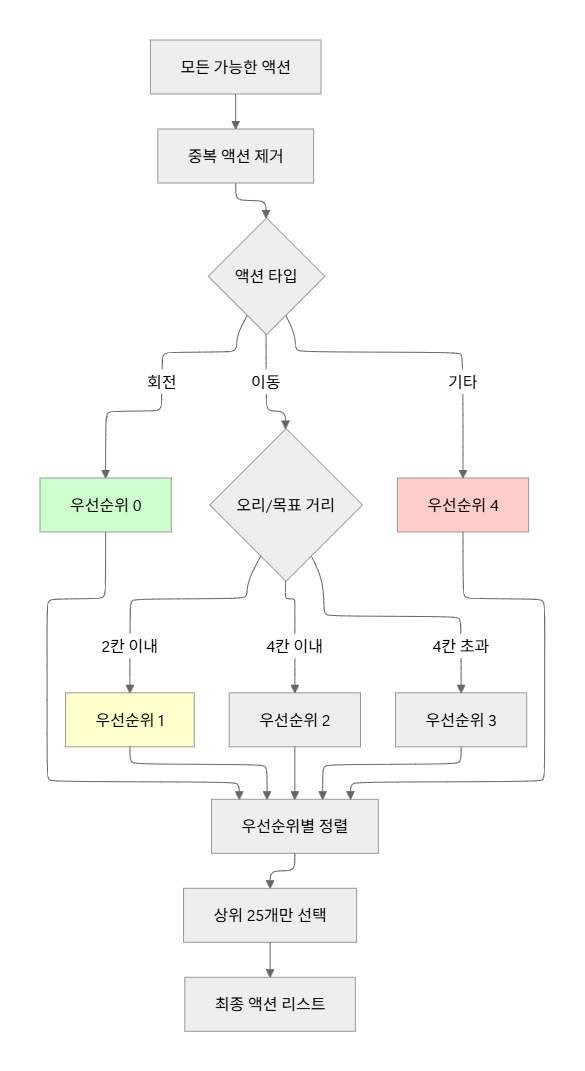
이제 타일을 직접 움직이도록(Action) PrioritizeActions가 액션 우선순위를 정해주는 역할
여기서 ApplyAction... 호출해서 불필요한 이동(중복)&회전 체크해서 해당하는 경우 catch로 빠져나와서 무시
- 같은 타일 90도로 4번 회전
- 어떤 위치로 이동했다가 다시 원위치로 복귀 등
currentNode.State에서 액션을 수행한 newState를 만들어주고
타일 이동 / 회전 적용 > 성공했는지 체크
- currentIncompleteDucks : 액션 전, 아직 안 끝난 Duck 수
- newIncompleteDucks : 액션 후, 아직 안 끝난 Duck 수
newIncompleteDucks < currentIncompleteDucks 이면 적어도 한마리는 Goal에 도달했으니까 퍼즐 진행에 의미있는 변화로 판별해서 우선순위를 -5000 해줌 > 이것들만 큐에 등록
/// <summary>
/// 액션 우선순위 부여 (Duck-Goal 연결 중심)
/// </summary>
private static List<WaterSlideSimulator.GameAction> PrioritizeActions(
    List<WaterSlideSimulator.GameAction> actions,
    List<WaterSlideSimulator.GameAction> history,
    WaterSlideSimulator.GameState currentState)
{
    // 간단한 레벨에서는 모든 액션 고려
    var maxActions = actions.Count <= 30 ? actions.Count : 25;

    // Duck과 Goal 위치 수집
    var duckPositions = currentState.Ducks.Where(d => !d.IsCompleted).Select(d => d.Position).ToList();
    var goalPositions = currentState.Goals.Select(g => g.Position).ToList();

    return actions
        .Where(a => !IsRedundantAction(a, history))
        .OrderBy(a =>
        {
            // 우선순위 1: 회전은 가장 먼저 시도 (비용이 낮음)
            if (a.Type == WaterSlideSimulator.GameAction.ActionType.Rotate)
                return 0;

            // 우선순위 2: Duck이나 Goal 주변으로 이동하는 액션
            if (a.Type == WaterSlideSimulator.GameAction.ActionType.Move && a.ToPosition.HasValue)
            {
                var targetPos = a.ToPosition.Value;

                // Duck 주변 (거리 2 이내)으로 이동하는 액션 우선
                var minDuckDist = duckPositions.Any()
                    ? duckPositions.Min(d => Math.Abs(targetPos.x - d.x) + Math.Abs(targetPos.y - d.y))
                    : 999;

                // Goal 주변 (거리 2 이내)으로 이동하는 액션 우선
                var minGoalDist = goalPositions.Any()
                    ? goalPositions.Min(g => Math.Abs(targetPos.x - g.x) + Math.Abs(targetPos.y - g.y))
                    : 999;

                var minDist = Math.Min(minDuckDist, minGoalDist);

                if (minDist <= 2) return 1; // Duck/Goal 매우 가까움 → 최우선
                if (minDist <= 4) return 2; // Duck/Goal 가까움 → 우선
                return 3; // 멀리 있음 → 후순위
            }

            return 4; // 기타
        })
        .ThenBy(a => history.Count(h => h.TileId == a.TileId)) // 덜 사용된 타일 우선
        .Take(maxActions)
        .ToList();
}


/// <summary>
/// 중복/무의미한 액션인지 확인
/// </summary>
private static bool IsRedundantAction(WaterSlideSimulator.GameAction action, List<WaterSlideSimulator.GameAction> history)
{
    if (history.Count == 0) return false;

    var lastAction = history[history.Count - 1];

    // 같은 타일의 반복 회전 (360도 = 원점 복귀)
    if (action.Type == WaterSlideSimulator.GameAction.ActionType.Rotate &&
        lastAction.Type == WaterSlideSimulator.GameAction.ActionType.Rotate &&
        action.TileId == lastAction.TileId)
    {
        var totalRotation = history
            .Where(a => a.Type == WaterSlideSimulator.GameAction.ActionType.Rotate && a.TileId == action.TileId)
            .Sum(a => a.RotationSteps) + action.RotationSteps;

        if (totalRotation % 4 == 0) // 360도 회전
            return true;
    }

    // 이동 후 즉시 원래 위치로 복귀
    if (action.Type == WaterSlideSimulator.GameAction.ActionType.Move &&
        lastAction.Type == WaterSlideSimulator.GameAction.ActionType.Move &&
        action.TileId == lastAction.TileId &&
        action.ToPosition == lastAction.FromPosition)
    {
        return true;
    }

    return false;
}
회전 타일은 없던 길을 만들 수 있기 때문에 우선 순위가 가장 높고
Move는 오리가 골 근처로 가는 이동을 우선으로 하고 (CalculateHeuristicScore()으로 측정)
- Move의 목적지 ToPosition 기준으로
- 아직 완료 안 된 Duck 위치들과의 거리
- 모든 Goal 위치들과의 거리
- 이 둘 중 더 가까운 거리를 minDist로 보고
- minDist <= 2 → 우선순위 1 (매우 가까움)
- minDist <= 4 → 우선순위 2 (꽤 가까움)
- 나머지 → 우선순위 3 (멀다)
동일한 타일을 너무 자주 들여다 보지 않기 위해 ThenBy(a => history.Count(h => h.TileId == a.TileId)) 선언
액션이 30개 이하면 전부 액션 전부 고려하고 30개 이상이면 상위 25개만 고려해서 탐색
3. CheckForDeadEndPossibility
// 레벨 설계 검증: 막다른 길 체크
if (solutionPaths.Count > 0)
{
    CheckForDeadEndPossibility(simulator, initialState, result);
}

return (solutionPaths, exploredStates);
막다른 길 있는지 체크하는 부분
/// <summary>
/// 레벨 설계 검증: 잘못된 순서로 진행하면 막다른 길이 생기는지 체크
/// </summary>
private static void CheckForDeadEndPossibility(
    WaterSlideSimulator simulator,
    WaterSlideSimulator.GameState initialState,
    AdvancedValidationResult result)
{
    // Breakable 파이프가 있고, 여러 Duck이 있는 경우에만 체크
    var breakablePipes = initialState.Tiles.Values.Count(t => t.Traits.Contains("Breakable") && !t.IsRemoved);
    var duckCount = initialState.Ducks.Count;

    if (breakablePipes == 0 || duckCount <= 1)
    {
        return; // 순서 문제 없음
    }

    // 간단한 시뮬레이션: 각 Duck을 순서대로 처리했을 때 문제가 있는지 체크
    var testState = simulator.CloneState(initialState);
    var ducksToTest = testState.Ducks.OrderBy(d => d.Id).ToList();

    foreach (var duck in ducksToTest)
    {
        if (duck.IsCompleted) continue;

        // 이 Duck이 Goal에 도달할 수 있는지 체크
        var path = simulator.FindPathToGoalPublic(duck, testState);

        if (path == null || path.Count == 0)
        {
            // 이 Duck은 Goal에 도달할 수 없음 → 막다른 길 발견!
            result.Messages.Add(new ValidationMessage(
                ValidationSeverity.Warning,
                $"레벨 설계 경고: 특정 순서로 진행하면 Duck {duck.Id} ({duck.Color})가 Goal에 도달할 수 없는 막다른 길이 발생할 수 있습니다. " +
                $"Breakable 파이프가 {breakablePipes}개 있고, {duckCount}개의 Duck이 있어 순서가 중요할 수 있습니다."));
            return;
        }

        // 이 Duck을 완료 처리 (시뮬레이션)
        duck.IsCompleted = true;
        var goal = testState.Goals.FirstOrDefault(g => g.Color == duck.Color);
        if (goal != null)
        {
            goal.CurrentCount += duck.Count;
        }
    }

    // 모든 Duck을 순서대로 처리했을 때 문제가 없으면 OK
    UnityEngine.Debug.Log($"[Validation] 레벨 설계 검증: 순서대로 진행 시 막다른 길 없음 (Breakable: {breakablePipes}, Ducks: {duckCount})");
}
Breakable 파이프가 1개 이상 있고 오리가 두마리 이상 있을 때
(브레이커블 파이프가 없으면 길이 사라질 일이 없으니 1개 이상 / 오리가 한마리인 경우 먼저 성공한 오리 때문에 나중 오리가 막히는 경우가 없으니 생략)
Duck을 순서대로 Goal에 보내는 소규모 시뮬레이션을 돌려서
어떤 순서에서는 후반 Duck이 아예 Goal에 갈 수 없게 되는지 체크하는 역할
막다른 길이 있는경우
ValidationSeverity.Warning로 경고 띄어줌

public List<Vector2Int> FindPathToGoalPublic(DuckInfo duck, GameState state)
{
    return FindPathToGoal(duck, state);
}

/// <summary>
/// 오리에서 목적지까지의 경로 찾기 (BFS)
/// </summary>
private List<Vector2Int> FindPathToGoal(DuckInfo duck, GameState state)
{
    var targetGoals = state.Goals.Where(g => g.Color == duck.Color).ToList();
    if (targetGoals.Count == 0) return null;

    var visited = new HashSet<Vector2Int>();
    var queue = new Queue<(Vector2Int pos, List<Vector2Int> path)>();
    var parent = new Dictionary<Vector2Int, Vector2Int>();

    queue.Enqueue((duck.Position, new List<Vector2Int> { duck.Position }));
    visited.Add(duck.Position);

    while (queue.Count > 0)
    {
        var (current, path) = queue.Dequeue();

        // 목적지에 도달했는지 확인
        if (targetGoals.Any(g => g.Position == current))
        {
            return path;
        }

        // 4방향 탐색 (게임 좌표계: Row 증가 = North)
        var directions = new Vector2Int[]
        {
            new Vector2Int(1, 0),   // North = Row+1 (위)
            new Vector2Int(0, 1),   // East = Col+1 (오른쪽)
            new Vector2Int(-1, 0),  // South = Row-1 (아래)
            new Vector2Int(0, -1)   // West = Col-1 (왼쪽)
        };

        foreach (var dir in directions)
        {
            var next = current + dir;

            if (IsValidPosition(next) && !visited.Contains(next))
            {
                if (CanFlowBetween(current, next, state))
                {
                    visited.Add(next);
                    var newPath = new List<Vector2Int>(path) { next };
                    queue.Enqueue((next, newPath));
                }
            }
        }
    }

    return null; // 경로 없음
}
BFS 경로 탐색 메서드
(오리 시작 위치부터 골까지의 경로를 List<Vector2Int> 형태로 담아줌)
우선 같은 색의 오리와 골을 targetGoalse 리스트로 만들고 없으면 갈 길이 없으니 null로 리턴
- next = current + dir
→ 인접 방향으로 한 칸 이동한 좌표 - IsValidPosition(next)
→ 보드 범위 안에 있는지 검사 (그리드 밖이면 패스) - !visited.Contains(next)
→ 이미 탐색해 본 칸이면 패스 (BFS 중복 방지) - CanFlowBetween(current, next, state)
→ 파이프 연결/벽 등을 고려했을 때, 물이 current에서 next로 실제로 흐를 수 있는 구조인지 체크

/// <summary>
/// 두 위치 간 물 흐름 가능 여부 확인 (멀티 셀 파이프 지원)
/// </summary>
private bool CanFlowBetween(Vector2Int from, Vector2Int to, GameState state)
{
    var direction = GetDirection(from, to);
    var oppositeDirection = GetOppositeDirection(direction);

    // from 위치에서 물이 나갈 수 있는지 확인
    var fromTile = GetTileAt(from, state);
    var fromDuck = state.Ducks.FirstOrDefault(d => d.Position == from);

    bool fromCanOutput = false;
    if (fromTile != null && !fromTile.IsRemoved)
    {
        // 멀티 셀 파이프의 특정 셀 연결 정보 가져오기
        var fromConnections = GetConnectionsAtPosition(fromTile, from, state);
        fromCanOutput = fromConnections.Contains(DirectionToString(direction));
    }
    else if (fromDuck != null)
    {
        // Duck은 모든 방향으로 물을 출력 가능
        fromCanOutput = true;
    }

    if (!fromCanOutput) return false;

    // to 위치에서 물을 받을 수 있는지 확인
    var toTile = GetTileAt(to, state);
    var toGoal = state.Goals.FirstOrDefault(g => g.Position == to);

    if (toGoal != null)
    {
        // Goal은 모든 방향에서 물을 받을 수 있음
        return true;
    }
    else if (toTile != null && !toTile.IsRemoved)
    {
        // 멀티 셀 파이프의 특정 셀 연결 정보 가져오기
        var toConnections = GetConnectionsAtPosition(toTile, to, state);
        var expected = DirectionToString(oppositeDirection);
        return toConnections.Contains(expected);
    }

    return false;
}
이 메서드는
- 두 칸에 있는 타일/파이프가 서로 해당 방향으로 연결되어 있는지
- 막힌 파이프, 벽, 사용 불가 타일이 아닌지
- 색상이 맞는지
- 물이 흐를 수 있는지 등
게임 규칙을 반영해서 true/false로 돌려줌
2. 그 외 함수들
- GenerateAllPossibleStatesWithGameRulesAsync
- GenerateMovesWithGameRulesAsync / Sync
- CanMoveTileToPositionWithGameRules
- IsStateSolvableWithGameRules
- HasValidPathToMatchingGoal
- IsConnectionAllowedWithGameRules
- IsTileUsableForPath
이 메서드들은 ValidateAsync, FindSolution.. 메서드에서 쓰이진 않지만
레벨 에디터에서 실제 게임 규칙(얼음 등 기믹)을 최대한 반영해서 가능한 모든 보드 상태를 만들어주는 용도이다.
- GenerateAllPossibleStatesWithGameRulesAsync가
- 초기 상태 하나 큐에 넣고 시작해서
- BFS로 상태 확장한다
- visitedStateHashes로 중복 방지
- maxDepth, maxStates로 과부하 방지
- GenerateMovesWithGameRules*가
- Move 후보: 모든 그리드 좌표 돌면서 갈 수 있는 곳만 필터링
- Rotate 후보: Frozen 언락 상태 보고 회전 허용/차단
- HasValidPathToMatchingGoal / IsConnectionAllowedWithGameRules가
- Duck → Goal 경로를 BFS로 찾고
- 파이프 연결방향 / 반대방향 / 얼음 상태까지 검사
- ApplyMove, ApplyRotation, RotateShapeCell
- 위치/회전/연결정보를 갱신하는 역할
안에 구조를 보면 위에서 설명한 것들과 굉장히 유사해서 이해 안되는 부분이 있는 경우에 추가로 정리해야겠담
'Unity > 멋쟁이사자처럼 부트캠프' 카테고리의 다른 글
| [멋쟁이사자처럼 - 유니티 스튜디오 인턴십] 레벨 매핑 작업 (40~50레벨) (0) | 2025.12.09 |
|---|---|
| [멋쟁이사자처럼 - 유니티 스튜디오 인턴십] Level Editor 수정 (0) | 2025.12.04 |
| [천도컴퍼니] 플레이어가 사망했을 때 타 플레이어가 업어가는 로직 구현 (4) (7) | 2025.12.01 |
| [멋쟁이사자처럼 - 유니티 스튜디오 인턴십] 하이퍼캐주얼 게임 기획 및 로직 확인 (0) | 2025.11.28 |
| [천도컴퍼니] 플레이어가 사망했을 때 타 플레이어가 업어가는 로직 구현 (3) (0) | 2025.11.27 |

