
✅ 오늘의 학습 목표
1. Enemy 사망 효과 처리
- Character Joint
- Ragdoll
- MaterialPropertyBlock
2. Hp bar 수정
1. Character Joint
Character Joint는 Unity의 물리 기반 조인트 중 하나로
두 개의 Rigidbody를 관절처럼 연결해서 회전 운동을 제약하는 데 사용한다.
주로 팔·다리 같은 뼈대 구조, 물리 인형(Ragdoll), 물리적으로 움직이는 체인이나 로프, 기계적인 arm 구조 등에 쓰인다.
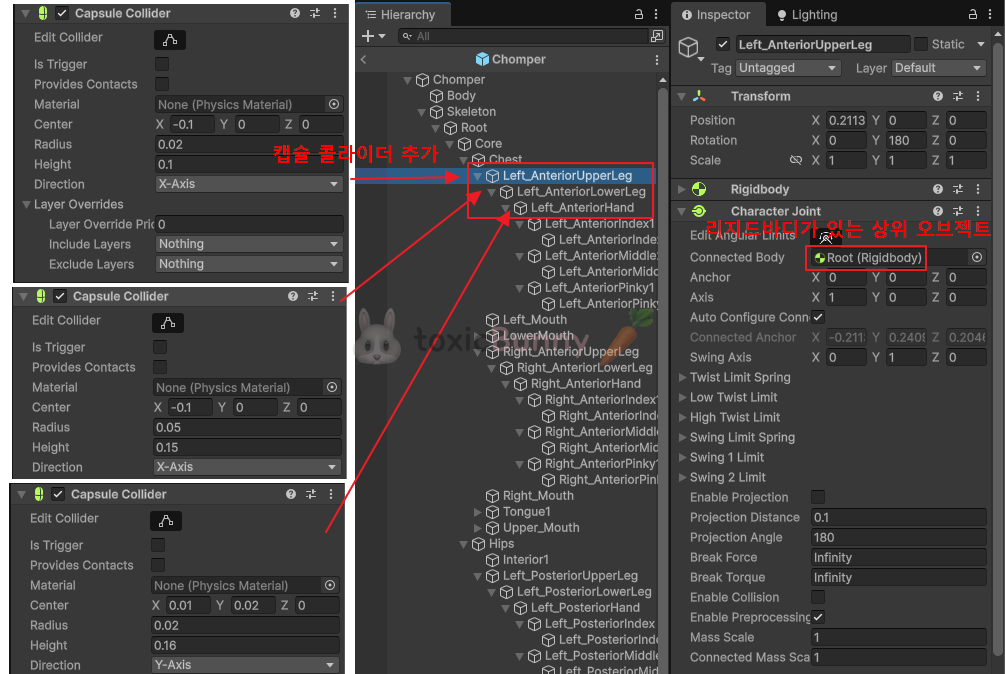
Connected Body
- 연결할 다른 Rigidbody
- 팔에 Character Joint를 붙이고 Connected Body에 몸통의 Rigidbody를 넣으면 팔이 몸에 붙은 관절처럼 움직임

1. Ragdoll
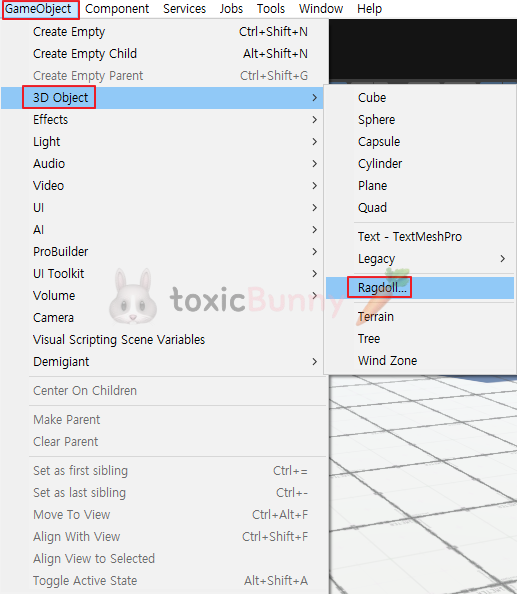
랙돌은 게임에서 캐릭터가 죽거나 힘을 잃었을 때
애니메이션 대신 물리 법칙에 따라 몸이 쓰러지고 흔들리는 효과를 구현한 것이다.
캐릭터 본(Bone) 구조에 Rigidbody, Collider, Character Joint 등을 조합해서 캐릭터가 죽었을 때 자연스럽게 동작할 수 있도록 도와준다.
🚨 랙돌 구현 시 주의할 점
| 항목 | 주의 사항 |
| Collider 겹침 | 처음 세팅할 때 Collider가 서로 겹쳐 있으면 폭발하듯 튕겨나감 |
| 질량 밸런스 | 몸통을 가장 무겁게, 팔다리는 가볍게 설정해야 자연스러움 |
| Joint 제한값 | 너무 빡빡하면 부자연스럽고, 너무 느슨하면 팔·다리가 이상하게 꺾임 |
| Animator 충돌 | Ragdoll 상태로 전환할 때 Animator를 꺼주지 않으면 물리와 애니메이션이 충돌함 (→ 흔들림, 떨림 발생) |
public class EnemyController : MonoBehaviour
{
    [Header("Ragdoll")]
    [SerializeField] private Collider[] ragdollColliders;
    [SerializeField] private Rigidbody[] ragdollRigidbodies;
    [SerializeField] private CharacterJoint[] ragdollJoints;

    private void Awake()
    {
        // Ragdoll 비활성화
        SetRagdollEnabled(false);

        // ...
    }

    private void OnCollisionEnter(Collision other)
    {
        if (other.gameObject.CompareTag("Ground"))
        {
            Debug.Log("## Ground");
            SetRagdollEnabled(true);
        }
    }

    #region Ragdoll 관련 함수
    private void SetRagdollEnabled(bool isEnabled)
    {
        foreach (var ragdollCollider in ragdollColliders)
        {
            ragdollCollider.enabled = isEnabled;
        }

        foreach (var ragdollRigidbody in ragdollRigidbodies)
        {
            ragdollRigidbody.isKinematic = !isEnabled;
            ragdollRigidbody.detectCollisions = isEnabled;
        }

        _animator.enabled = !isEnabled;
        _collider.enabled = !isEnabled;
        _rigidbody.detectCollisions = !isEnabled;

        _animator.Rebind();
        _animator.Update(0f);
    }
    #endregion
}| 옵션 | 설명 |
| ragdollCollider.enabled | 랙돌 충돌 부위의 Collider를 On/Off |
| ragdollRigidbody.isKinematic | 물리 연산을 적용할지 여부 전환 |
| _animator.enabled | Animator를 꺼서 물리 상태와 애니메이션 충돌 방지 |
| _collider.enabled / _rigidbody.detectCollisions | 본체의 충돌 기능을 꺼서 래그돌 부위만 충돌 처리 |
| _animator.Rebind() / Update(0) | 랙돌에서 애니메이션 상태로 돌아올 때 본 위치를 리셋 |
1. 랙돌 콜라이더 On/Off
foreach (var ragdollCollider in ragdollColliders)
{
    ragdollCollider.enabled = isEnabled;
}
랙돌용으로 부착한 콜라이더들을 활성/비활성 처리하여 충돌 처리를 전환
2. 랙돌 Rigidbody 설정
foreach (var ragdollRigidbody in ragdollRigidbodies)
{
    ragdollRigidbody.isKinematic = !isEnabled;
    ragdollRigidbody.detectCollisions = isEnabled;
}
랙돌을 켜면 → kinematic을 끄고, 물리 연산을 활성화해서 중력/충돌에 반응
랙돌을 끄면 → kinematic을 켜고, 충돌 감지를 끄며 애니메이션으로만 움직이게
3. 기본 Animator / Collider / Rigidbody 제어
_animator.enabled = !isEnabled;       // Animator 끄기 (래그돌 상태일 때 애니메이션과 물리 충돌 방지)
_collider.enabled = !isEnabled;       // 본체 Collider 비활성화 (중복 충돌 방지)
_rigidbody.detectCollisions = !isEnabled; // 본체 Rigidbody 충돌 감지 끄기 (래그돌이 대신 충돌 처리)
랙돌이 켜질 때는 Animator를 끄고, 본체의 Collider와 Rigidbody 충돌도 비활성화해서
랙돌 부위끼리만 물리 연산이 적용되게 함
4. Animator 상태 초기화
_animator.Rebind();  // 본/포즈를 초기 상태로 되돌림
_animator.Update(0f); // 0초짜리 프레임 강제 갱신
랙돌을 다시 끌 때 Animator의 본(Transform)들이 물리 연산으로 흐트러져 있으므로
Rebind()로 본래 포즈를 다시 불러오고 Update(0)으로 반영
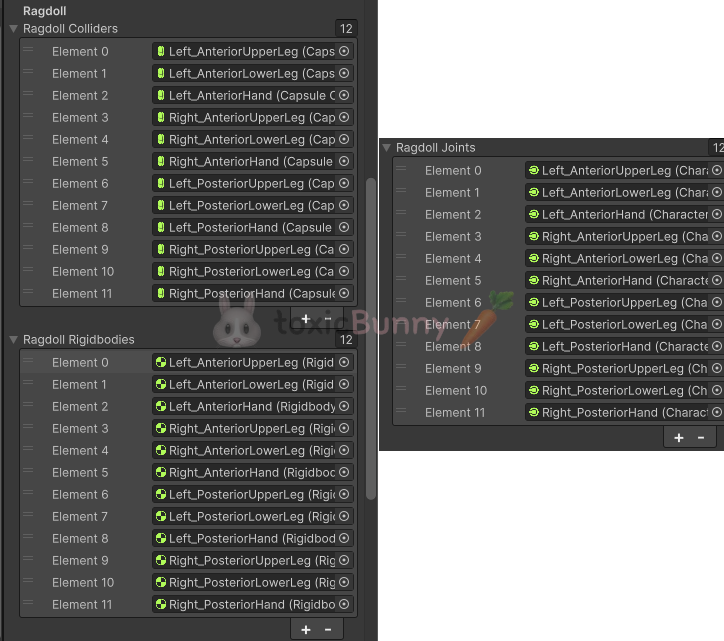

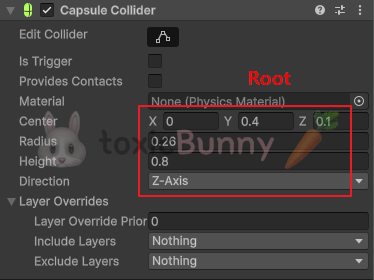
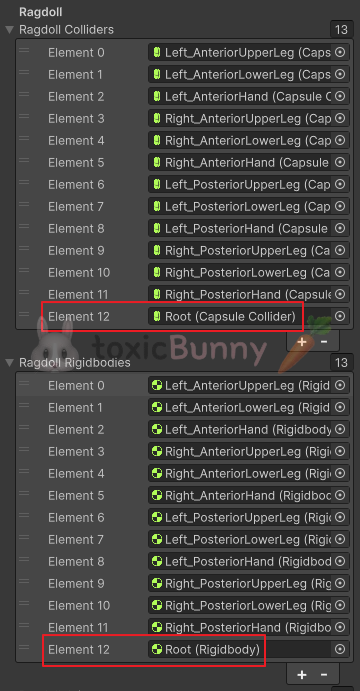
Enemy가 사망했을 때 물리적인 힘을 모두 빼서 바닥에 쓰러지기 위해서는 콜라이더가 정확히 몸에 맞아야한다.
그래서 Root에 캡슐 콜라이더를 몸에 맞게 추가해주었다.
2. 사망 효과
Enemy가 죽었을 때 Destory() 함수를 써서 오브젝트를 바로 사라지게 하는 방법이 있지만
좀 더 시각적인 연출을 활용해주기 위해 쉐이더 값을 조절해주려고 한다.
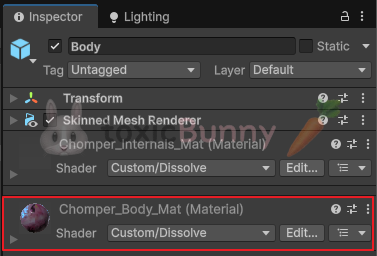
Chomper는 커스텀된 쉐이더를 사용하고 있는데 해당 쉐이더의 스크립트를 살펴보면 여러 속성들이 정의되어 있는 것을 살펴볼 수 있다.
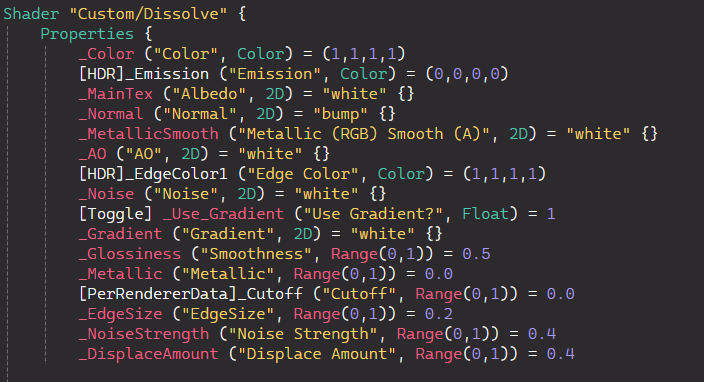
우리는 이 중에서 _Cutoff 속성을 활용해서
Enemy가 죽었을 때 서서히 사라지는 효과를 주려고 한다.
❓ Cutoff가 무엇인가?
Standard/URP Lit 등에서 Alpha Clipping (컷아웃) 임계값으로 흔히 _Cutoff를 사용한다.
1 : 투명(알파 낮은) 픽셀 부터 잘라내기(clip/discard)가 많이 일어남
0 : 잘라내기가 적음
즉 Cutoff 값을 0에서 1로 바꾸어주면 오브젝트가 점점 사라지는 효과가 나타난다.
1. MaterialPropertyBlock
MaterialPropertyBlock은 Renderer 하나에만 적용되는 임시 머테리얼 속성 덮어쓰기 기능이다.
renderer.material로 값을 바꾸면 머테리얼 인스턴스가 복제되어 메모리 관련해서 비효율적이다. (개체수가 많을 수록 더)
MaterialPropertyBlock는 원본 머테리얼은 손대지 않고 특정 Renderer 하나에만 값(색, float, 텍스처 등)을 임시로 적용시킬 수 있다.
MaterialPropertyBlock을 활용하면
Enemy 개체가 많을 때 해당 Enemy들이 같은 머테리얼을 공유한다해도 각자 다른 값을 넣어줄 수도 있다.
public class EnemyController : MonoBehaviour
{
    [Header("Renderer")]
    [SerializeField] private Renderer enemyRenderer;

    private void OnCollisionEnter(Collision other)
    {
        if (other.gameObject.CompareTag("Ground"))
        {
            Debug.Log("## Ground");
            SetRagdollEnabled(true);
            StartCoroutine(Disolve());
        }
    }

    IEnumerator Disolve()
    {
        var propertyBlock = new MaterialPropertyBlock();
        enemyRenderer.GetPropertyBlock(propertyBlock);
        var value = 0f;

        while (value < 1f)
        {
            value += Time.deltaTime;
            propertyBlock.SetFloat("_Cutoff", value);
            enemyRenderer.SetPropertyBlock(propertyBlock);
            yield return null;
        }
    }
}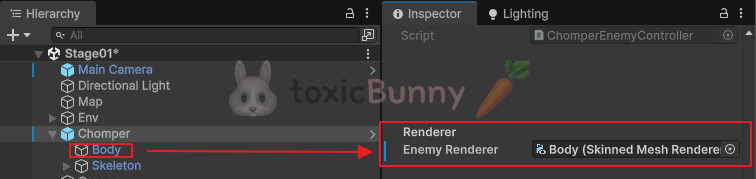
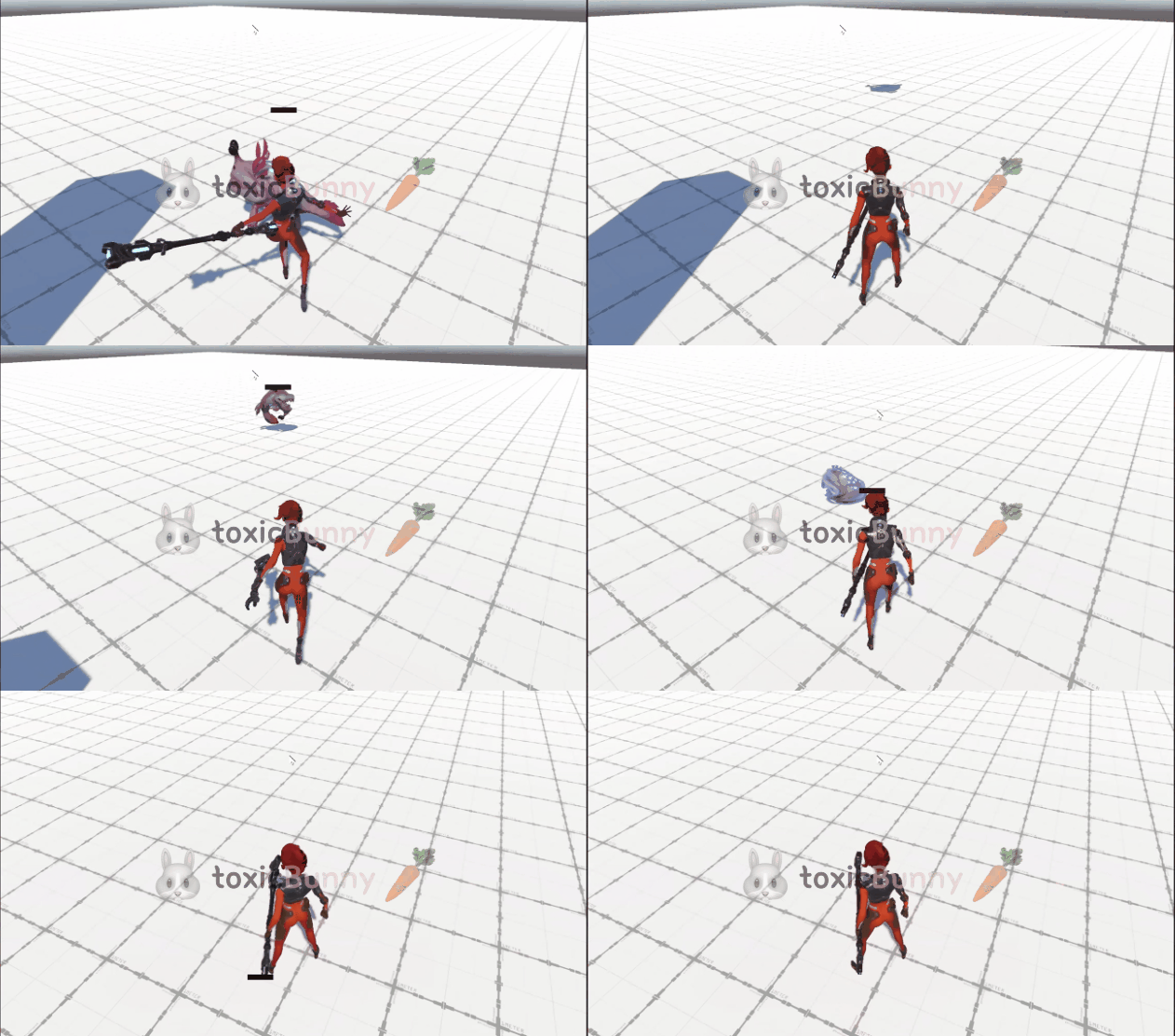
Cutoff의 값을 0에서 Time값에 따라 점점 1에 가까워지도록 While문을 작성해주었다.
따라서 Enemy가 사망했을때 서서히 사라지는 것을 확인할 수 있다.
3. HP Bar 수정
Enemy가 공격 받았을 때만 Hp바가 나타나도록 변경해주려고 한다.
public class HPBarController : MonoBehaviour
{
    private Coroutine _hideHPBarCoroutine;

    void Start()
    {
        // ...
        SetActiveHPBar(false);
    }

    public void SetHp(float hp)
    {
        _hpBar.SetHPGauge(hp);
        SetActiveHPBar(true);

        if (_hideHPBarCoroutine != null )
        {
            StopCoroutine(_hideHPBarCoroutine );
        }
        _hideHPBarCoroutine = StartCoroutine(HideHPBarAfterDelay(1f));
    }

    IEnumerator HideHPBarAfterDelay(float delay)
    {
        yield return new WaitForSeconds(delay);
        SetActiveHPBar(false);

        _hideHPBarCoroutine = null;
    }

    public void SetActiveHPBar(bool isActive)
    {
        _hpBar.gameObject.SetActive(isActive);
    }

    // Enemy의 움직임에 따라 캔버스도 위치 변경되도록 LateUpdate 활용
    void LateUpdate()
    {
        var screenPosition = _camera.WorldToScreenPoint(transform.position + _offset);

        // 카메라가 바라보는 시야에 있는 경우에만 HP Bar 보이도록 설정
        bool isVisible = screenPosition.z > 0
            && screenPosition.x > 0 && screenPosition.x < Screen.width
            && screenPosition.y > 0 && screenPosition.y < Screen.height;

        if (isVisible)
            _hpBarRectTransform.position = screenPosition;
        else
            SetActiveHPBar(false);
    }
}
1초동안만 Hp 바가 보이도록 코루틴을 생성해 주었고
HP바가 활성화/비활성화 되는 부분이 많기 때문에 SetActiveHPBar() 메서드를 생성해주었다.
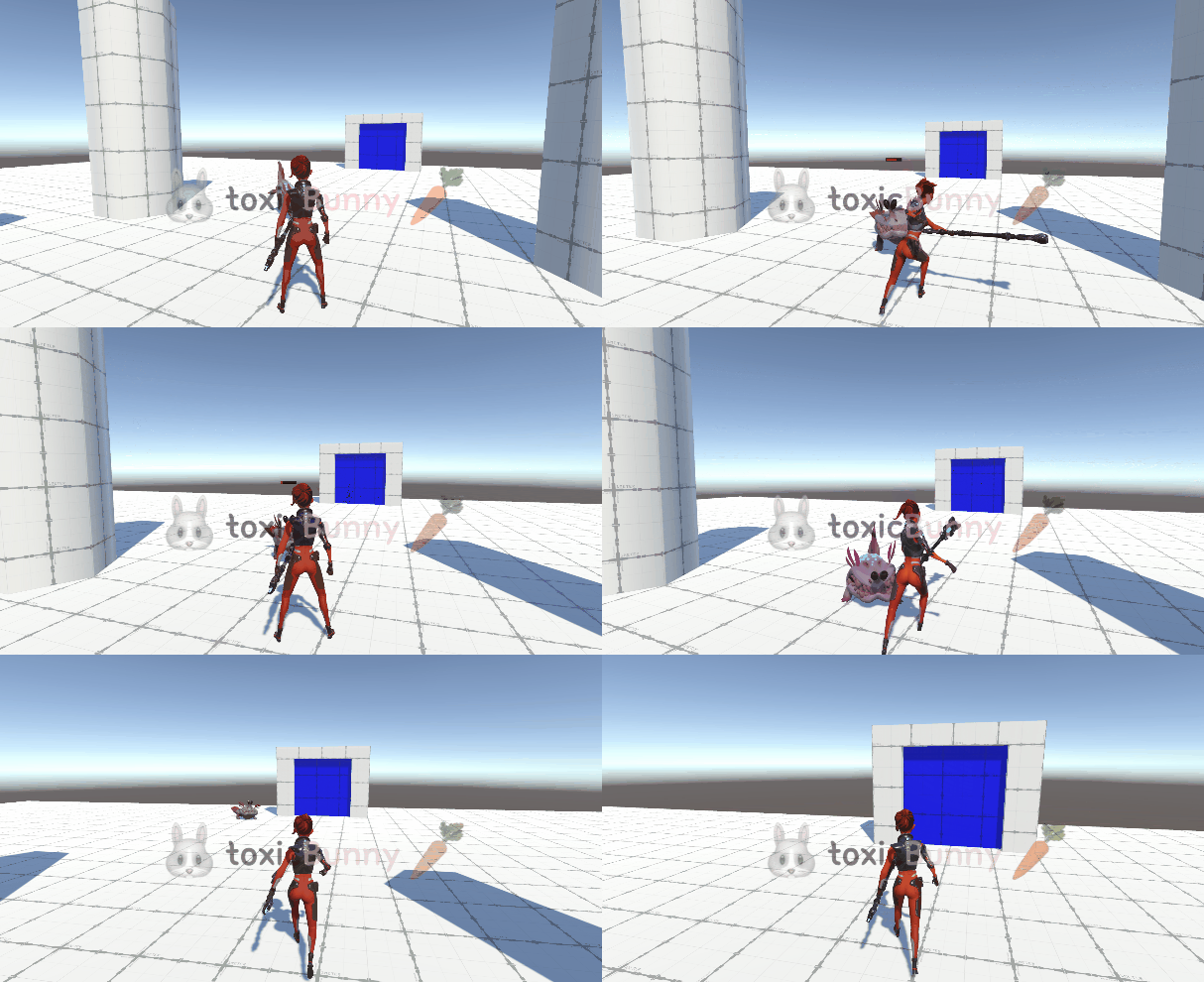
촘퍼.. 마음 아파서 못 때리겠다.. ㅠ
'Unity > 멋쟁이사자처럼 부트캠프' 카테고리의 다른 글
| [멋쟁이사자처럼부트캠프] 유니티 게임 개발 5기(99일차) - [3D 게임] 버그 수정 및 Stage 2 개발 (0) | 2025.10.19 |
|---|---|
| [멋쟁이사자처럼부트캠프] 유니티 게임 개발 5기(98일차) - 팀 프로젝트 기획 발표 (0) | 2025.10.18 |
| [멋쟁이사자처럼부트캠프] 유니티 게임 개발 5기(96일차) - [3D 게임] HP bar 구현 (2) (0) | 2025.10.16 |
| [멋쟁이사자처럼부트캠프] 유니티 게임 개발 5기(95일차) - [3D 게임] Hp 구현 (1) / Git LFS (0) | 2025.10.15 |
| [멋쟁이사자처럼부트캠프] 유니티 게임 개발 5기(94일차) - [3D 게임] Enemy&Player Hit 구현 (옵저버 패턴 활용) / 비동기 씬 로드 (0) | 2025.10.02 |


