
✅ 오늘의 학습 목표
1. A Star 알고리즘 학습
2. FPS 게임 (4)
1. A Star 알고리즘
A*는 실제 비용 + 예상 비용을 기준으로 경로를 탐색하여 빠르고 정확하게 최단 경로를 찾는 알고리즘이다.
- Dijkstra 알고리즘 + 휴리스틱(예상 거리)을 결합한 방식
- g(n): 시작 노드부터 현재 노드까지의 실제 비용 (이동한 거리)
- h(n): 현재 노드에서 목표 노드까지의 예상 비용 (휴리스틱)
- f(n) = g(n) + h(n): 총 예상 비용 (우선순위 기준)
1. Node 클래스
각 타일을 표현하는 데이터 단위.
이 노드는 단순한 좌표만 있는 게 아니라, 아래 정보들을 가지고 있다:
public class Node : IComparable<Node>
{
    public Node parent;
    public Vector3 pos;
    public float nodeTotalCost;  // G(n)
    public float estimateCost;   // H(n)
    public bool isObstacle;
}
▶ 핵심 함수
- GetFCost(): F = G + H를 반환
- CompareTo(): 우선순위를 비교해서 정렬 시 사용
public float GetFCost()
{
    return nodeTotalCost + estimateCost;
}

public int CompareTo(Node node)
{
    float myF = GetFCost();
    float otherF = node.GetFCost();

    if (myF < otherF) return -1;
    if (myF > otherF) return 1;

    // F가 같을 경우 H를 기준으로
    if (estimateCost < node.estimateCost) return -1;
    if (estimateCost > node.estimateCost) return 1;

    return 0;
}
2. PriorityQueue
말 그대로 우선순위 큐
List<Node>를 내부적으로 사용해서 Push 또는 Remove 시마다 Sort()를 해서 F값 기준 정렬을 유지함.
public class PriorityQueue : MonoBehaviour
{
    private List<Node> nodes = new List<Node>();

    public Node First() => nodes.Count > 0 ? nodes[0] : null;

    public void Push(Node node)
    {
        nodes.Add(node);
        nodes.Sort();
    }

    public void Remove(Node node)
    {
        nodes.Remove(node);
        nodes.Sort();
    }
}
3. GridManager
전체 맵을 그리드(격자) 형태로 관리하는 클래스
이 안에서 Node[,] nodes 배열을 만들고, 각 위치에 노드를 배치한다.
- GetGridIndex(Vector3 worldPos)
→ 월드 좌표를 받아서 1차원 인덱스로 바꿈. - GetRow(int index), GetColumn(int index)
→ 1차원 인덱스를 2차원 좌표로 변환. - GetNeighbors(Node node, List<Node> neighbors)
→ 특정 노드 주변의 노드들을 찾아서 리스트에 추가. 장애물은 제외.
일반적으로 위, 아래, 좌, 우 4방향(혹은 8방향까지도 가능)
4. AStar
드디어 A* 알고리즘의 실제 구현부다.
FindPath() 함수가 핵심인데 여기에 전체 A* 로직이 들어있다.
▶ 전체 흐름 요약:
- 시작 노드를 openList에 넣음
- openList에서 F가 가장 낮은 노드를 꺼냄
- 목적지면 종료, 아니면 이웃 노드 탐색
- 각 이웃 노드의 G, H, F 계산
- openList, closedList에 관리
- 목적지에 도달하면 parent를 따라 경로 재구성
4.1. 휴리스틱 계산
private static float HeuristicEstimateCost(Node curNode, Node endNode)
{
    Vector3 cost = curNode.pos - endNode.pos;
    return cost.magnitude; // 유클리드 거리
}
4.2. 경로 탐색 함수
public static List<Node> FindPath(Node startNode, Node endNode)
{
    // 초기화
    openList = new PriorityQueue();
    closedList = new PriorityQueue();
    openList.Push(startNode);
    startNode.nodeTotalCost = 0f;
    startNode.estimateCost = HeuristicEstimateCost(startNode, endNode);

    while (openList.Length != 0)
    {
        Node node = openList.First();

        if (node.pos == endNode.pos)
            return CalculatePath(node); // 경로 도착

        List<Node> neighbors = new List<Node>();
        GridManager.Instance.GetNeighbors(node, neighbors);

        foreach (var neighborNode in neighbors)
        {
            if (closedList.Contains(neighborNode)) continue;

            float cost = HeuristicEstimateCost(node, neighborNode);
            float totalCost = node.nodeTotalCost + cost;
            float h = HeuristicEstimateCost(neighborNode, endNode);

            neighborNode.nodeTotalCost = totalCost;
            neighborNode.parent = node;
            neighborNode.estimateCost = totalCost + h;

            if (!openList.Contains(neighborNode))
                openList.Push(neighborNode);
        }

        openList.Remove(node);
        closedList.Push(node);
    }

    Debug.LogError("Destination Path Not Found");
    return null;
}
4.3. 경로 재구성
private static List<Node> CalculatePath(Node node)
{
    List<Node> path = new List<Node>();

    while (node != null)
    {
        path.Add(node);
        node = node.parent;
    }

    path.Reverse();
    return path;
}
5. AStarMover
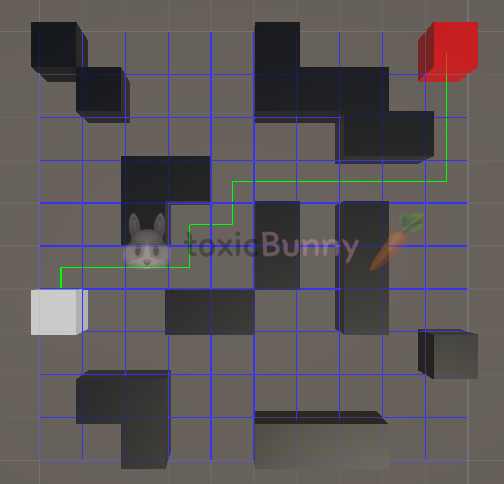
이 클래스는 실제로 시작 지점과 도착 지점 사이의 경로를 계산하고 Gizmos로 경로를 시각화하는 역할을 한다.
public class AStarMover : MonoBehaviour
{
    public GameObject startCube, endCube;
    public List<Node> pathList;

    void Start()
    {
        GetPath();
    }

    void GetPath()
    {
        // 시작, 끝 좌표
        Vector3 startPos = startCube.transform.position;
        Vector3 endPos = endCube.transform.position;

        // 위치를 인덱스로 변환 후 노드 찾기
        int startIndex = GridManager.Instance.GetGridIndex(startPos);
        int startRow = GridManager.Instance.GetRow(startIndex);
        int startCol = GridManager.Instance.GetColumn(startIndex);
        Node startNode = GridManager.Instance.nodes[startRow, startCol];

        int endIndex = GridManager.Instance.GetGridIndex(endPos);
        int endRow = GridManager.Instance.GetRow(endIndex);
        int endCol = GridManager.Instance.GetColumn(endIndex);
        Node endNode = GridManager.Instance.nodes[endRow, endCol];

        // 경로 찾기
        pathList = AStar.FindPath(startNode, endNode);
    }

    // 경로 시각화
    void OnDrawGizmos()
    {
        if (pathList == null || pathList.Count <= 1) return;

        for (int i = 0; i < pathList.Count - 1; i++)
        {
            Debug.DrawLine(pathList[i].pos, pathList[i + 1].pos, Color.green);
        }
    }
}
6. 전체 흐름 요약
- GridManager가 전체 맵의 노드들을 구성
- AStarMover가 시작/끝 위치를 받아서 해당 노드를 선택
- AStar가 그 사이의 경로를 계산 (F = G + H)
- 결과 경로는 pathList에 저장되고, Gizmos로 화면에 표시됨
2. FPS 게임 (4)
1. Navigation

유니티에서는 내비게이션 메시를 활용해서 3D 지형 공간을 2D 형식처럼 만들고 그 영역에서 A* 알고리즘을 이용해 목적지까지의 최단 경로를 찾아낸다.
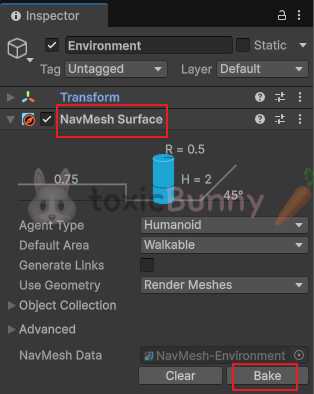
- Agent Type : 이동하는 대상 (우리 프로젝트에서는 Enemy)
- Object Collection : NavMesh를 생성할 때 어떤 오브젝트들을 길 찾기 가능한 영역으로 포함시킬지를 설정
- All : 씬 전체의 Navigation Static 오브젝트
- Value : 특정 Volume 안의 오브젝트만
- Current Object Hierarchy : 현재 오브젝트의 자식만
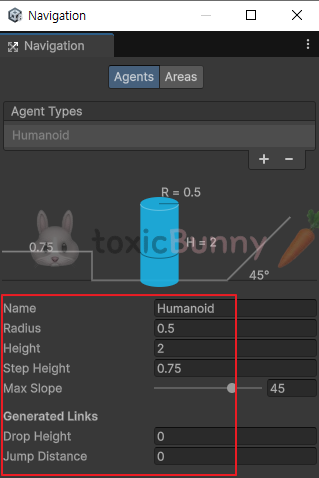

Agent의 크기 및 특성에 맞게 내비게이션 속성 값을 변경해주어야 한다.
반지름값을 지나치게 작게하면 벽에 파묻힐 수 있으니 주의한다.
이동 영역은 설정되었으니 이제 Enemy 오브젝트가 장애물을 피해서 걷기만 하면 된다.
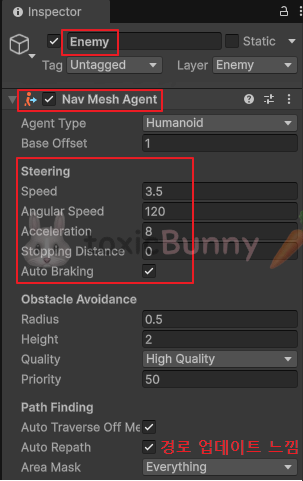
Enemy 오브젝트 안에 Nav Mesh Agent 컴포넌트를 추가하여 에이전트 영역을 기준으로 충돌과 이동 처리를 스크립트로 구현해 주면 된다.
- Steering
- Speed : 최대 이동 속도
- Angular Speed : 회전 속도
- Acceleration 가속도
- Stopping Distacne : 목적지에 해당 거리만큼 가까워지면 정지
- Auto Braking : 목적지에 다다르면 속도 감소
using UnityEngine;
using UnityEngine.AI;

public class AgentController : MonoBehaviour
{
    public Transform player;
    private NavMeshAgent agent;

    void Start()
    {
        agent = GetComponent<NavMeshAgent>();
        player = GameObject.Find("Player").transform;
    }

    void Update()
    {
        agent.SetDestination(player.transform.position);
    }
}
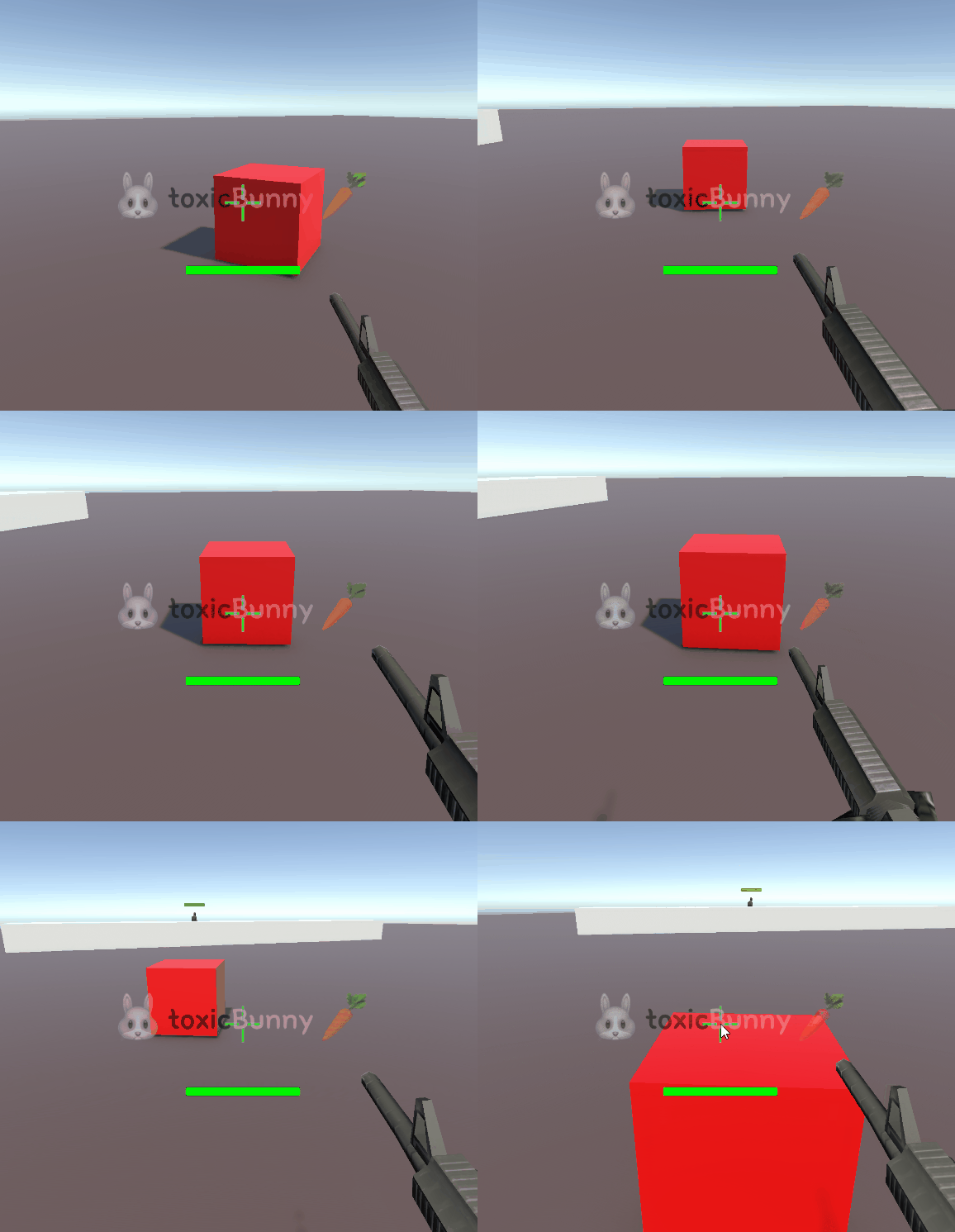
우선 새로운 큐브를 만들어서 Agent를 구현해주었는데 제대로 작동되는 것을 확인할 수 있었다.

using UnityEngine;
using UnityEngine.AI;

public class AgentController : MonoBehaviour
{
    private Transform player;
    private NavMeshAgent agent;

    public Transform[] points;
    public int index;

    void Start()
    {
        agent = GetComponent<NavMeshAgent>();
        SetRandomPoint();
    }

    void Update()
    {
        if (agent.remainingDistance <= 1.5f)
        {
            Debug.Log("목적지 변경");
            SetRandomPoint();
        }
    }

    private void SetRandomPoint()
    {
        int temp = index;

        while (temp == index)
        {
            index = Random.Range(0, points.Length);
        }

        agent.SetDestination(points[index].position);
    }
}
지정된 좌표로 랜덤하게 움직이게 할 수도 있다.
가속도나 회전 속도를 조절해 주면 미끄러지는 부분을 좀 보완해 줄 수 있다.
'Unity > 멋쟁이사자처럼 부트캠프' 카테고리의 다른 글
| [멋쟁이사자처럼부트캠프] 유니티 게임 개발 5기(49일차) - FPS 게임 (6) (0) | 2025.07.25 |
|---|---|
| [멋쟁이사자처럼부트캠프] 유니티 게임 개발 5기(48일차) - Nav 실습 및 FPS 게임 (5) (3) | 2025.07.24 |
| [멋쟁이사자처럼부트캠프] 유니티 게임 개발 5기(46일차) - FPS 게임 (3) (1) | 2025.07.22 |
| [멋쟁이사자처럼부트캠프] 유니티 게임 개발 5기(45일차) - FPS 게임 (2) (2) | 2025.07.21 |
| [멋쟁이사자처럼부트캠프] 유니티 게임 개발 5기(44일차) - FPS 게임 (1) & Raycast 실습 (4) | 2025.07.18 |


